Drive Control Default Setup
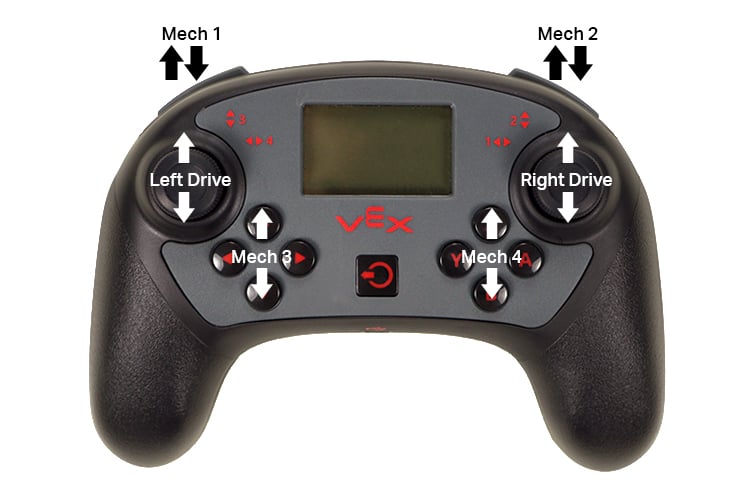
The various motor groups that can be controlled in the Drive program
Drive Control Functions
By default, the V5 Controller can control up to ten motors on six different groups configured for a skid steer drive. Motors connected to Smart Ports 1 and 9 are associated with left drive, 2 and 10 with right drive. These V5 Smart Motor groups are controlled by tilting the left or right joysticks, respectively. The remaining six motors are individually controlled by the four button groups on the controllers.
Default Behavior for Each Button Group
Port (Smart Ports 1-21, 3-Wire Ports A-H) | Motor Designation | Controller and Control | Details |
|---|---|---|---|
Port (Smart Ports 1-21, 3-Wire Ports A-H) 1 | Motor Designation Left Drive | Controller and Control Controller 1 - Joysticks | Details Will depend on option selected in Controls screen of Drive program. Default is "Left" (arcade control via left joystick). |
Port (Smart Ports 1-21, 3-Wire Ports A-H) 2 | Motor Designation Right Drive | Controller and Control Controller 1 - Joysticks | Details Will depend on option selected in Controls screen of Drive program. Default is "Left" (arcade control via left joystick). |
Port (Smart Ports 1-21, 3-Wire Ports A-H) 3 | Motor Designation Motor - Forward/Reverse | Controller and Control Controller 1 - L1 and L2 (left shoulder buttons) | Details L1 will rotate the motor in the positive (+) direction, L2 in the negative. Use the rotation indicator next to the VEX logo on the motor to see positive (+) direction. |
Port (Smart Ports 1-21, 3-Wire Ports A-H) 4 | Motor Designation Motor - Forward/Reverse | Controller and Control Controller 1 - ▶ and ◀ (left button group) | Details ▶ will rotate the motor in the positive (+) direction, ◀ in the negative. Use the rotation indicator next to the VEX logo on the motor to see positive (+) direction. |
Port (Smart Ports 1-21, 3-Wire Ports A-H) 5 | Motor Designation Motor - Forward/Reverse | Controller and Control Controller 1 - ▲ and ▼ (left button group) | Details ▲ will rotate the motor in the positive (+) direction, ▼ in the negative. Use the rotation indicator next to the VEX logo on the motor to see positive (+) direction. |
Port (Smart Ports 1-21, 3-Wire Ports A-H) 6 | Motor Designation Motor - Forward/Reverse | Controller and Control Controller 1 - A and Y (right button group) | Details A will rotate the motor in the positive (+) direction, Y in the negative. Use the rotation indicator next to the VEX logo on the motor to see positive (+) direction. |
Port (Smart Ports 1-21, 3-Wire Ports A-H) 7 | Motor Designation Motor - Forward/Reverse | Controller and Control Controller 1 - X and B (right button group) | Details X will rotate the motor in the positive (+) direction, B in the negative. Use the rotation indicator next to the VEX logo on the motor to see positive (+) direction. |
Port (Smart Ports 1-21, 3-Wire Ports A-H) 8 | Motor Designation Motor - Forward/Reverse | Controller and Control Controller 1 - R1 and R2 (right shoulder buttons) | Details R1 will rotate the motor in the positive (+) direction, R2 in the negative. Use the rotation indicator next to the VEX logo on the motor to see positive (+) direction. |
Port (Smart Ports 1-21, 3-Wire Ports A-H) 9 | Motor Designation Left Drive | Controller and Control Controller 1 - Joysticks | Details Will depend on option selected in Controls screen of Drive program. Default is "Left" (arcade control via left joystick). |
Port (Smart Ports 1-21, 3-Wire Ports A-H) 10 | Motor Designation Right Drive | Controller and Control Controller 1 - Joysticks | Details Will depend on option selected in Controls screen of Drive program. Default is "Left" (arcade control via left joystick). |
Port (Smart Ports 1-21, 3-Wire Ports A-H) 11 | Motor Designation Motor - Variable | Controller and Control Controller 2 - Joysticks | Details Will depend on option selected in Controls screen of Drive program. Default is "Left" (arcade control via left joystick). |
Port (Smart Ports 1-21, 3-Wire Ports A-H) 12 | Motor Designation Motor - Variable | Controller and Control Controller 2 - Joysticks | Details Will depend on option selected in Controls screen of Drive program. Default is "Left" (arcade control via left joystick). |
Port (Smart Ports 1-21, 3-Wire Ports A-H) 13 | Motor Designation Motor - Forward/Reverse | Controller and Control Controller 2 - L1 and L2 (left shoulder buttons) | Details L1 will rotate the motor in the positive (+) direction, L2 in the negative. Use the rotation indicator next to the VEX logo on the motor to see positive (+) direction. |
Port (Smart Ports 1-21, 3-Wire Ports A-H) 14 | Motor Designation Motor - Forward/Reverse | Controller and Control Controller 2 - ▶ and ◀ (left button group) | Details ▶ will rotate the motor in the positive (+) direction, ◀ in the negative. Use the rotation indicator next to the VEX logo on the motor to see positive (+) direction. |
Port (Smart Ports 1-21, 3-Wire Ports A-H) 15 | Motor Designation Motor - Forward/Reverse | Controller and Control Controller 2 - ▲ and ▼ (left button group) | Details ▲ will rotate the motor in the positive (+) direction, ▼ in the negative. Use the rotation indicator next to the VEX logo on the motor to see positive (+) direction. |
Port (Smart Ports 1-21, 3-Wire Ports A-H) 16 | Motor Designation Motor - Forward/Reverse | Controller and Control Controller 2 - A and Y (right button group) | Details A will rotate the motor in the positive (+) direction, Y in the negative. Use the rotation indicator next to the VEX logo on the motor to see positive (+) direction. |
Port (Smart Ports 1-21, 3-Wire Ports A-H) 17 | Motor Designation Motor - Forward/Reverse | Controller and Control Controller 2 - X and B (right button group) | Details X will rotate the motor in the positive (+) direction, B in the negative. Use the rotation indicator next to the VEX logo on the motor to see positive (+) direction. |
Port (Smart Ports 1-21, 3-Wire Ports A-H) 18 | Motor Designation Motor - Forward/Reverse | Controller and Control Controller 2 - R1 and R2 (right shoulder buttons) | Details R1 will rotate the motor in the positive (+) direction, R2 in the negative. Use the rotation indicator next to the VEX logo on the motor to see positive (+) direction. |
Port (Smart Ports 1-21, 3-Wire Ports A-H) 19 | Motor Designation Motor - Variable | Controller and Control Controller 2 - Joysticks | Details Will depend on option selected in Controls screen of Drive program. Default is "Left" (arcade control via left joystick). |
Port (Smart Ports 1-21, 3-Wire Ports A-H) 20 | Motor Designation Motor - Variable | Controller and Control Controller 2 - Joysticks | Details Will depend on option selected in Controls screen of Drive program. Default is "Left" (arcade control via left joystick). |
Port (Smart Ports 1-21, 3-Wire Ports A-H) 21 | Motor Designation Radio | Controller and Control n/a | Details n/a |
Port (Smart Ports 1-21, 3-Wire Ports A-H) A | Motor Designation 3-Wire Port - Switch | Controller and Control n/a | Details Limits Motor 3 to Forward only |
Port (Smart Ports 1-21, 3-Wire Ports A-H) B | Motor Designation 3-Wire Port - Switch | Controller and Control n/a | Details Limits Motor 3 to Reverse only |
Port (Smart Ports 1-21, 3-Wire Ports A-H) C | Motor Designation 3-Wire Port - Switch | Controller and Control n/a | Details Limits Motor 8 to Forward only |
Port (Smart Ports 1-21, 3-Wire Ports A-H) D | Motor Designation 3-Wire Port - Switch | Controller and Control n/a | Details Limits Motor 8 to Reverse only |
Port (Smart Ports 1-21, 3-Wire Ports A-H) E | Motor Designation 3-Wire Port - Switch | Controller and Control n/a | Details Limits Motor 13 to Forward only |
Port (Smart Ports 1-21, 3-Wire Ports A-H) F | Motor Designation 3-Wire Port - Switch | Controller and Control n/a | Details Limits Motor 13 to Reverse only |
Port (Smart Ports 1-21, 3-Wire Ports A-H) G | Motor Designation 3-Wire Port - Switch | Controller and Control n/a | Details Limits Motor 18 to Forward only |
Port (Smart Ports 1-21, 3-Wire Ports A-H) H | Motor Designation 3-Wire Port - Switch | Controller and Control n/a | Details Limits Motor 18 to Reverse only |