turn to heading Block
The turn to heading block turns a robot based on relative position. It does this by using the Gyro Sensor. The turn for block also uses the Gyro sensor.
The Gyro Sensor measures rotational angle of the robot. The sensor measures rotation along the axis indicated by the curved arrow. The Gyro Sensor returns values in degree. Counter-clockwise movement increases the value, clockwise movement decreases.
The Gyro Sensor measures rotational angle of the robot. The sensor measures rotation along the axis indicated by the curved arrow. The Gyro Sensor returns values in degree. Counter-clockwise movement increases the value, clockwise movement decreases.
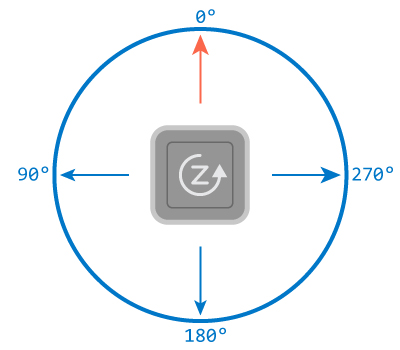
A Gyro Sensor measures angular rotation based off of a “zero” point. Whatever the heading of Autopilot when it begins, that will be the zero point. Therefore, using the turn for block, Autopilot will also turn 90 degrees from its original position. However, if using the turn to heading block, the robot will just turn to that specific heading. If this block is used:

The robot will turn until it reaches the 90 degree heading. It doesn’t matter how many degrees it takes to get there.
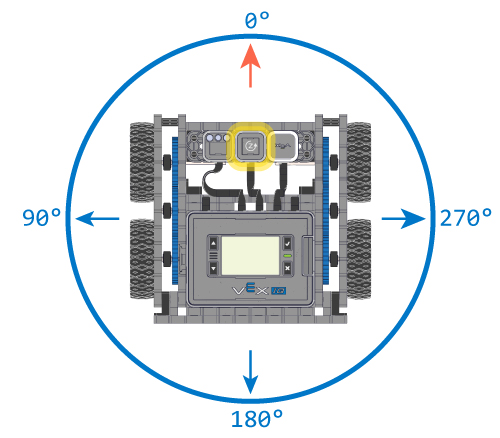
Here is a program that can also be used with the students to demonstrate the how the output of the Gyro sensor changes as the Autopilot moves:
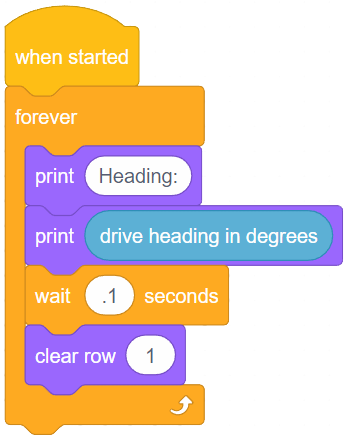
This program prints “Heading:” on the first line, followed by the drive heading in degrees of the Gyro sensor. Run this program (make sure to use the Autopilot robot configuration) and turn the robot to the left. The Gyro sensor value should increase. Turn it to the right, the Gyro sensor value decreases.