
നിങ്ങൾ ആരംഭിക്കുന്നതിന് മുമ്പ്
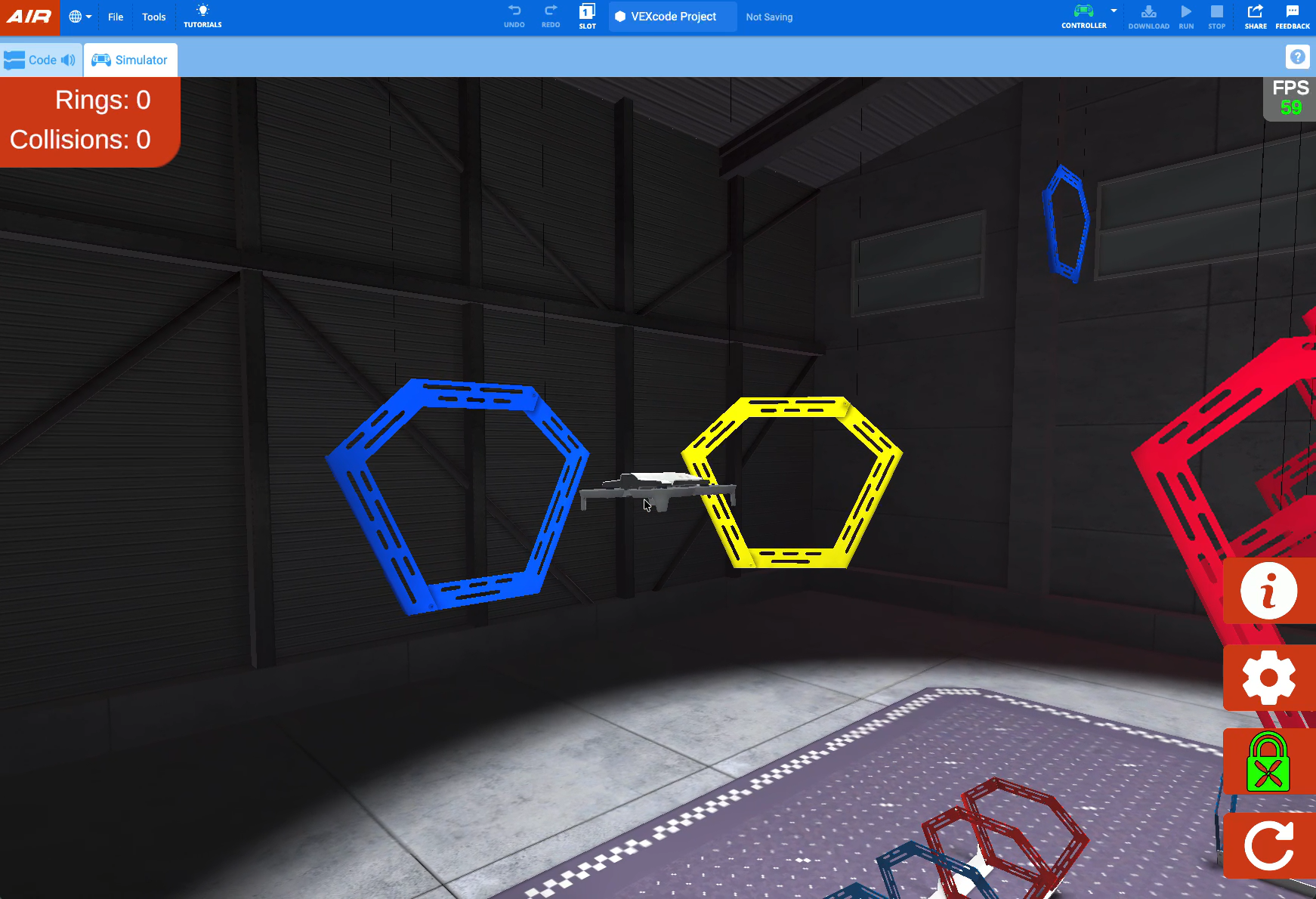
ഈ യൂണിറ്റിൽ, VEX AIR ഡ്രോൺ കൺട്രോളറിലെ റോൾ നിയന്ത്രണങ്ങൾ ഉപയോഗിച്ച് വെർച്വൽ VEX AIR ഡ്രോൺ നീക്കുന്നതിനുള്ള നിയന്ത്രണങ്ങളെക്കുറിച്ചുള്ള അവരുടെ ധാരണ വിദ്യാർത്ഥികൾ തുടർന്നും വികസിപ്പിക്കും. സ്റ്റാൻഡേർഡ്, ഹെഡ്ലെസ് എന്നീ രണ്ട് സ്റ്റിയറിംഗ് മോഡുകളെക്കുറിച്ചും അവർ പഠിക്കും. രണ്ട് സ്റ്റിയറിംഗ് രീതികളും ഉപയോഗിച്ച് പ്ലാറ്റ്ഫോമിന്റെ ഇരുവശത്തും സ്ഥാപിച്ചിരിക്കുന്ന നീല വളയങ്ങളിലൂടെ പറന്നുയർന്ന് അവർ ഈ പുതിയ കഴിവുകൾ പരിശീലിക്കും.
ആരംഭിക്കുന്നതിന് മുമ്പ് വിദ്യാർത്ഥികൾ ഇനിപ്പറയുന്ന ഉപയോഗത്തിനായി തയ്യാറാണെന്ന് ഉറപ്പാക്കുക:
- ചാർജ്ജ് ചെയ്ത VEX AIR ഡ്രോൺ കൺട്രോളർ
- ഒരു USB-C കേബിൾ
- VEXcode AIR-ലേക്ക് ആക്സസ് ഉള്ള ഒരു കമ്പ്യൂട്ടിംഗ് ഉപകരണം
പഠന ലക്ഷ്യങ്ങൾ:
VEX AIR ഫ്ലൈറ്റ് സിമുലേറ്ററിലെ റോൾ കൺട്രോളുകളും സ്റ്റിയറിംഗ് മോഡുകളും വിദ്യാർത്ഥികളെ പരിചയപ്പെടുത്തുന്നതിനും വെർച്വൽ ഡ്രോൺ പറത്തുന്ന രീതി വികസിപ്പിക്കുന്നതിനുമാണ് ഈ യൂണിറ്റ് രൂപകൽപ്പന ചെയ്തിരിക്കുന്നത്. ഈ യൂണിറ്റിന്റെ അവസാനത്തോടെ വിദ്യാർത്ഥികൾക്ക് ഇവ ചെയ്യാൻ കഴിയും:
- ഒരു ഡ്രോണിനെ x-അക്ഷത്തിൽ ഇടത്തോട്ടും വലത്തോട്ടും ചലിപ്പിക്കുന്ന ചലനമാണ് റോൾ എന്ന് തിരിച്ചറിയുക.
- റോൾ, പിച്ച്, യാ, ത്രോട്ടിൽ തുടങ്ങിയ പദങ്ങൾ ഉപയോഗിച്ച് ത്രിമാന സ്ഥലത്ത് ഡ്രോണുകളുടെ ചലനങ്ങൾ വിവരിക്കുക.
- സിമുലേറ്ററിലെ VEX AIR ഡ്രോൺ കൺട്രോളർ ഉപയോഗിച്ച് ഇടത്തോട്ടും വലത്തോട്ടും നിയന്ത്രിത ചലനങ്ങൾ പ്രകടിപ്പിക്കുക.
- സിമുലേറ്ററിൽ ഡ്രോൺ പറത്തുമ്പോൾ ഹെഡ്ലെസ് സ്റ്റിയറിംഗും സ്റ്റാൻഡേർഡ് സ്റ്റിയറിംഗും താരതമ്യം ചെയ്യുക.
സ്റ്റാൻഡേർഡ്സ് അലൈൻമെന്റ്
ഈ യൂണിറ്റിൽ താഴെ പറയുന്ന മാനദണ്ഡങ്ങൾ കൈവരിക്കാൻ കഴിയും. ഈ മാനദണ്ഡങ്ങൾ എങ്ങനെ പാലിക്കുന്നുവെന്ന് അറിയുന്നതിനും സമഗ്രമായ ഒരു സ്റ്റാൻഡേർഡ് അലൈൻമെന്റ് കാണുന്നതിനും, standards.vex.comലേക്ക് പോകുക.
കോമൺ കോർ ഇംഗ്ലീഷ് ലാംഗ്വേജ് ആർട്സ് (CCSS ELA)
- CCSS.ELA-LITERACY.CCRA.L.6 - കോളേജ് തലത്തിലും കരിയർ തലത്തിലും വായന, എഴുത്ത്, സംസാരിക്കൽ, കേൾക്കൽ എന്നിവയ്ക്ക് ആവശ്യമായ പൊതുവായ അക്കാദമിക്, ഡൊമെയ്ൻ-നിർദ്ദിഷ്ട പദങ്ങളുടെയും ശൈലികളുടെയും ഒരു ശ്രേണി കൃത്യമായി നേടുകയും ഉപയോഗിക്കുകയും ചെയ്യുക; ഗ്രാഹ്യത്തിനോ ആവിഷ്കാരത്തിനോ പ്രധാനപ്പെട്ട ഒരു അജ്ഞാത പദം നേരിടുമ്പോൾ പദാവലി പരിജ്ഞാനം ശേഖരിക്കുന്നതിൽ സ്വാതന്ത്ര്യം പ്രകടിപ്പിക്കുക.
- CCSS.ELA-LITERACY.RST.9-10/11-12.3 - പരീക്ഷണങ്ങൾ നടത്തുമ്പോഴോ, അളവുകൾ എടുക്കുമ്പോഴോ, സാങ്കേതിക ജോലികൾ ചെയ്യുമ്പോഴോ, പ്രത്യേക കേസുകൾ അല്ലെങ്കിൽ വാചകത്തിൽ നിർവചിച്ചിരിക്കുന്ന ഒഴിവാക്കലുകൾ ശ്രദ്ധിക്കുമ്പോഴോ സങ്കീർണ്ണമായ ഒരു മൾട്ടിസ്റ്റെപ്പ് നടപടിക്രമം കൃത്യമായി പാലിക്കുക.
- CCSS.ELA-LITERACY.RST.9-10/11-12.4 - ഗ്രേഡ് ലെവൽ വിഷയങ്ങളുമായി ബന്ധപ്പെട്ട ഒരു പ്രത്യേക ശാസ്ത്രീയ അല്ലെങ്കിൽ സാങ്കേതിക സന്ദർഭത്തിൽ ഉപയോഗിക്കുമ്പോൾ ചിഹ്നങ്ങൾ, പ്രധാന പദങ്ങൾ, മറ്റ് ഡൊമെയ്ൻ-നിർദ്ദിഷ്ട വാക്കുകൾ, ശൈലികൾ എന്നിവയുടെ അർത്ഥം നിർണ്ണയിക്കുക.
ഇന്റർനാഷണൽ സൊസൈറ്റി ഫോർ ടെക്നോളജി ഇൻ എഡ്യൂക്കേഷൻ (ISTE)
- എംപവേർഡ് ലേണർ - 1.1.c - വിദ്യാർത്ഥികൾ തങ്ങളുടെ പരിശീലനത്തെ വിവരദായകവും മെച്ചപ്പെടുത്തുന്നതുമായ ഫീഡ്ബാക്ക് തേടുന്നതിനും വിവിധ രീതികളിൽ അവരുടെ പഠനം പ്രകടിപ്പിക്കുന്നതിനും സാങ്കേതികവിദ്യ ഉപയോഗിക്കുന്നു.
- എംപവേർഡ് ലേണർ - 1.1.d - സാങ്കേതികവിദ്യ എങ്ങനെ പ്രവർത്തിക്കുന്നു എന്നതിന്റെ അടിസ്ഥാന ആശയങ്ങൾ വിദ്യാർത്ഥികൾ മനസ്സിലാക്കുന്നു, നിലവിലുള്ള സാങ്കേതികവിദ്യകൾ ഫലപ്രദമായി തിരഞ്ഞെടുക്കാനും ഉപയോഗിക്കാനുമുള്ള കഴിവ് പ്രകടിപ്പിക്കുന്നു, കൂടാതെ ഉയർന്നുവരുന്ന സാങ്കേതികവിദ്യകളെ ചിന്താപൂർവ്വം പര്യവേക്ഷണം ചെയ്യുന്നതിൽ സമർത്ഥരാണ്.
- നോളജ് കൺസ്ട്രക്ടർ – 1.3.d – വിദ്യാർത്ഥികൾ യഥാർത്ഥ ലോകത്തിലെ പ്രശ്നങ്ങൾ പര്യവേക്ഷണം ചെയ്തുകൊണ്ട് അറിവ് വളർത്തിയെടുക്കുകയും ആധികാരിക സാഹചര്യങ്ങളിൽ അവരുടെ പഠനം പ്രയോഗിക്കുന്നതിൽ അനുഭവം നേടുകയും ചെയ്യുന്നു.
- ഗ്ലോബൽ കൊളാബറേറ്റർ - 1.7.c - വിദ്യാർത്ഥികൾ പ്രോജക്ട് ടീമുകൾക്ക് ക്രിയാത്മകമായി സംഭാവന നൽകുന്നു, ഒരു പൊതു ലക്ഷ്യത്തിലേക്ക് ഫലപ്രദമായി പ്രവർത്തിക്കുന്നതിന് വിവിധ റോളുകളും ഉത്തരവാദിത്തങ്ങളും ഏറ്റെടുക്കുന്നു.
ഈ യൂണിറ്റിൽ, VEX AIR ഡ്രോൺ എങ്ങനെ പറത്താം എന്നതിനെക്കുറിച്ചുള്ള നിങ്ങളുടെ ഗ്രാഹ്യം വർദ്ധിപ്പിക്കും. VEX AIR ഡ്രോൺ കൺട്രോളർ ഉപയോഗിച്ച് ഡ്രോൺ ഇടത്തോട്ടും വലത്തോട്ടും പറത്തുന്നതിന് റോൾ കൺട്രോൾ എങ്ങനെ ഉപയോഗിക്കാമെന്ന് നിങ്ങൾ പഠിക്കും. രണ്ട് വ്യത്യസ്ത സ്റ്റിയറിംഗ് മോഡുകളെക്കുറിച്ചും (സ്റ്റാൻഡേർഡ്, ഹെഡ്ലെസ്) ഓരോന്നും എപ്പോൾ, എങ്ങനെ ഉപയോഗിക്കാമെന്നതിനെക്കുറിച്ചും നിങ്ങൾ പഠിക്കും. യൂണിറ്റിന്റെ അവസാനത്തോടെ, പ്ലാറ്റ്ഫോമിന്റെ ഇരുവശത്തും സ്ഥാപിച്ചിരിക്കുന്ന നീല വളയങ്ങളിലൂടെ പറക്കുമ്പോൾ ഈ രണ്ട് സ്റ്റിയറിംഗ് മോഡുകളും നിങ്ങൾ പരീക്ഷിച്ചു കഴിഞ്ഞിരിക്കും.
പദാവലി
ഈ യൂണിറ്റിലെ ഡ്രോൺ ചലനങ്ങളെക്കുറിച്ച് ചർച്ച ചെയ്യാൻ താഴെ പറയുന്ന പദാവലി വാക്കുകൾ നിങ്ങളെ സഹായിക്കും.
- റോൾ — ഒരു ഡ്രോണിനെ വശങ്ങളിലേക്ക് ചരിഞ്ഞും ചലിപ്പിച്ചും ചലിപ്പിക്കുന്ന ചലനം. ഒരു ഡ്രോൺ ഇടത്തേക്ക് ഉരുളുമ്പോൾ, അത് ഇടത്തേക്ക് നീങ്ങാൻ തുടങ്ങും, ഒരു ഡ്രോൺ വലത്തേക്ക് ഉരുളുമ്പോൾ, അത് വലത്തേക്ക് നീങ്ങാൻ തുടങ്ങും.
- ഹെഡ്ലെസ് സ്റ്റിയറിംഗ് — ഡ്രോൺ ഏത് ദിശയിലേക്ക് അഭിമുഖീകരിച്ചാലും, നിങ്ങൾ ജോയിസ്റ്റിക്ക് തള്ളുന്ന ദിശയിലേക്ക് ഡ്രോൺ എപ്പോഴും നീങ്ങുന്ന ഒരു ഡ്രോൺ നിയന്ത്രണ മോഡ്.
- സ്റ്റാൻഡേർഡ് സ്റ്റിയറിംഗ് — ഡ്രോൺ ഏത് ദിശയിലാണ് അതിന്റെ മൂക്ക് അഭിമുഖീകരിക്കുന്നത് എന്നതിനെ അടിസ്ഥാനമാക്കി അത് നീങ്ങുന്ന ഒരു ഡ്രോൺ നിയന്ത്രണ മോഡ്.
ഈ യൂണിറ്റിലെ ഡ്രോൺ ചലനങ്ങളെക്കുറിച്ച് ചർച്ച ചെയ്യാൻ താഴെ പറയുന്ന പദാവലി വാക്കുകൾ നിങ്ങളെ സഹായിക്കും.
- റോൾ — ഒരു ഡ്രോണിനെ വശങ്ങളിലേക്ക് ചരിഞ്ഞും ചലിപ്പിച്ചും ചലിപ്പിക്കുന്ന ചലനം. ഒരു ഡ്രോൺ ഇടത്തേക്ക് ഉരുളുമ്പോൾ, അത് ഇടത്തേക്ക് നീങ്ങാൻ തുടങ്ങും, ഒരു ഡ്രോൺ വലത്തേക്ക് ഉരുളുമ്പോൾ, അത് വലത്തേക്ക് നീങ്ങാൻ തുടങ്ങും.
- ഹെഡ്ലെസ് സ്റ്റിയറിംഗ് — ഡ്രോൺ ഏത് ദിശയിലേക്ക് അഭിമുഖീകരിച്ചാലും, നിങ്ങൾ ജോയിസ്റ്റിക്ക് തള്ളുന്ന ദിശയിലേക്ക് ഡ്രോൺ എപ്പോഴും നീങ്ങുന്ന ഒരു ഡ്രോൺ നിയന്ത്രണ മോഡ്.
- സ്റ്റാൻഡേർഡ് സ്റ്റിയറിംഗ് — ഡ്രോൺ ഏത് ദിശയിലാണ് അതിന്റെ മൂക്ക് അഭിമുഖീകരിക്കുന്നത് എന്നതിനെ അടിസ്ഥാനമാക്കി അത് നീങ്ങുന്ന ഒരു ഡ്രോൺ നിയന്ത്രണ മോഡ്.
വിദ്യാർത്ഥികൾ വിവിധ ഡ്രോൺ ചലനങ്ങൾക്കുള്ള പദാവലി പഠിക്കുമ്പോൾ, വാക്കുകളുടെ അർത്ഥം ആന്തരികമാക്കാൻ അവരെ സഹായിക്കുന്നതിനുള്ള ഒരു ഫലപ്രദമായ മാർഗം, ഓരോ ചലനത്തിനും അനുസൃതമായി അവരുടെ കൈകളോ ശരീരമോ ചലിപ്പിക്കുക എന്നതാണ്.
ഉദാഹരണത്തിന്, വിദ്യാർത്ഥികൾക്ക് പിച്ചിനായി മുന്നോട്ട് ചരിക്കാം, യാവിന് വേണ്ടി വശങ്ങളിലേക്ക് തിരിക്കാം, റോളിനായി ഇടത്തോട്ടോ വലത്തോട്ടോ ചായാം. ഇത് ഓരോ പദത്തെയും അവർക്ക് അനുഭവിക്കാനും ഓർമ്മിക്കാനും കഴിയുന്ന ഒരു ചലനവുമായി ബന്ധിപ്പിക്കാൻ സഹായിക്കും.
അടുത്ത പാഠത്തിലേക്ക് പോകാൻ അടുത്തത് > തിരഞ്ഞെടുക്കുക.