Now that you have experience flying with the Motorized Hook Module, you are ready to explore with additional challenges moving orbit balls with the VEX AIR Drone and VEX AIR Drone Controller. Completing these missions requires physical inspection of the drone from the propellers to the landing feet. The landing feet are important to the stability of the drone during takeoff and landing.
Watch the video below to learn how to:
- Inspect the landing feet for damage
- Replace any worn or damaged landing feet
Mission Prep
Each exploration mission in this lesson focuses on flying with orbit balls while controlling your movement carefully and precisely. For each mission, make sure you:
- Complete a pre-flight check before every mission. Inspect your drone and landing feet for damage before flying.
- The Pre-Flight Checklist will be available in each Mission Log below so you have multiple reminders to complete these safety checks.
- Be sure the Motorized Hook Module is attached to the drone.
- See this article for pre-flight safety reminders and guidance on getting your drone ready for flight.
- Log each flight in your Mission Log. Record what worked, what didn’t, and what you want to improve.
- Practice each mission multiple times. Your goal is not just to complete the task, but to improve your accuracy and control while using the Motorized Hook Module.
- Reset the flight area between attempts. This ensures that other pilots are starting with a consistent setup.
Each exploration mission in this lesson focuses on flying with orbit balls while controlling your movement carefully and precisely. For each mission, make sure you:
- Complete a pre-flight check before every mission. Inspect your drone and landing feet for damage before flying.
- The Pre-Flight Checklist will be available in each Mission Log below so you have multiple reminders to complete these safety checks.
- Be sure the Motorized Hook Module is attached to the drone.
- See this article for pre-flight safety reminders and guidance on getting your drone ready for flight.
- Log each flight in your Mission Log. Record what worked, what didn’t, and what you want to improve.
- Practice each mission multiple times. Your goal is not just to complete the task, but to improve your accuracy and control while using the Motorized Hook Module.
- Reset the flight area between attempts. This ensures that other pilots are starting with a consistent setup.
Links to Mission Logs and images of the setup for each mission are included in each exploration. Distribute each Mission Log when students reach that exploration to help them stay focused on the current task.
Allow enough time for every student to fly each mission multiple times. These missions are more complex than any they have flown previously, and will likely take more time, patience, and perseverance to complete. Encourage students to engage with one another as they are flying or planning for their next flight. Strategies could include:
- Moving all students through each exploration mission together, so students have a common goal they are working toward.
- Encouraging students who are feeling frustrated to move to another mission on this page so they can continue practicing while also giving them space to reflect on their practice.
- Celebrating successes together and highlighting each time a student reduces the time it takes to move the orbit balls or helps their partner to improve.
- Reminding students to use the Competition Layout in the VEX AIR Flight Simulator to practice picking up and moving orbit balls with the drone.
Mission: Hit the Mark (Hook)
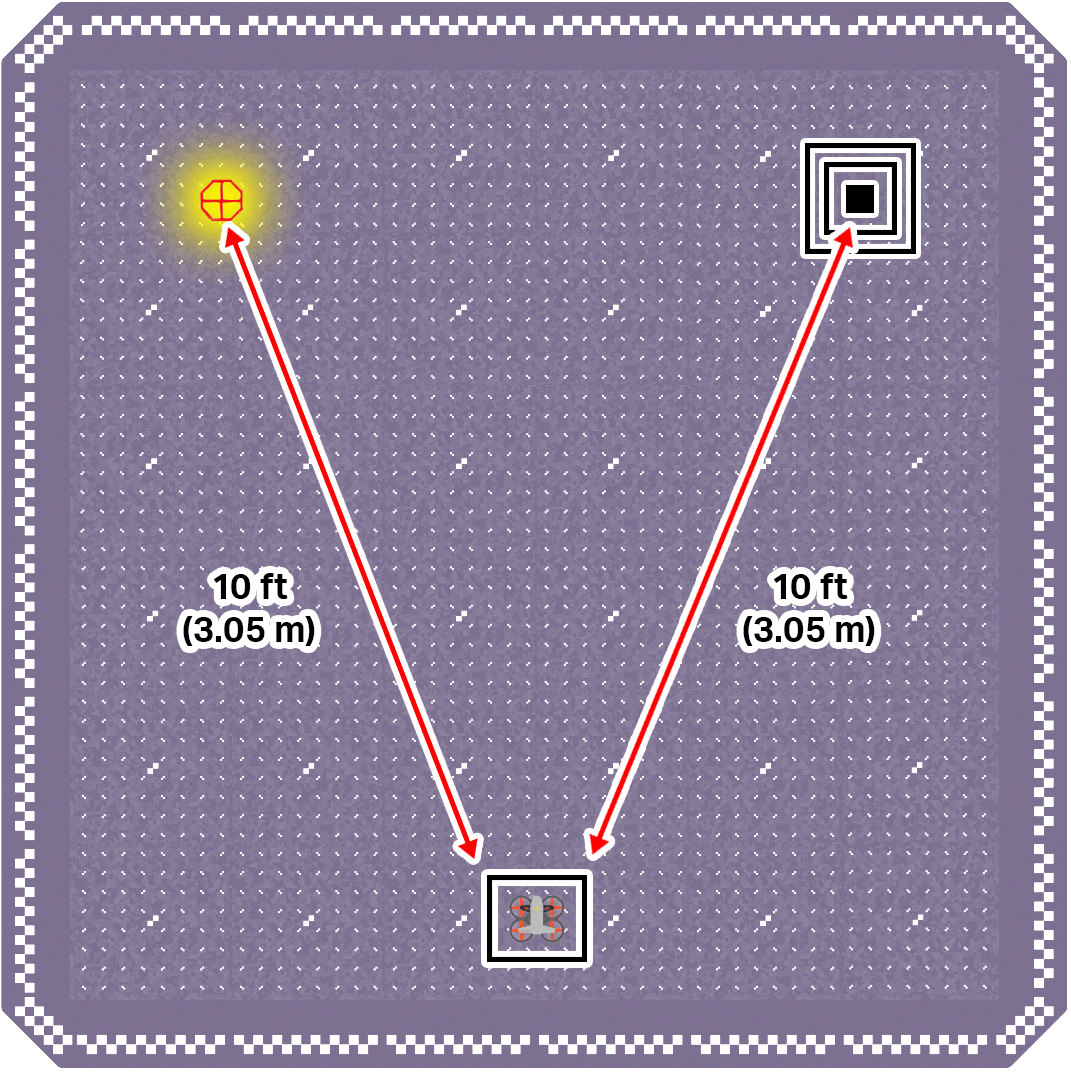
The goal of this mission is to fly the drone to pick up and move an orbit ball from its starting location to the target. Get as close to the middle of your target as you can!
To set up your flight area, place an orbit ball in the upper left corner. Mark a target zone in the upper right corner. Use the image below for reference as you set up your flight area.
Record your results in your Mission Log (Google Doc / .docx / .pdf).
- Mark where the orbit ball landed in the target zone for each flight.
- Note strategies you used to help improve your precision and success with the Motorized Hook Module for each flight attempt.
Pro Tip: Use different camera views throughout the mission to ensure you have helpful visual information while flying.
The goal of this mission is to fly the drone to pick up and move an orbit ball from its starting location to the target. Get as close to the middle of your target as you can!
To set up your flight area, place an orbit ball in the upper left corner. Mark a target zone in the upper right corner. Use the image below for reference as you set up your flight area.

Record your results in your Mission Log (Google Doc / .docx / .pdf).
- Mark where the orbit ball landed in the target zone for each flight.
- Note strategies you used to help improve your precision and success with the Motorized Hook Module for each flight attempt.
Pro Tip: Use different camera views throughout the mission to ensure you have helpful visual information while flying.
Distribute the Hit the Mark (Hook) Mission Log to all students (Google Doc / .docx / .pdf). Make sure students complete the Pre-Flight Checklist. Distribute additional checklists as needed as students work through the mission (Google Doc / .docx / .pdf).
Use nested, high-walled containers for the drop-off zone to help create consistent target areas for students as they fly. The behavior of the orbit ball after it is dropped may vary depending on the target setup.
Talk with students as they practice. Ask questions like:
- How are you deciding when to drop the orbit ball?
- What tools are you using to align the drone over the target?
- What is challenging about flying this path for you? How are you working to overcome that challenge?
Encourage students to try and improve their precision and efficiency as they place the orbit ball on the target. Students can aim to pick up the objects more smoothly, to improve their delivery location, or try to complete the whole mission in less time. Remind students to think about specific ways they want to make their flight better than the last to help them practice with intention.
Mission: Flip Flop Flight (Hook)
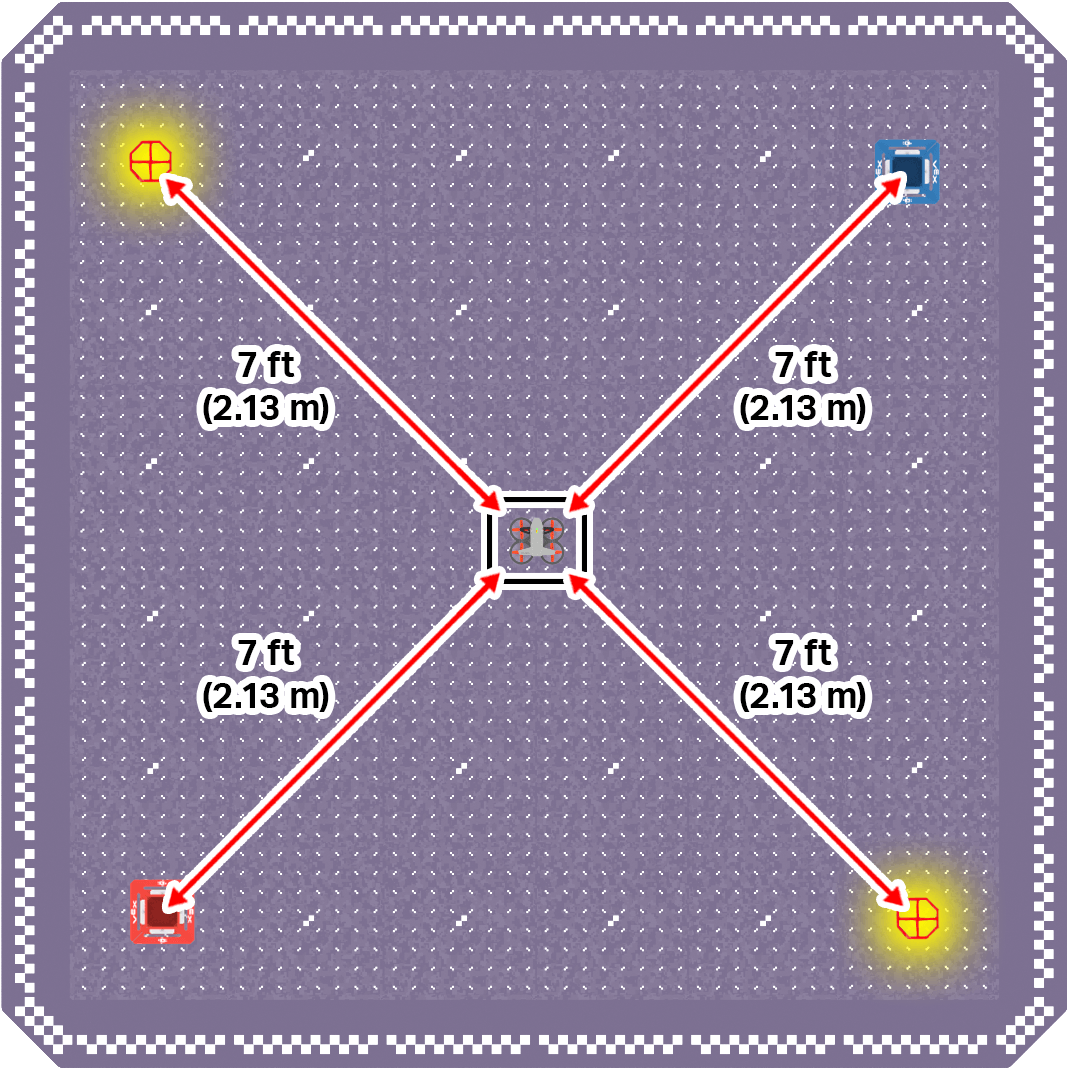
The goal of this mission is to fly the drone to pick up and move orbit balls from their starting locations across the flight area to drop-off zones. Only one object can be delivered to each drop-off zone.
To set up your flight area, place one orbit ball in the upper left corner and one orbit ball in the lower right corner. Mark drop-off zones in the upper right and lower left corners of the flight area. Use the image below for reference as you set up your space.
Record your results in your Mission Log (Google Doc / .docx / .pdf).
- Note your intended path for each flight in your Mission Log. Number each location 1 through 4 in the order you intend to fly to them. You can also use arrows to indicate your intended path.
- Record how well your flight path worked and any strategies or tips you learned about moving orbit balls with precision and efficiency in your reflection.
Pro Tip: The angle of the hook on the module can make picking up an orbit ball difficult. Instead of moving straight down, line up the drone and lower the hook, then use a controlled forward motion to scoop the orbit ball. Keeping your movements smooth and steady will help you line up the hook and successfully pick up the object.
The goal of this mission is to fly the drone to pick up and move orbit balls from their starting locations across the flight area to drop-off zones. Only one object can be delivered to each drop-off zone.
To set up your flight area, place one orbit ball in the upper left corner and one orbit ball in the lower right corner. Mark drop-off zones in the upper right and lower left corners of the flight area. Use the image below for reference as you set up your space.

Record your results in your Mission Log (Google Doc / .docx / .pdf).
- Note your intended path for each flight in your Mission Log. Number each location 1 through 4 in the order you intend to fly to them. You can also use arrows to indicate your intended path.
- Record how well your flight path worked and any strategies or tips you learned about moving orbit balls with precision and efficiency in your reflection.
Pro Tip: The angle of the hook on the module can make picking up an orbit ball difficult. Instead of moving straight down, line up the drone and lower the hook, then use a controlled forward motion to scoop the orbit ball. Keeping your movements smooth and steady will help you line up the hook and successfully pick up the object.
Distribute the Flip Flop Flight (Hook) Mission Log to all students (Google Doc / .docx / .pdf). Make sure students complete the Pre-Flight Checklist. Distribute additional checklists as needed as students work through the mission (Google Doc / .docx / .pdf).
Set up your flight area so that there is an orbit ball and drop-off zone on each side. Use the setup image for reference. Tape can be used to mark the drop-off zones along with the high-walled container. You can adjust the size and shape to best meet the needs of your students.
Talk with students as they practice. Ask questions like:
- Why are you moving the objects in that order? How does your flight path work with your strategy for moving orbit balls?
- What do you notice as you fly across to the drop-off zone carrying an orbit ball? How is your drone movement similar or different to previous flight experiences?
- What is one tip you would share with a new pilot trying to use the Motorized Hook Module for the first time? Why is that important?
Remind students that they can talk with one another before, during, and after flight to help them improve their skills with each mission. The perspective of the co-pilot can be helpful when positioning the drone for pickup or drop-off.
Mission: Orbit Ball Weave
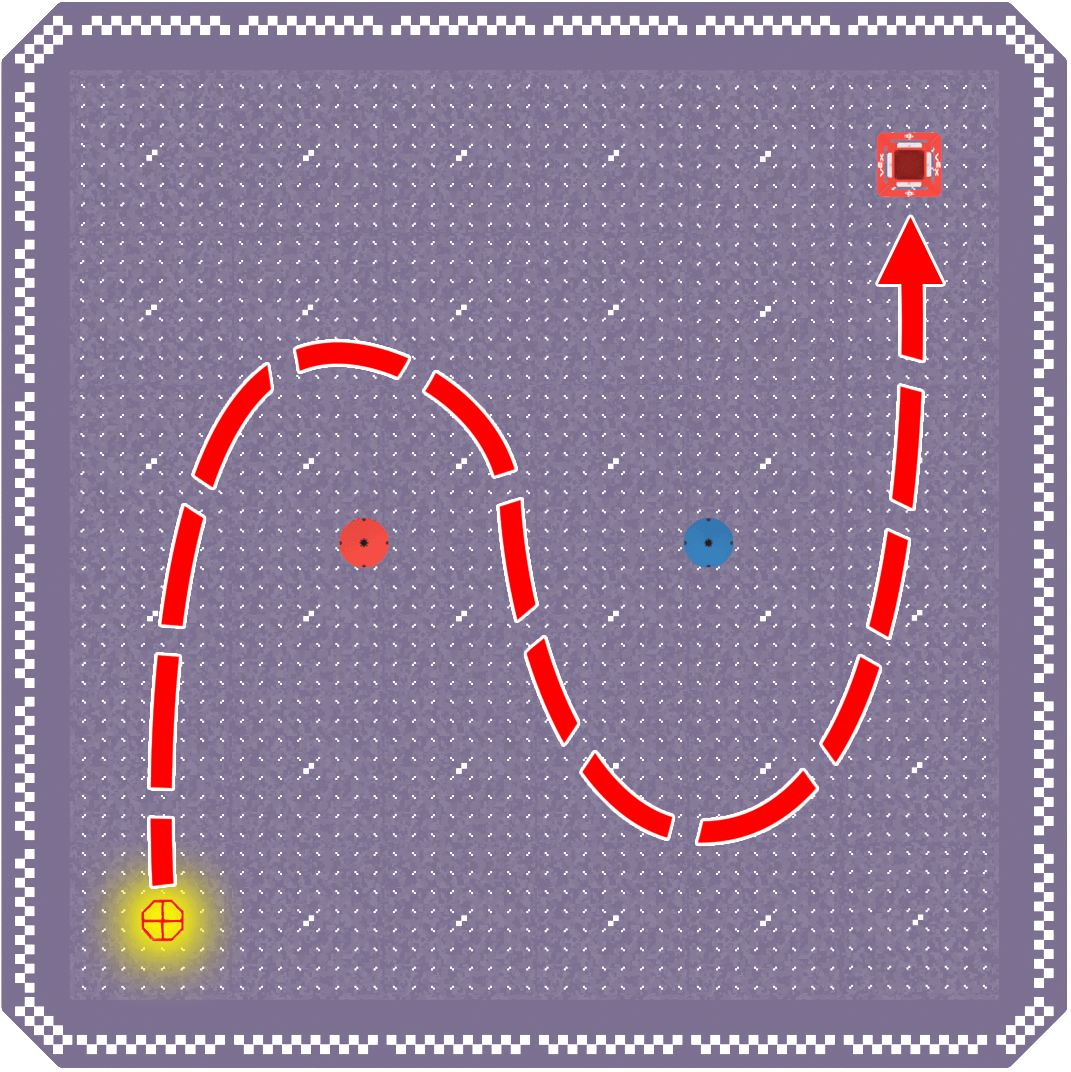
The goal of this mission is to pick up and move one orbit ball across the flight area in a zigzag path, and drop it in the drop-off zone.
Use the image below for reference as you set up your flight area:
- Place one orbit ball in the lower left corner.
- Mark a drop-off zone in the upper right corner.
- Mark two “obstacles” in the center of the flight area that you will fly around.

Record your results in your Mission Log (Google Doc / .docx / .pdf).
- Note things like how you knew when to change direction on the zigzag path, how the drone moved with an object attached, and tools you used to improve your movements.
Pro Tip: This mission is meant to simulate more complex movements, so be sure you are flying around each marked obstacle location. Reference the image in the Mission Objectives section if you need help remembering where the drone should fly to complete the mission.
The goal of this mission is to pick up and move one orbit ball across the flight area in a zigzag path, and drop it in the drop-off zone.
Use the image below for reference as you set up your flight area:
- Place one orbit ball in the lower left corner.
- Mark a drop-off zone in the upper right corner.
- Mark two “obstacles” in the center of the flight area that you will fly around.

Record your results in your Mission Log (Google Doc / .docx / .pdf).
- Note things like how you knew when to change direction on the zigzag path, how the drone moved with an object attached, and tools you used to improve your movements.
Pro Tip: This mission is meant to simulate more complex movements, so be sure you are flying around each marked obstacle location. Reference the image in the Mission Objectives section if you need help remembering where the drone should fly to complete the mission.
Distribute the Orbit Ball Weave Mission Log to all students (Google Doc / .docx / .pdf). Make sure students complete the Pre-Flight Checklist. Distribute additional checklists as needed as students work through the mission (Google Doc / .docx / .pdf).
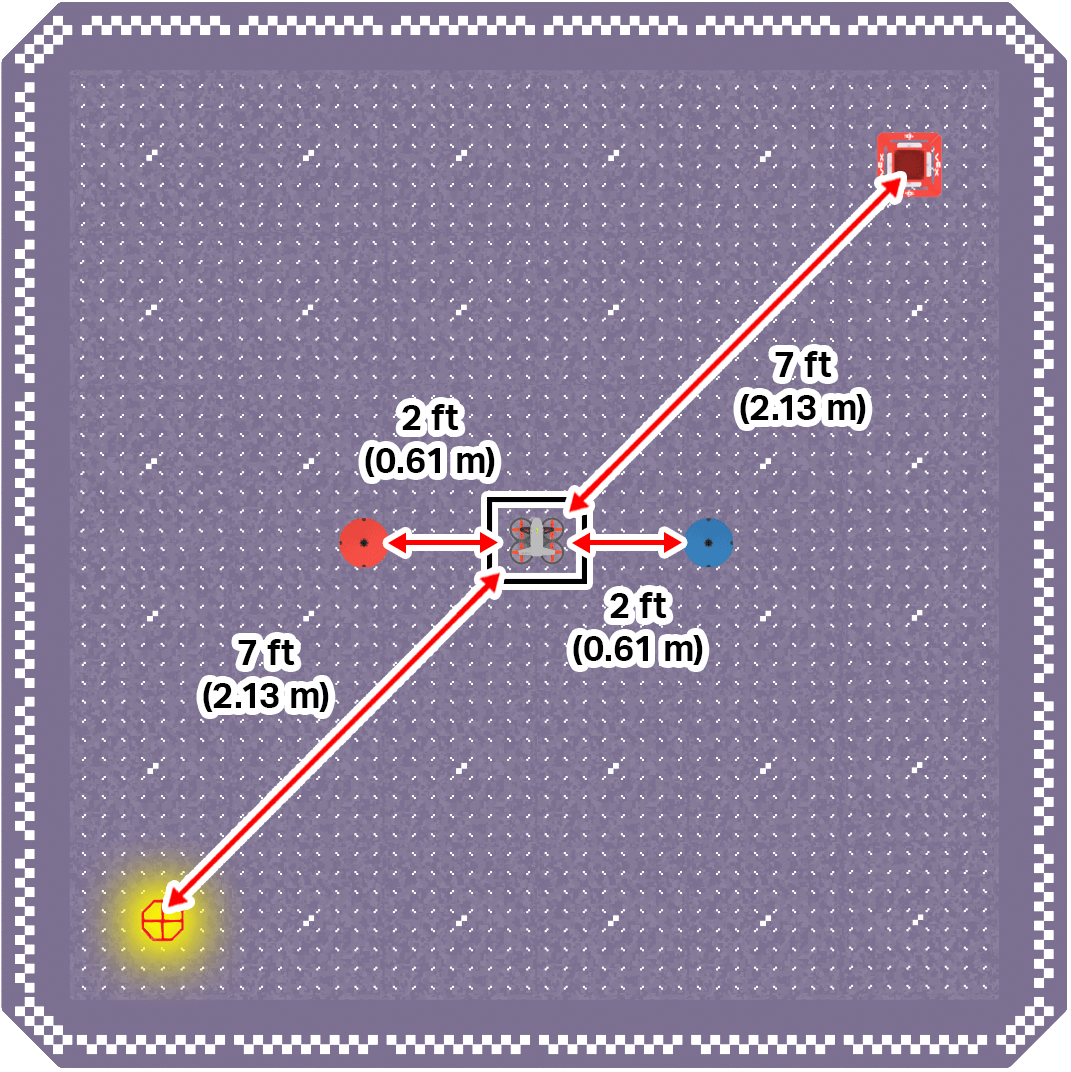
Set up your flight area for zigzag flight! Use the setup image for reference.
- You can use tape alongside the high-walled container to mark off a drop-off zone in one corner of the flight area. You can make the drop-off zone larger or smaller to best meet students' needs and growing skills.
- Mark “obstacles” with tape or heavy objects like textbooks to give students objects to fly around to complete the path.
- If needed, use tape to identify the takeoff and landing zone as well.
Be sure that students know the path they are intended to fly before they begin. Use the reference image below (or in the Mission Log) to help clarify.

Talk with students as they practice. Ask questions like:
- What do you notice about how the drone moves while flying a more complex path holding an orbit ball?
- How do you know when to change direction around an obstacle?
- How are you keeping the orbit ball on the hook while making complex movements like a tight turn?
- What is challenging about flying this path for you? How are you working to overcome that challenge?
Wrap-Up Discussion
Now that you have flown all three missions and logged your practice flights, pause and reflect on your progress. Throughout this course, you have learned how to safely operate a physical drone, perform basic maintenance, and use different modules to interact with objects in your environment. Consider how your skills have developed from your first flight to now, then discuss the following questions as a class.
- How have you improved as a drone pilot throughout this course? What are you able to do now that you were not able to do at the beginning?
- How has flying a physical drone compared to using the VEX AIR Virtual Flight Simulator? What skills transferred, and what felt different?
- How did flying the drone change when using each module (Passive, Magnet, and Motorized Hook)? For example, how was picking up objects different with each one? Which did you find most challenging or most effective? Why?
- Why is it important to inspect and maintain your drone, including checking propellers and landing feet? How does this impact your success during missions?
Now that you have flown all three missions and logged your practice flights, pause and reflect on your progress. Throughout this course, you have learned how to safely operate a physical drone, perform basic maintenance, and use different modules to interact with objects in your environment. Consider how your skills have developed from your first flight to now, then discuss the following questions as a class.
- How have you improved as a drone pilot throughout this course? What are you able to do now that you were not able to do at the beginning?
- How has flying a physical drone compared to using the VEX AIR Virtual Flight Simulator? What skills transferred, and what felt different?
- How did flying the drone change when using each module (Passive, Magnet, and Motorized Hook)? For example, how was picking up objects different with each one? Which did you find most challenging or most effective? Why?
- Why is it important to inspect and maintain your drone, including checking propellers and landing feet? How does this impact your success during missions?
Bring the class together for discussion and reflection on student progress before moving to the course capstone. Throughout this course, students have transitioned from using the simulator to flying a physical drone and completing increasingly complex missions. Before moving forward, take time to discuss their progress and learning.
Give students a few minutes to think about or jot down their answers to the discussion prompts. Then facilitate a class discussion about each question.
Select Return to Units > to move to the next unit.