
Now that you have experience flying the VEX AIR Drone, you are ready to explore how the drone can interact with objects in its environment. In this lesson, you will use the Competition layout in the VEX AIR Flight Simulator to practice picking up magnetic cargo with the Magnet Module. You will learn how to align the drone above cargo, and which controls on the VEX AIR Drone Controller enable you to pick up and detach cargo from the magnet.
Watch this video to learn more about:
- What the Magnet Module is and how it works.
- How to change settings in the simulator.
- Picking up and dropping cargo with the controller and magnet.
- Using visual tools like the reticle and camera views to help align the drone with cargo.
Hover & Discover
As a drone flies, its propellers push air downward, creating a stream of fast-moving air called downwash. This downwash is what lifts the drone into the air. According to Newton’s Third Law, every action has an equal and opposite reaction—pushing air down causes the drone to be pushed up.
Downwash matters most when flying close to the ground or near objects. Air that hits the floor or cargo can bounce back and affect the drone’s stability. When using the Magnet Module, careful control of height and movement helps prevent downwash from pushing objects away or making pickup less precise.
Mission: Single Cargo Pickup
In this mission, you will test out the Magnet Module on the virtual drone for yourself! In the Competition layout, you will fly to pick up cargo, throttle up and hover, drop the cargo, then land on a platform.
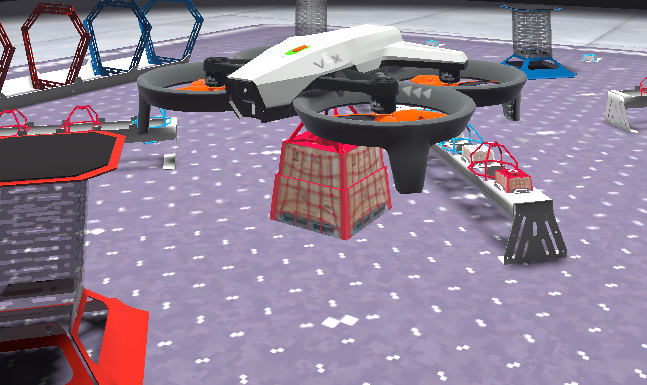
Follow these steps to complete your mission:
- Connect your controller to VEXcode AIR and select the Simulator tab.
- Change to the Competition layout. Refer to this article about using the VEX AIR Flight Simulator for more detailed instructions.
- Fly the drone to pick up cargo, hover above the pickup area, then drop the cargo and land on a platform.
- Use the Mission Log to record your flights (Google doc / .docx / .pdf). Be sure to record any strategies or tips that helped you be successful picking up cargo with the magnet.
Pro Tip: Align the reticle in front of the cargo on the ground, to help make sure that the Magnet Module and the magnet on the cargo are lined up before throttling down for pickup.
This mission will take practice. Repeat the mission multiple times to help improve your precision and accuracy when picking up cargo.
Once you have practiced the mission and logged your practice flights in your Mission Log, complete the Single Cargo Pickup Challenge mission in Flight School.
- Read the VEX Library article Using Flight School in the VEX AIR Flight Simulator for instructions on how to access and use Flight School.
- Find badge criteria for the mission in the Mission Log.
- When you have completed your Flight School mission, add your name to your badge.
- Save your badge, and share it with your instructor as directed.
Real-World Connections
Real-world drones are excellent tools for delivering payloads to hard-to-reach locations. They can transport medicine, tools, or emergency equipment quickly and safely where people or vehicles cannot easily go.
Carrying a payload changes how a drone flies. The extra weight affects balance and movement, requiring pilots to fly more slowly and maintain careful control. Aviation regulations require extra caution when flying with cargo, especially near people, buildings, or traffic. Pilots must plan flight paths, maintain safe distances from obstacles, and deliver cargo with precision.

Emergency response teams sometimes use professionally-flown outdoor drones to deliver important supplies when time matters. For example, a drone may carry medicine, first-aid kits, or rescue gear to people in hard-to-reach places after a storm, flood, or earthquake. Drones can also bring supplies to areas where roads are blocked, helping responders act quickly and safely.
Check Your Understanding
Before moving on, ensure that you understand the concepts in this lesson by answering the questions here (Google doc / .docx / .pdf).
Select Next > to move on to the mini-challenge.