
Challenge
In this challenge, you will use the ‘Arm Display Position’ example project to find the coordinate values of the four positions indicated on this image of the Workcell.
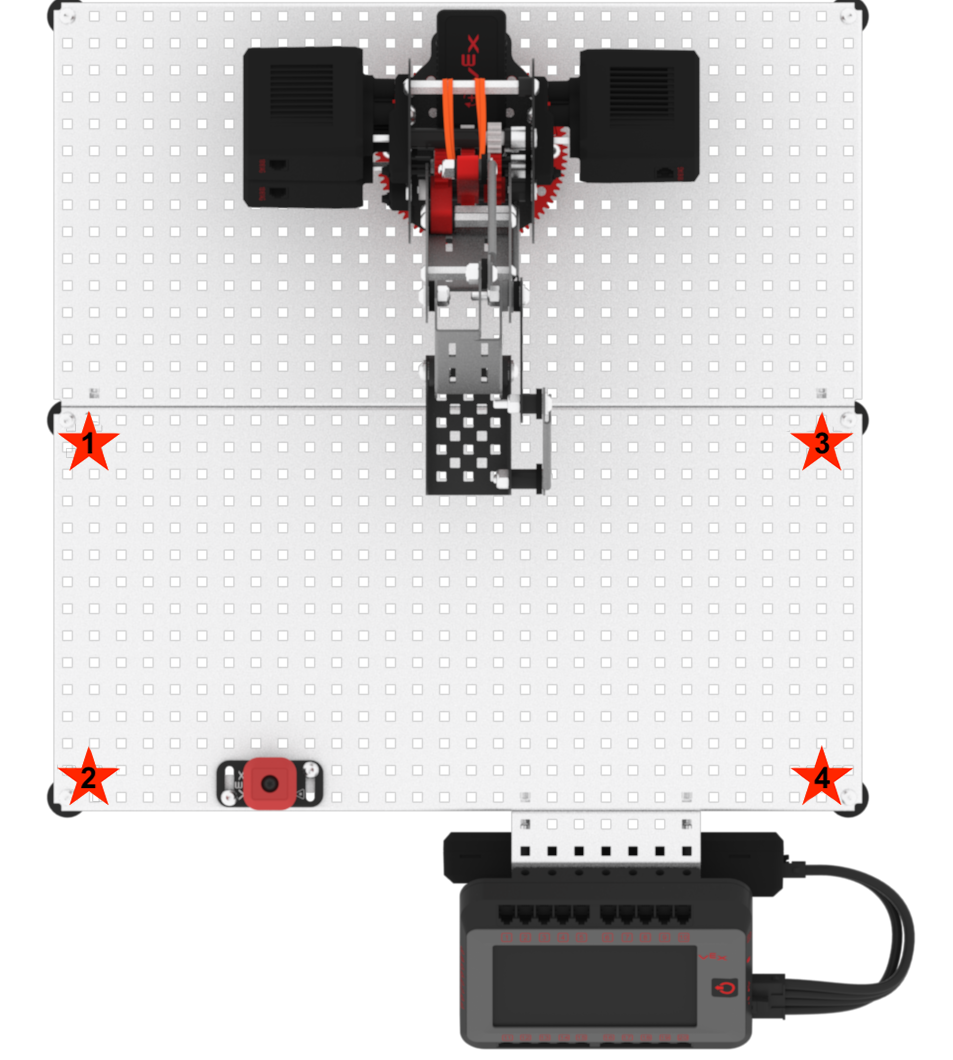
Follow these steps to complete the challenge.
- Launch VEXcode V5.
- Open the ‘Arm Display Position’ example project.
- Manually move the arm mounted on the VEX V5 Workcell to the four locations shown in the image above indicated by red stars.
- Document the X, Y, and Z coordinate values in your Engineering Notebook of each of the four locations by labeling them as the following:
- Location 1
- Location 2
- Location 3
- Location 4
 Teacher Tips
- If students are struggling to open the example project, have them follow the steps from the Lab 3 Play section.
- After everyone has finished the challenge, ask students to compare their answers. Remind them that their answers may be slightly different depending on the exact position of their V5 Workcell.
 Teacher Toolbox
The following is an example solution. Note that values may vary:
Location 1:
- X: 5.742
- Y: 8.756
- Z: -6.502
Location 2:
- X: 12.472
- Y: 7.480
- Z: -6.208
Location 3:
- X: 5.901
- Y: -7.856
- Z: -6.606
Location 4:
- X: 11.515
- Y: -8.280
- Z: -6.378