Before You Begin
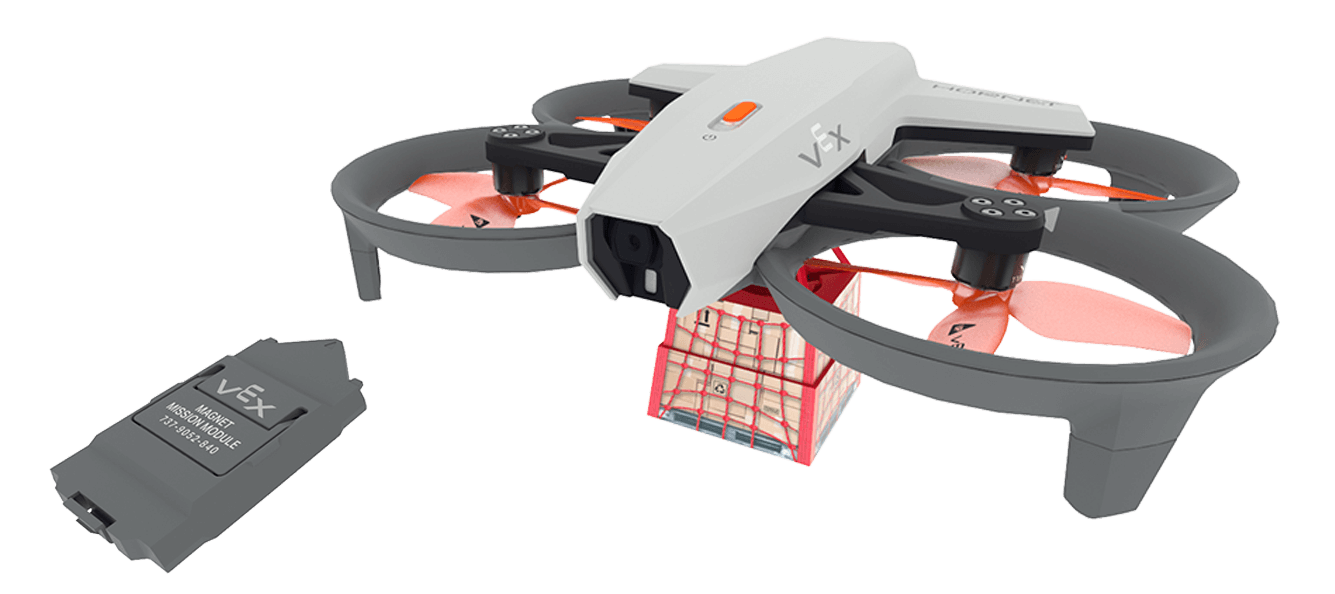
This unit continues students' exploration of the different modules available for the VEX AIR Drone. This time focusing on the Magnet Module. Students learn how to pick up, move, and drop cargo with the drone and VEX AIR Drone Controller. Students will also learn how to assess propellers on the drone for damage and replace them if needed.
Learning Objectives:
By the end of the unit, students will be able to:
- Identify that the Magnet Module can pick up magnetized objects and has a mechanized flap to detach objects from the magnet during flight.
- Identify how to drop an object with Magnet Module using the VEX AIR Drone Controller.
- Demonstrate controlled pickup and delivery of cargo during flight.
- Identify how to inspect and change propellers on the VEX AIR Drone.
Environment Setup and Materials
Ensure that your flight area is marked and labeled, and that students know the safety procedures for your space. Use the following articles to help you as you set up your space and ready your students for flight.
- Setting Up Your Classroom for Safe Flight with VEX AIR — This article gives recommendations for creating a safe flight area in your space, and environment considerations to support safe flight sessions.
- Classroom Management for Teaching with the VEX AIR Drone — This article provides roles and responsibilities for before, during, and after flight.
Students will need access to the contents of their VEX AIR Kit for this unit, including charged batteries. For more information about charging batteries, see this article.
In this unit, students will be flying the drone to move pieces of cargo using the Magnet Module. Ensure that you have the following for your flight area:
- 2 pieces of cargo
- 2 pickup locations for cargo:
- If you have the VEX AIR Drone Competition Field Kit, use the provided plates or the Long Rack.
- If you have the VEX AIR Classroom Bundle, use the Field Plates.
- 2 drop-off locations for cargo:
- If you have the VEX AIR Drone Competition Field Kit, use the Cargo Platforms.
- If you do not have that kit, you can use a hook-and-loop surface. These could include felt, higher pile carpet, or another hook-and-loop surface.
Note: Be sure the pickup and drop-off zones are securely weighed down or anchored to the ground so that air turbulence from the propellers (or downwash) does not affect the area.
Standards Alignment
Common Core English Language Arts (CCSS ELA)
- CCSS.ELA-LITERACY.CCRA.L.6 - Acquire and use accurately a range of general academic and domain-specific words and phrases sufficient for reading, writing, speaking, and listening at the college and career readiness level; demonstrate independence in gathering vocabulary knowledge when encountering an unknown term important to comprehension or expression.
- CCSS.ELA-LITERACY.RST.9-10/11-12.3 - Follow precisely a complex multistep procedure when carrying out experiments, taking measurements, or performing technical tasks, attending to special cases or exceptions defined in the text.
- CCSS.ELA-LITERACY.RST.9-10/11-12.4 - Determine the meaning of symbols, key terms, and other domain-specific words and phrases as they are used in a specific scientific or technical context relevant to grade level topics.
International Society for Technology in Education (ISTE)
- Empowered Learner – 1.1.c – Students use technology to seek feedback that informs and improves their practice and to demonstrate their learning in a variety of ways.
- Knowledge Constructor – 1.3.d – Students build knowledge by exploring real-world issues and gain experience in applying their learning in authentic settings.
- Global Collaborator - 1.7.c - Students contribute constructively to project teams, assuming various roles and responsibilities to work effectively toward a common goal.
In this unit, the focus shifts to how the VEX AIR Drone interacts with objects using the Magnet Module. Begin by experimenting with picking up, moving, and delivering magnetic cargo using the drone and VEX AIR Drone Controller. A series of exploration missions will provide you with opportunities to continue building piloting skills with the Magnet Module. This unit also dives deeper to drone maintenance and pre-flight checks, with a focus on inspecting and replacing propellers as needed.
Vocabulary
The key terms below will be useful as you learn about using modules with the drone. The vocabulary list is here to provide you with a reference for terms you may not be familiar with.
- Magnet Module — A module containing a magnet with a mechanized flap to pick up and release objects when the flap is triggered by the controller.
- Payload — The total weight of any equipment (modules) or cargo carried by a drone that is not part of its core operating structure.
- Reticle — A visual marker or crosshair on a screen that helps a pilot line up and aim precisely at a target.
The key terms below will be useful as you learn about using modules with the drone. The vocabulary list is here to provide you with a reference for terms you may not be familiar with.
- Magnet Module — A module containing a magnet with a mechanized flap to pick up and release objects when the flap is triggered by the controller.
- Payload — The total weight of any equipment (modules) or cargo carried by a drone that is not part of its core operating structure.
- Reticle — A visual marker or crosshair on a screen that helps a pilot line up and aim precisely at a target.
This unit includes the repeated vocabulary term Magnet Module. Use this as an opportunity to revisit other terms from this course and the Virtual Flight course with students that are related to this unit such as:
- Cargo — A lightweight magnetic box that expands when lifted. The drone can pick up, carry, and drop cargo using the Magnet Module.
- Downwash — A stream of fast-moving air pushed downward by the propellers as a drone flies.
Select Next > to move to the next lesson.