
In this lesson, you will use the Magnet Module with your VEX AIR Drone to interact with magnetic objects. You will learn about how to control the Magnet Module with the VEX AIR Drone Controller, and practice picking up and delivering cargo during flight.
Watch the video below to learn more about:
- What the Magnet Module is and how it works.
- Picking up and dropping cargo with the drone and controller.
- Using visual tools like the reticle and camera views to help align the drone with cargo.
Hover & Discover
Payload is the total weight of any equipment or objects carried by a drone that is not part of its core operating structure. For the VEX AIR Drone, the payload includes the attached module and any objects it is carrying. When the drone picks up cargo, the added weight of that payload affects how the drone moves through the air. You may feel added resistance as you are flying, and need to pay closer attention to your controls.
When you release a piece of cargo, the weight of the drone changes again, and you may feel less resistance as you fly. Noticing how payload affects your drone's movement can help you improve your precision during flight, making you better able to pilot the drone and interact with objects effectively.
Mission: Magnetic Moves
In this mission, you will use the Magnet Module to pick up and move cargo. You will need to line up the drone carefully and control your movements as you carry and drop the cargo. Follow these steps to complete your mission:
- Place a piece of cargo opposite the takeoff zone in the center of the indoor flight area. The cargo should be 4 ft (1.22 m) apart from the takeoff zone. Place a hook-and-loop surface in the drop-off zone behind the drone. The hook-and-loop surface should be 4 ft (1.22 m) apart from the takeoff zone.
- Use the image below for reference as you set up your indoor flight area.
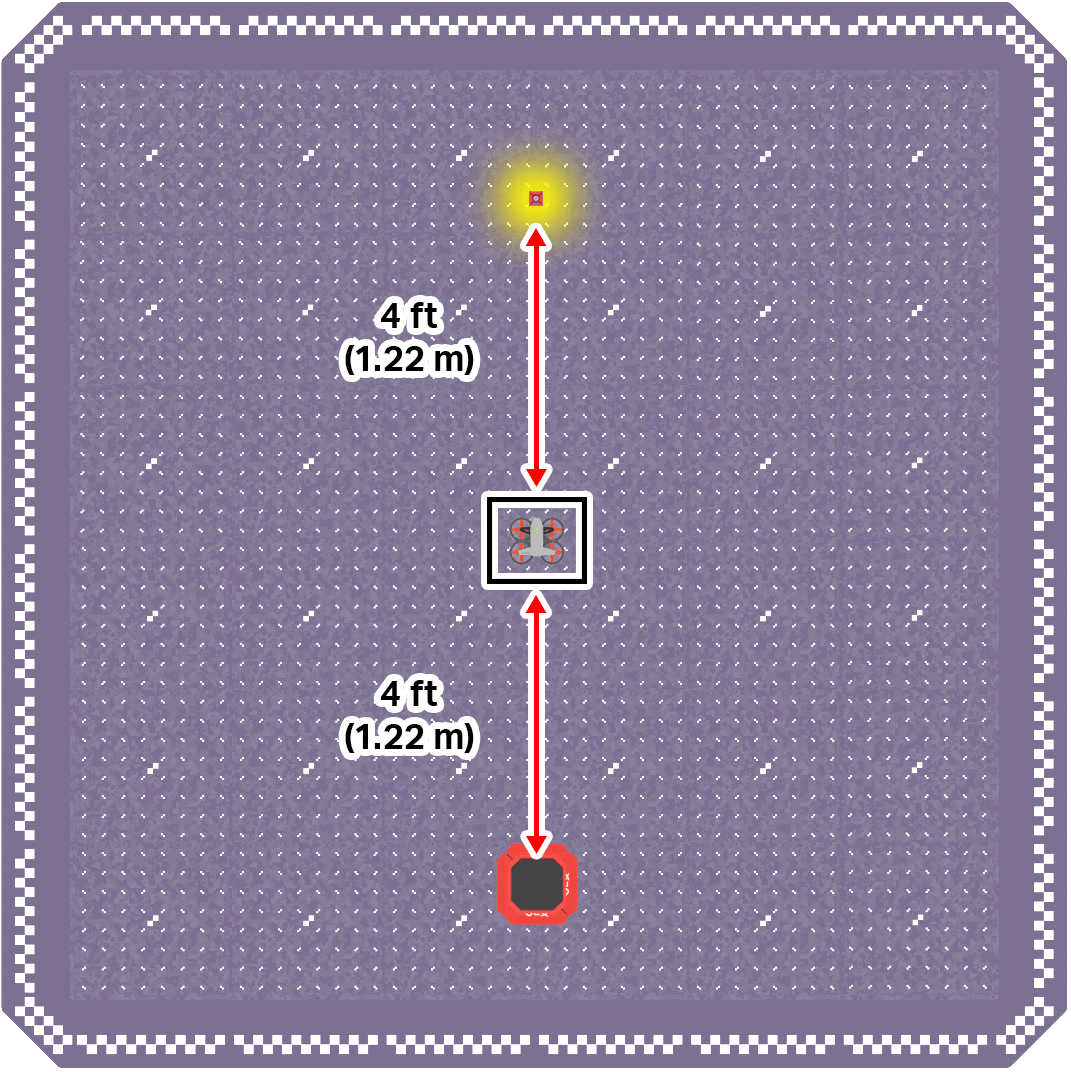
- Use the image below for reference as you set up your indoor flight area.
- Ensure all flight team members are clear on their roles, then use the Pre-Flight Checklist in the Mission Log (Google Doc / .docx / .pdf) to ensure you, your indoor flight environment, and the drone itself are ready and safe for flight.
- Be sure the Magnet Module is attached to the drone.
- See this article for pre-flight safety reminders and guidance on getting your drone ready for flight.
- Try to pick up the cargo using the Magnet Module, deliver it to the drop-off zone, and land. Record each flight in the Mission Log.
Pro Tip: During flight, try using the reticle and different camera views to help you align the drone when picking up and transporting cargo.
This mission will take practice! Repeat it several times to get a feel for how to best pick up and deliver cargo with the drone.
Check Your Understanding
Before moving on, ensure that you understand the concepts in this lesson by answering the questions here (Google Doc / .docx / .pdf).
Select Next > to move on to the next lesson.