Before You Begin
Before You Begin
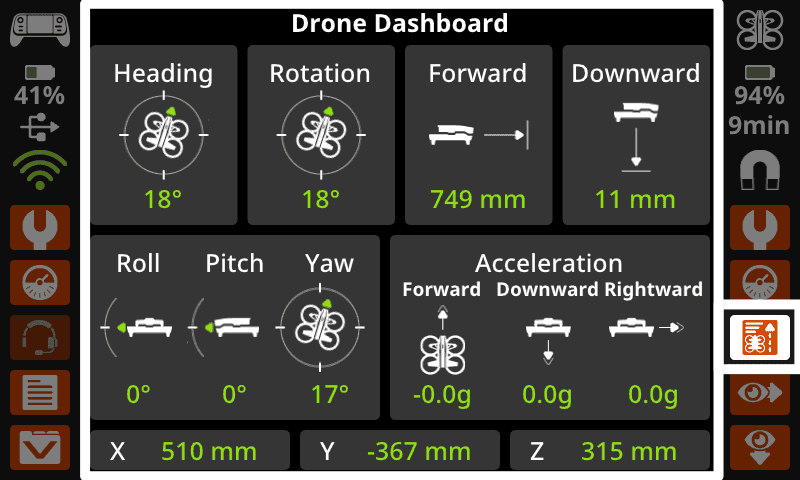
In this unit, students will build on their foundational flight skills by focusing on yaw control, or rotating the front of the VEX AIR Drone to the right and left. While previous units emphasized movement along the x-, y-, and z-axes, this unit introduces the concept of heading and how direction is measured during flight. Students will learn how the drone’s heading is displayed on the VEX AIR Drone Controller’s Drone Dashboard and how to interpret that data to understand which direction the drone is facing. They will also apply what they have learned about navigating with the drone using data to complete a mini-challenge.
Learning Objectives:
This unit is designed to introduce students to heading data in the Drone Dashboard, and provide them with an opportunity to apply their skills to complete a mini-challenge in which they use data and camera views to help them navigate. By the end of the unit, students will be able to:
- Identify how yaw (turning) affects the drone’s orientation during physical flight.
- Describe what heading is and explain why heading data is important for drone navigation.
- Use data on the controller’s screen to determine the drone’s heading.
- Demonstrate how to rotate the drone to face a specific direction using yaw controls.
- Identify how to access different camera views on the controller.
- Demonstrate how the front and down cameras are useful for navigation with the drone.
Environment Setup and Materials
Ensure that your flight area is marked and labeled, and students know the safety procedures for your space. Use the following articles to help you as you set up your space and ready your students for flight.
- Setting Up your Classroom for Safe Flight with VEX AIR — This article gives recommendations for creating a safe flight area in your space, and environment considerations to support safe flight sessions.
- Classroom Management for Teaching with the VEX AIR Drone — This article provides roles and responsibilities for before, during, and after flight.
Students will need access to the contents of their VEX AIR Kit for this unit, including charged batteries. For more information about charging batteries, see this article.
Standards Alignment
Common Core English Language Arts (CCSS ELA)
- CCSS.ELA-LITERACY.CCRA.L.6 - Acquire and use accurately a range of general academic and domain-specific words and phrases sufficient for reading, writing, speaking, and listening at the college and career readiness level; demonstrate independence in gathering vocabulary knowledge when encountering an unknown term important to comprehension or expression.
- CCSS.ELA-LITERACY.RST.9-10/11-12.3 - Follow precisely a complex multistep procedure when carrying out experiments, taking measurements, or performing technical tasks, attending to special cases or exceptions defined in the text.
- CCSS.ELA-LITERACY.RST.9-10/11-12.4 - Determine the meaning of symbols, key terms, and other domain-specific words and phrases as they are used in a specific scientific or technical context relevant to grade level topics.
Common Core Mathematics (CCSS MATH)
- CCSS.Math.Practice.MP2 – Reason abstractly and quantitatively.
- CCSS.Math.Practice.MP4 – Model with mathematics.
International Society for Technology in Education (ISTE)
- Empowered Learner – 1.1.c – Students use technology to seek feedback that informs and improves their practice and to demonstrate their learning in a variety of ways.
- Knowledge Constructor – 1.3.d – Students build knowledge by exploring real-world issues and gain experience in applying their learning in authentic settings.
- Global Collaborator - 1.7.c - Students contribute constructively to project teams, assuming various roles and responsibilities to work effectively toward a common goal.
In the last unit, you learned how to use Drone Dashboard data on the VEX AIR Drone Controller to help you understand where your VEX AIR Drone is located when you throttle up and down, pitch forward and back, and roll side-to-side. In this unit, you will learn about heading data on the Drone Dashboard, and how it corresponds to your drone's position when using yaw control, or rotating the drone right and left. Then you will learn how camera views help you navigate as you fly.
Vocabulary
The key terms below will be useful as you build your flight skills with the drone. The vocabulary list is here to provide you with a reference for terms you may not be familiar with.
- Yaw — The control that changes how fast opposite pairs of propellers spin to rotate a drone left or right while maintaining the same position in the air.
- Heading — The direction the front of the drone is pointing, measured in degrees (0° – 360°).
- Orientation — The overall position of the drone in space, including its heading and whether it is tilted forward and backward, or from side to side.
- Headless Steering — A drone control mode where the drone always moves in the direction you push the joystick, no matter which way the drone itself is facing.
- Standard Steering — A drone control mode where the drone moves based on which direction its nose is facing.
The key terms below will be useful as you build your flight skills with the drone. The vocabulary list is here to provide you with a reference for terms you may not be familiar with.
- Yaw — The control that changes how fast opposite pairs of propellers spin to rotate a drone left or right while maintaining the same position in the air.
- Heading — The direction the front of the drone is pointing, measured in degrees (0° – 360°).
- Orientation — The overall position of the drone in space, including its heading and whether it is tilted forward and backward, or from side to side.
- Headless Steering — A drone control mode where the drone always moves in the direction you push the joystick, no matter which way the drone itself is facing.
- Standard Steering — A drone control mode where the drone moves based on which direction its nose is facing.
Encourage students to consistently use precise spatial language when describing drone movement. Instead of saying “turn it that way” or “move over there,” prompt students to use the vocabulary they are learning in this course as well as the Virtual Flight Course. Using correct vocabulary supports safety and teamwork during flight. When students can accurately describe direction, orientation, and heading, they are better able to follow instructions, make corrections, and explain their decisions. Modeling and reinforcing this language during instruction helps students think and communicate like real pilots.
Select Next > to move on to the next lesson.