Challenge
 Teacher Toolbox
-
Facilitating the Rethink Section
Teacher Toolbox
-
Facilitating the Rethink Section
In this Rethink challenge, groups will compete in a mini-competition! The goal of the mini-competition is to sort as many ‘shipments’ as possible in a 5-minute round. A shipment is a collection of six disks: two red, two green, and two blue.
What the Teacher Will Do:
- As a whole class, introduce the challenge to students. Explain that they will be editing their Workcell build and creating their own VEXcode V5 project to complete in the mini-competition. This is the application of the troubleshooting and improvement strategies they learned in Play.
- Show students the image on this page to ensure that everyone has a shared understanding for the expectation of the challenge.
- Break students into their groups. Ensure they have their assigned Workcell, their device with VEXcode V5, and their engineering notebooks.
- Instruct groups to follow the steps on this page to complete the challenge.
- While groups are completing the challenge, circle the room.
- Ask students about how they are approaching the challenge.
- How are they planning to make hardware changes to their Workcell?
- What blocks will you use in your VEXcode V5 project to ensure that your Workcell can sort disks quickly?
- For groups that are struggling with the movement of the arm to pick up and sort disks, encourage them to look back at the Lab 7 Play section for specific steps on how to find x, y, and z-coordinates and use the electromagnet to pick up disks.
- Ask students about how they are approaching the challenge.
- After groups have completed the mini-competition, bring students back together for a whole-class discussion. Ask students some of these questions to wrap up the mini-competition.
- What hardware changes to your Workcell did you make and why?
- How did you begin designing your VEXcode V5 project? Did you start with an example project or a project from a previous Lab?
- What did your group find difficult about this mini-competition?
- Use the Collaboration and Programming Rubrics (Google / .docx / .pdf) to provide students with feedback and assess their projects throughout the Rethink challenge.
For more information on how to facilitate the Rethink challenge, go to the V5 Workcell Educator Certification.
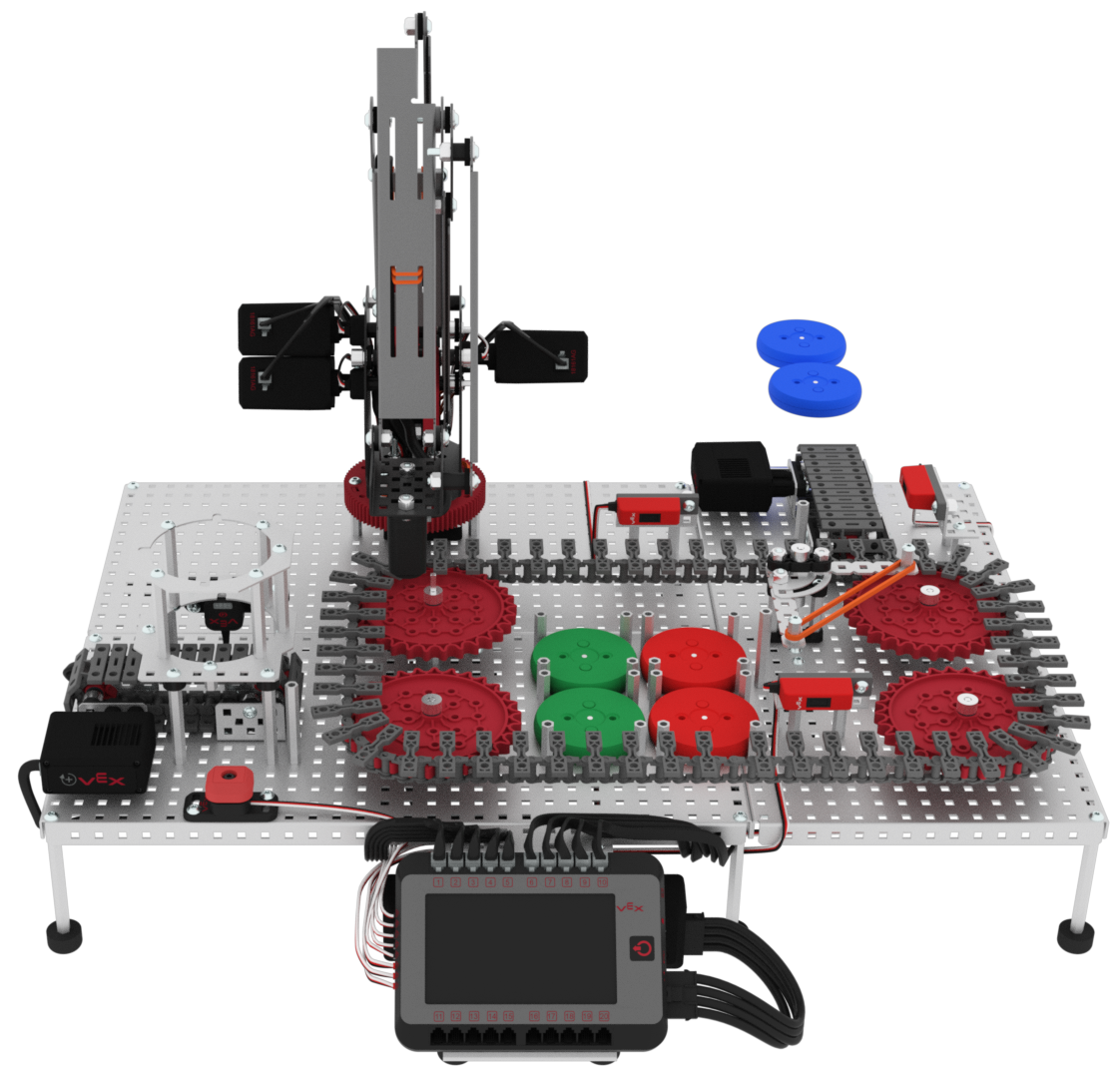
In this challenge, you will compete in a mini-competition! The goal of the competition is to sort as many ‘shipments’ as possible in a 5-minute round. A shipment is a collection of six disks: two red, two green, and two blue.
Follow these steps to complete the challenge:
- Ensure all team members understand the rules and scoring of the competition (Google / .docx / .pdf).
- Create a new project or open an existing project.
- Select ‘File’ then ‘Save As’ to rename the project ‘Lab 12 - Competition.’
- Using the skills developed in previous Labs, edit the project. Your VEXcode V5 project should accomplish the following:
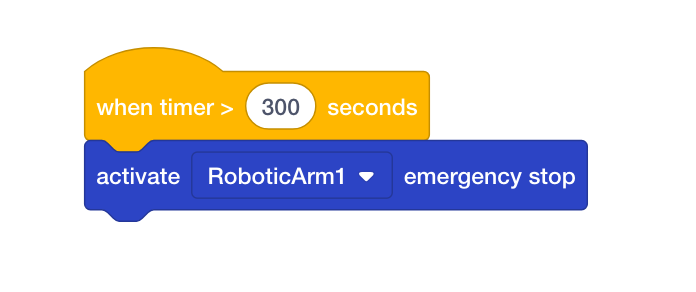
- Use a {When timer} block and set the parameter to 300 seconds. Attach an [Activate emergency stop] block to the {When timer} block. This will stop the Workcell after a 5-minute round.
- Sort as many shipments as possible in 5 minutes.
- A shipment includes:
- Two green disks are to be placed on the left side of the delivery zone.
- Two red disks are to be placed on the right side of the delivery zone.
- Two blue disks are to be diverted off of the Workcell completely via the exit conveyor.
- Use a {When timer} block and set the parameter to 300 seconds. Attach an [Activate emergency stop] block to the {When timer} block. This will stop the Workcell after a 5-minute round.
-
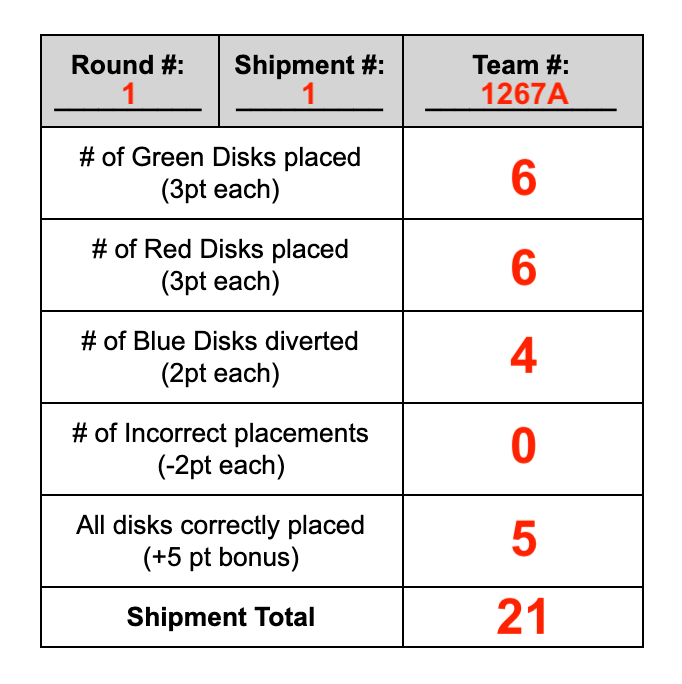
Keep track of your score using the Scoring Sheet (Google / .docx / .pdf).
 Teacher Tips
- The Rules Sheet as well as the Scoring Sheet are Google Docs. A copy of them can be made in order to edit them to best fit the needs of your classroom. This can be printed or distributed electronically via Google Classroom or other CMS.
- Ensure the students change the [Set tool] block to ‘electromagnet.’ If this is missed, the arm on the Workcell may not move as intended.

- Remind students that the z-coordinate value should raise the arm up enough to not collide with any standoffs, especially when transporting a disk.
- Encourage students to use [Comment] blocks while planning and creating and outlining their projects.
Teacher Toolbox
Solutions may vary. The following is an example of a partially filled out Scoring Sheet.