Now that you have created your first robot-to-robot messaging projects, it is time to try sending multiple messages! In this lesson, you will learn how to create projects to send more than one message from one robot to another.
Watch the video below to learn about:
- Creating projects for robots to send and receive more than one message.
- How the concept of “first in, first out" (FIFO) determines the order in which messages are received and acted upon.
- Using a repeat loop and conditional statements to check for multiple messages.
Now that you have watched the video, capture your thoughts in your journal. Answer these questions to guide your thinking and help you get ready for a whole-class discussion:
- How does sending multiple messages make it possible to code the robot to perform complex actions?
- What did you see in the video that justifies your claims?
- What is similar or different about the projects in this video compared to those in the previous lesson?
- What should you consider when planning projects like the ones shown in the video, and why?
- What questions do you have about creating projects that include multiple messages?
Now that you have watched the video, capture your thoughts in your journal. Answer these questions to guide your thinking and help you get ready for a whole-class discussion:
- How does sending multiple messages make it possible to code the robot to perform complex actions?
- What did you see in the video that justifies your claims?
- What is similar or different about the projects in this video compared to those in the previous lesson?
- What should you consider when planning projects like the ones shown in the video, and why?
- What questions do you have about creating projects that include multiple messages?
After students watch the video and before practicing, come together for a whole-class discussion. Use student answers to the questions provided as the basis for discussion.
Note student responses on the board, so they can revisit them as needed. Encourage students to refer to their notes in their journals to support their assertions.
Guided Practice
Now that you have watched and discussed the video, it is your turn to practice. You will collaborate to code projects for robots to send and receive multiple messages.
Step 1: Set up the field as shown below.
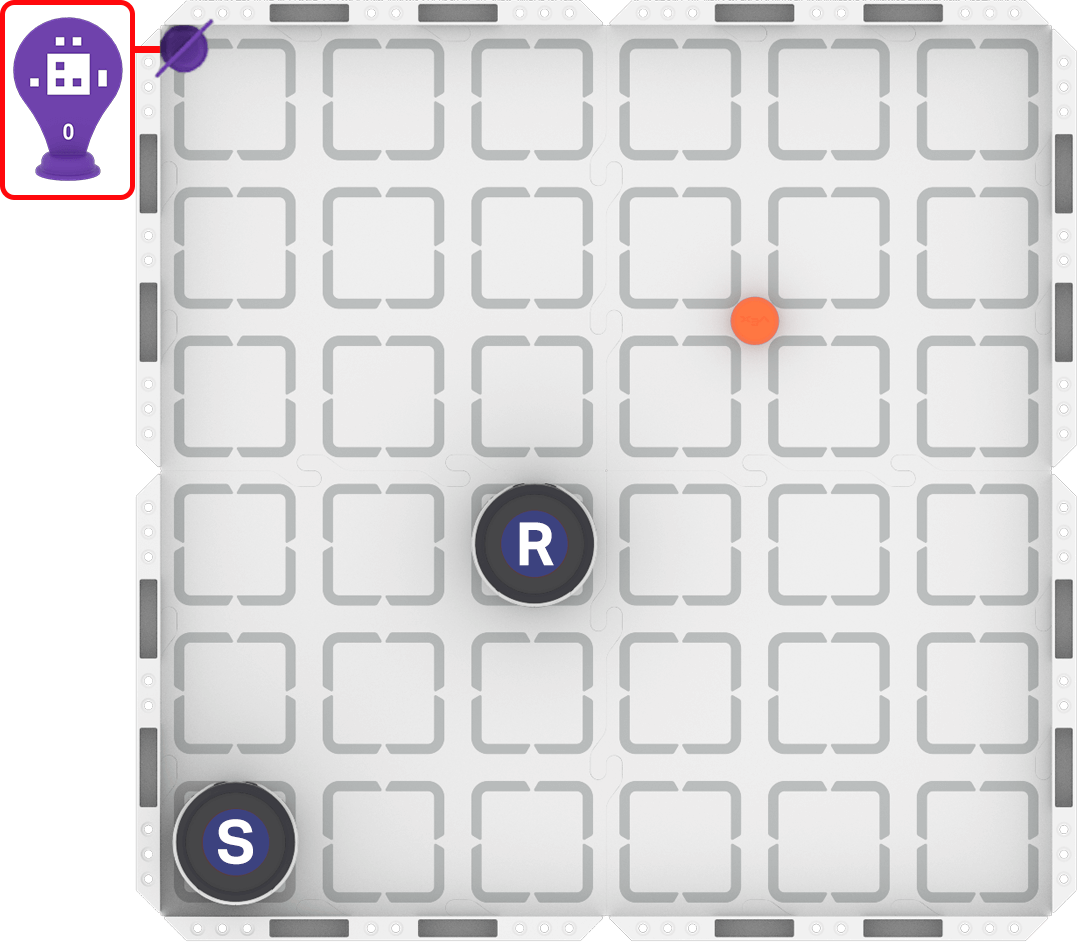
Step 2: Create projects where one robot sends messages directing another robot to pick up three different objects and deliver each to AprilTag ID 0. Collaborate to plan and code both robots to complete the task.
- Use this task card (Google / .docx / .pdf) to guide your practice.
- Replace the object on the field with a different piece of cargo, once the object has been delivered.
Resources for Practice:
The resources linked here are available if you need additional support while completing the activity.
Now that you have watched and discussed the video, it is your turn to practice. You will collaborate to code projects for robots to send and receive multiple messages.
Step 1: Set up the field as shown below.

Step 2: Create projects where one robot sends messages directing another robot to pick up three different objects and deliver each to AprilTag ID 0. Collaborate to plan and code both robots to complete the task.
- Use this task card (Google / .docx / .pdf) to guide your practice.
- Replace the object on the field with a different piece of cargo, once the object has been delivered.
Resources for Practice:
The resources linked here are available if you need additional support while completing the activity.
Distribute the Step 2 task card (Google / .docx / .pdf). As students collaborate to plan and code their projects, circulate through the room and ask questions such as:
- On Coding:
- How are you ensuring that Robot R receives all the messages Robot S has sent?
- How do you know in what order Robot R will receive Robot S's messages?
- If you wanted to change the order of the objects Robot R is picking up and delivering, what would you need to do?
- Could you change the message that Robot S sends, and still get the same behaviors from Robot R?
- Could you keep the message that Robot S sends the same, but get different behaviors from Robot R?
- On Collaboration:
- What kinds of things can you do to make sure you are communicating your ideas clearly between both groups?
- How are you ensuring everyone is participating?
If students are having difficulty creating projects for Robot R to pick up and deliver all three objects, encourage them to rewatch the video at the top of the page to reinforce their learning.
Wrap-Up
Now that you have completed the activity, it is time to share what you learned about coding projects for robots to send and receive multiple messages. Answer the following questions in your journal to help you reflect on your learning and prepare for a whole-class discussion:
- How did you decide what messages to send from Robot S to Robot R?
- How did you decide on the order of the messages being sent from Robot S to Robot R?
- How is Robot R able to act on each of the messages sent from Robot S?
- What challenges did you face when building your projects? How did you work together to overcome them?
- What advice would you give to someone learning how to create projects to send multiple messages from one robot to another?
Now that you have completed the activity, it is time to share what you learned about coding projects for robots to send and receive multiple messages. Answer the following questions in your journal to help you reflect on your learning and prepare for a whole-class discussion:
- How did you decide what messages to send from Robot S to Robot R?
- How did you decide on the order of the messages being sent from Robot S to Robot R?
- How is Robot R able to act on each of the messages sent from Robot S?
- What challenges did you face when building your projects? How did you work together to overcome them?
- What advice would you give to someone learning how to create projects to send multiple messages from one robot to another?
Guide students to share their learning in a whole-class discussion. Help students reflect on their learning through practice to converge on shared understandings or learning targets.
Use the questions students answered in their journals as the starting point for the discussion. Ask follow-up questions to guide student understanding:
- On sending and receiving multiple messages:
- What behaviors did each message trigger in the receiving robot?
- How did you ensure the receiving robot responded the way you intended?
- Did any of the messages not work as expected? How did you figure out why?
- Can you think of other projects where having robots communicate to send multiple messages could be useful?
- On collaboration:
- How did you work together to decide what messages needed to be sent, and in what order?
- Did your group have any disagreements when planning or coding? How did you resolve them?
Select Next > to move on to the next lesson.