
In this lesson, you will learn how to use the Motorized Hook Module on the VEX AIR Drone to pick up objects in the VEX AIR Flight Simulator. You will practice lowering and raising the motorized hook to grab an orbit ball and lift it safely off the ground. Using the motorized hook requires careful alignment and steady control.
You will also begin to notice how carrying an object below the drone affects flight. By the end of this lesson, you will be able to align the drone and transport an orbit ball using the VEX AIR Drone Controller.
Watch the video to learn more about:
- How the Motorized Hook Module works.
- Lowering and raising the motorized hook using the controller.
- Aligning the drone to pick up an orbit ball.
Hover & Discover
When a drone flies through the air, it experiences drag, which is a force that pushes against moving objects. Drag increases when a drone carries a suspended payload, like an orbit ball hanging below the drone. The payload adds extra surface area, giving the air more to push against.
Because of this added drag, drones carrying suspended objects respond more slowly to control inputs. Pilots must make smoother, smaller movements to stay stable. Flying too quickly can cause the payload to swing, making the drone harder to control.
Mission: Orbit Ball Drop
In this mission, you will test out the Motorized Hook Module on the virtual drone for yourself! In the Competition layout, you will fly to pick up an orbit ball, move to deliver the orbit ball into the Drop Zone, then land on a platform.
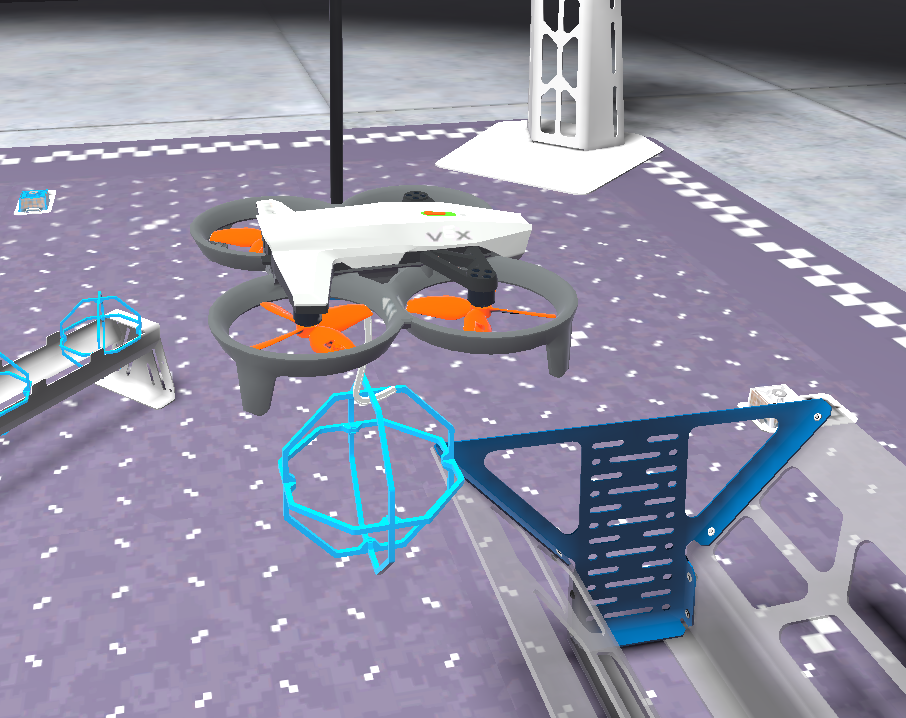
Follow these steps to complete your mission:
- Connect your controller to VEXcode AIR and select the Simulator tab.
- Change to the Competition layout and select the Motorized module. Refer to this article about using the VEX AIR Flight Simulator for more detailed instructions.
- Fly the drone to pick up an orbit ball, fly above the Drop Zone, drop the orbit ball into the Drop Zone, and land on a platform.
- Use the Mission Log to record your flights (Google Doc / .docx / .pdf). Be sure to record any strategies or tips that helped you be successful picking up and moving an orbit ball with the motorized hook.
Pro Tips:
- Experiment with which camera view gives you the best perspective as you align the drone with the orbit ball to pick it up.
- Practice the multi-axis movements that enable you to fly forward and upwards at the same time, to create a “scooping” motion. This will help you to hook and lift the orbit ball smoothly from the field.
Once you have practiced the mission and logged your practice flights in your Mission Log, complete the Orbit Ball Drop Challenge mission in Flight School.
- Read the VEX Library article Using Flight School in the VEX AIR Flight Simulator for instructions on how to access and use Flight School.
- Find badge criteria for the mission in the Mission Log.
- When you have completed your Flight School mission, add your name to your badge.
- Save your badge, and share it with your instructor as directed.
Check Your Understanding
Before moving on, ensure that you understand the concepts in this lesson by answering the questions here (Google Doc / .docx / .pdf).
Select Next > to move to the mini-challenge.