
Get Ready to Drive
In this Unit, students will drive their robots using the Drive Tab in VEXcode GO. To get ready to drive, students must first connect the Brain to VEXcode GO. Then, they can use the Drive Tab to set their preferred drive mode, and configure motor controls to operate the arm attachment. Use the following Tutorial Videos to help students get ready to drive and collect objects in the next Lesson.
To access tutorials, select the 'Tutorials' icon in the VEXcode GO Toolbar, as shown here.

Connecting To Your Robot
View the 'Connecting To Your Robot' Tutorial video and follow the steps to connect the Brain to VEXcode GO.
Be sure the Battery and Brain are connected, and the Brain is powered on.
Remote Control Driving
With the robot connected, students can use the Drive Tab in VEXcode GO to remote control drive their robot.
View the 'Remote Control' Tutorial Video and follow the steps to begin driving.
Note: Select the 'Motor' option in Port 3 in order to remotely control the arm in the Drive Tab. 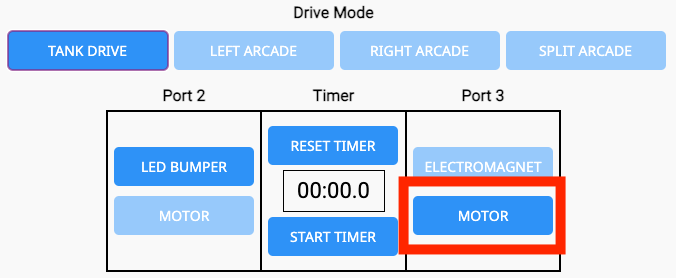

What is Next?
In this Lesson you built the Hero Robot and got ready to drive your robot on the Field.
In the next Lesson you will:
- Learn about how to collect samples and rescue a rover caught in the sand
- Practice driving your Hero Robot to move objects out of craters
- Compete in the Crater Collection Challenge!
Select < Return to Lessons to go back to the Lesson Overview.
Select Next Lesson > to continue to Lesson 2, to learn about how to collect objects from the craters in Stage 1 of the Mars Math Expedition!