
Challenge
Previously in this Lab you have explored joint and linear movement. In this challenge, you will continue to compare the two types of movement by calculating and drawing more points on the whiteboard using the VEX V5 Workcell.
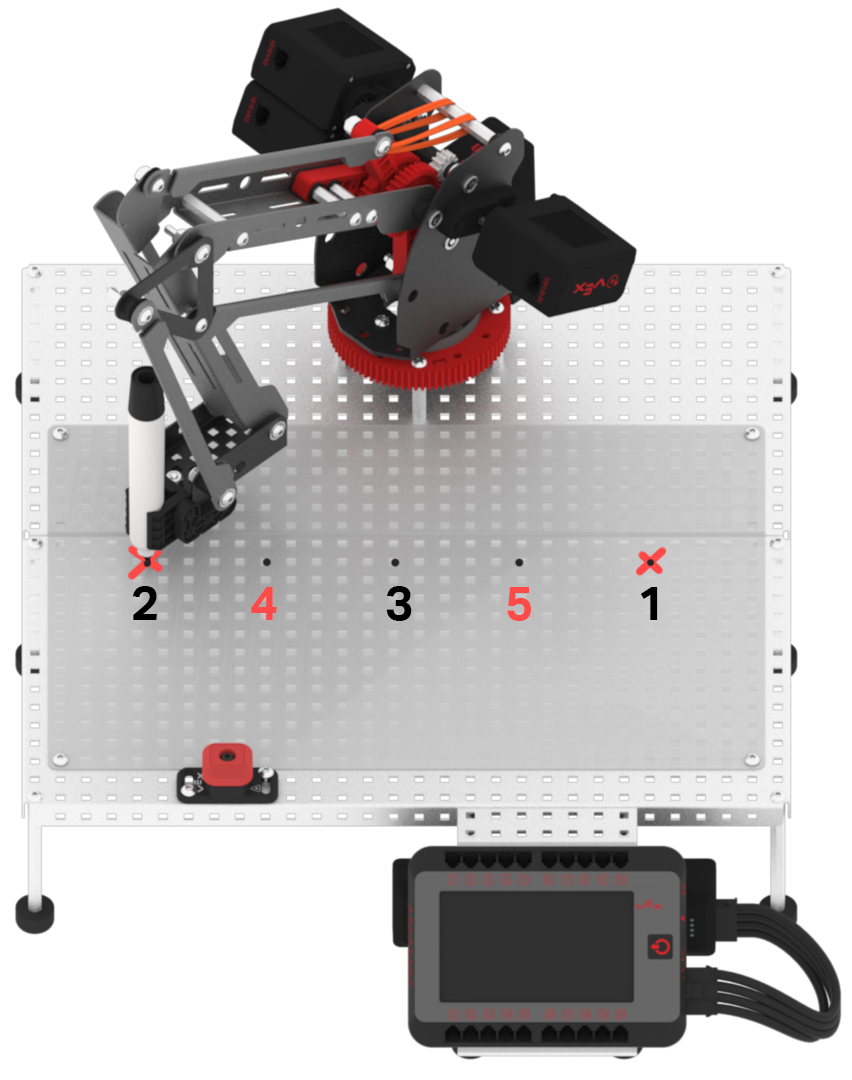
Follow these steps to complete the challenge:
- Use the Midpoint formula to calculate two more points, Point 4 and Point 5. Record all (x, y, z) values in your Engineering Notebook.
- Use the (x, y, z) values for Point 1, 2 and 3 from the Play section.
- Point 4 is calculated as the Midpoint of Point 2 and Point 3.
- Point 5 is calculated as the Midpoint of Point 1 and Point 3.
- Calculate and record the locations above Point 4 and Point 5.
- Create a project in VEXcode V5 to move the arm mounted on the V5 Workcell to all five points using linear motion.
- Note that this is the same as the Play activity, just adding two more points.
- The project must lift the arm mounted on the V5 Workcell up after each point is drawn. The dry-erase marker should not connect any of the points.
- Ensure that your project has the arm mounted on the V5 Workcell drawing the points in the correct order. The arm mounted on the V5 Workcell should draw Point 1, Point 5, Point 3, Point 4, then Point 2.
- For the safety of users and the V5 Workcell, the dry-erase marker must remain over the whiteboard at all times.
- Run the project on the V5 Workcell.
- Once the project is complete, change the color of the dry-erase marker in the attachment.
- Do not erase the whiteboard. This will be used to compare the two types of motion.
- Now, move the stack of blocks used for linear movement, and create a stack of blocks attached to the {When started} block to connect Point 1 and Point 2 using joint motion.
- Run the project to view the arm mounted on the V5 Workcell connect Point 1 and Point 2 using joint motion.
- Erase the whiteboard.
- Combine the linear movement and joint movement stacks together to create one fluid project with both movements. This will be used to compare the two types of motion.
- Run the combined project to view the arm mounted on the V5 Workcell’s linear and joint movements.