
Challenge
Previously in this Lab, you have created a 2D List with variables and blocks from the ‘Arm’ category to move the arm mounted on the VEX V5 Workcell to different points. In this challenge, you will use those same skills to instruct the arm mounted on the V5 Workcell to draw ‘VEX’ on the whiteboard.
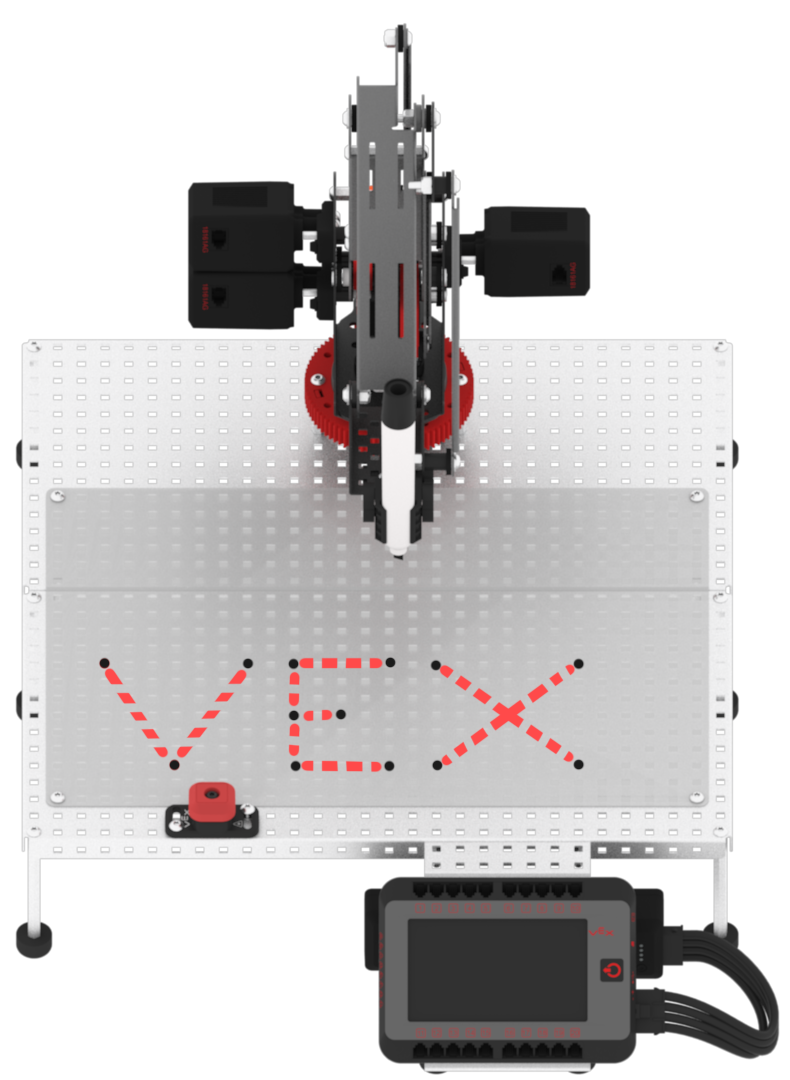
Follow these steps to complete the challenge:
- Draw the outline for the word ‘VEX’ from the points in the above image onto your whiteboard using one color of dry-erase marker.
- Be sure to provide space between each letter. No letters should share the same coordinate point.
- Draw the same outline of points in your Engineering Notebook.
- In your Engineering Notebook, label each coordinate point needed for the project to determine the height of your 2D List in VEXcode V5.
- Using the ‘Arm Display Position’ example project in VEXcode V5, record the coordinates of all coordinate points in your Engineering Notebook.
- Build a project in VEXcode V5 to instruct the arm mounted on the V5 Workcell to draw ‘VEX’ on the whiteboard.
- Using another color of dry-erase marker, run the project.