
Now that you have practiced using pitch to move the VEX AIR Drone forward and backward, you are ready to learn a new type of movement - yaw. In this lesson, you will explore how yaw allows the drone to rotate left and right around the z-axis, changing the direction the drone is facing. You will learn how to control yaw with the VEX AIR Drone Controller, and practice flying in different directions in the VEX AIR Flight Simulator.
Watch this video to learn about:
- How to use the left joystick to yaw (turn) left and right.
- How yaw changes the drone’s orientation in flight.
- How to combine yaw and pitch to fly in different directions.
Hover & Discover
Yaw is the control that rotates the drone left or right without changing its height. A drone yaws when one pair of propellers spins faster while the opposite pair spins slower. This difference in speed causes the drone to rotate in place around the z-axis.
When the propellers on one diagonal pair spin faster, the increased force causes the drone to turn in that direction. The other diagonal pair continues spinning but at a slower rate. Because these propellers work together, the drone can rotate smoothly without moving up or down. The highlights in the image below indicate which propellers spin faster to turn the drone to the left or right.

Mission: Yaw Flight
In this mission, you will use yaw and pitch together to fly in a V-shaped path through two yellow rings on the field. Follow these steps to complete your mission:
- Connect your controller to VEXcode AIR and select the Simulator tab. Refer to this article for help using the VEX AIR Flight Simulator.
Fly the drone in a V-shape through the two yellow rings, as shown in the screen recording below. Your drone should:
- Take off and yaw (turn) to the left.
- Fly through the first yellow ring.
- Return to the takeoff location.
- Then yaw (turn) right to fly through the second yellow ring.
- Finish the mission by landing on the platform.
- Use this Mission Log to document your flight (Google doc / .docx / .pdf). Record each attempt, including collisions, successful moments, and observations that helped you improve.
Try out different camera views during the mission, depending on what you are trying to do. The example shown above uses the Split Screen with Pilot View and Front Camera to start, then switches to the Split Screen with the Down Camera to line up for landing.
- The Front Camera helps you align the drone’s nose with the center of a ring.
- The Down Camera is useful for landing accurately on the platform.
Practice this mission multiple times! Combining two controls (yaw and pitch) can feel challenging at first. With practice, you will improve your ability to adjust the drone’s direction smoothly and fly accurately through the rings.
- Once you have practiced this mission and logged your practice flights in your Mission Log, complete the Yaw Flight mission in Flight School.
- Review the VEX Library article Using Flight School in the VEX AIR Flight Simulator for instructions on how to access and use Flight School.
- Find badge criteria for the mission in the Mission Log.
- When you have completed your Flight School mission, add your name to your badge.
- Save your badge, and share it with your instructor as directed.
Understanding Your Drone
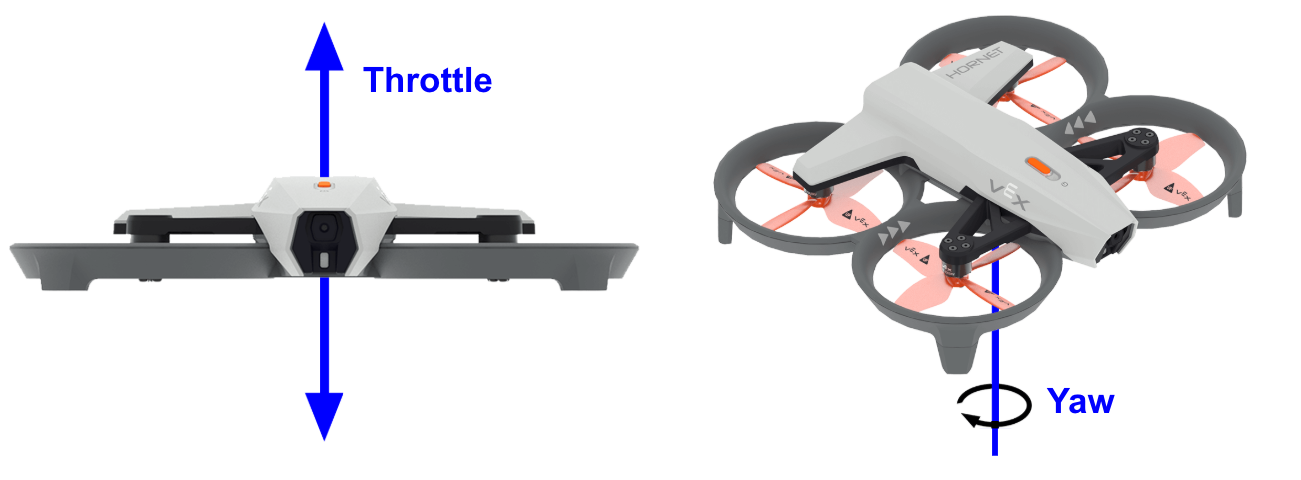
Both yaw and throttle relate to the drone’s movement with the z-axis, but they affect the drone in different ways.
- Throttle moves the drone up and down along the z-axis, changing its height while keeping the nose pointed in the same direction.
- Yaw rotates the drone around the z-axis, changing the direction the nose is pointing while maintaining its current height.
Check Your Understanding
Before moving on, ensure that you understand the concepts in this lesson by answering the questions here (Google Doc / .docx / .pdf).
Select Next > to move on to the next lesson.