
Spin the Exit Conveyor
Now that the red disk has been diverted from the Transport Conveyor onto the Exit Conveyor, the Exit Conveyor needs to spin in reverse in order to move the red disk off of the Exit Conveyor.
- Add a [Spin] block to the ‘Exit red disk’ [Comment] block and set the motor to ‘ExitMotor.’ The direction of the Exit Motor should be set to ‘reverse.’
![Add a [Spin] block to the ‘Exit red disk’ [Comment] block.](/stemlabs/sites/default/files/inline-images/exit-block-to-red.png)
The Exit Conveyor should spin in reverse until the Exit Sensor detects a light value greater than the higher threshold value. Then, once the red disk is in front of the Exit Sensor, all conveyor motors should stop.
- Repeat steps 34-36 to add a [Wait until] block to the [Spin] block.
![Add a [Wait until] block to the [Spin] block.](/stemlabs/sites/default/files/inline-images/add-second-wait-red.png)
- Set the Sensor of the (Reflectivity of) block to ‘Exit’ and the second parameter of the <Greater than> block to the higher threshold value for the Exit Sensor.
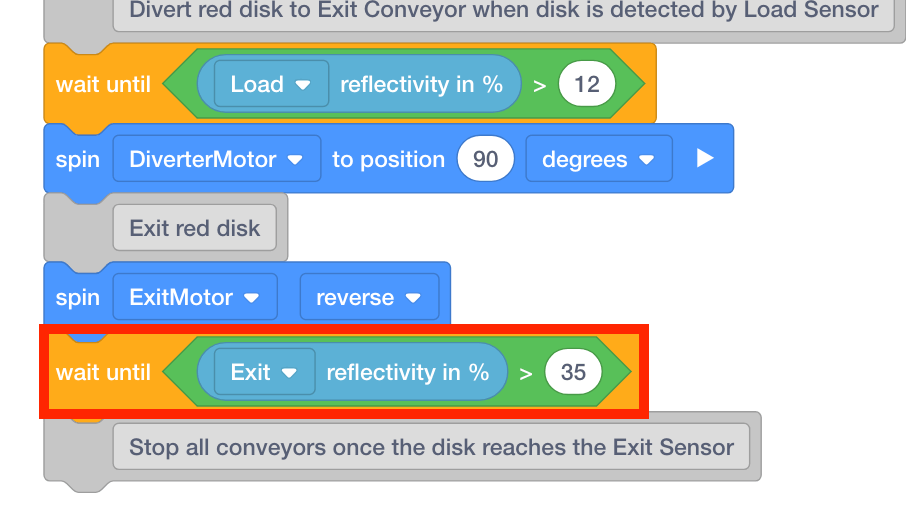
Once the Exit Sensor detects the red disk, all conveyors should stop.
-
Add two [Stop] blocks to the ‘Stop all conveyors once the disk reaches the Exit Sensor’ [Comment] block. Set the motors to the ‘TransportMotor’ and the ‘ExitMotor.’
![Add two [Stop] blocks.](/stemlabs/sites/default/files/inline-images/add-stop-blocks-red.png)