It’s time to code your robot with blocks! In this lesson, you'll explore coding your VEX AIM Coding Robot for the first time using VEXcode AIM. You'll learn how to code the robot to move straight ahead, precisely passing between two barrels on the field. Discover how your code directly controls the robot's movement!
Watch the video below to learn about:
- Using the Move for block in a project
- Changing the distance parameter in a project
- Downloading, running, and starting a VEXcode AIM project
Now that you have watched the video, capture your thoughts in your journal. Answer these questions to guide your thinking and help you prepare for a whole-class discussion:
- What do you notice about moving the robot with blocks compared to driving or Button Coding? Write at least three observations.
- What did you see in the video to support your ideas?
- List at least two questions you have about using VEXcode to move the robot to a location.
- What is a skill you have that you think will help you be successful with coding in VEXcode?
Now that you have watched the video, capture your thoughts in your journal. Answer these questions to guide your thinking and help you prepare for a whole-class discussion:
- What do you notice about moving the robot with blocks compared to driving or Button Coding? Write at least three observations.
- What did you see in the video to support your ideas?
- List at least two questions you have about using VEXcode to move the robot to a location.
- What is a skill you have that you think will help you be successful with coding in VEXcode?
After students watch the video and before practicing, come together for a whole-class discussion using the video content and the answers to students' questions. Guide students to share their ideas about the similarities and differences between driving the robot, coding the robot using Button Coding, and coding the robot using VEXcode AIM. Encourage students to support their assertions with evidence.
Note students' ideas on the board, as you will come back to them in the Wrap-Up section of the lesson.
Students may have questions or observations relating to coding with blocks. Watch this video from the VEX Robotics Educators Conference to learn more about the case for block-based programming from Dr. David Weintrop.
Guided Practice
Now that you have learned about and discussed coding the robot, it is your turn to practice!
Step 1: Set up the field as shown below.
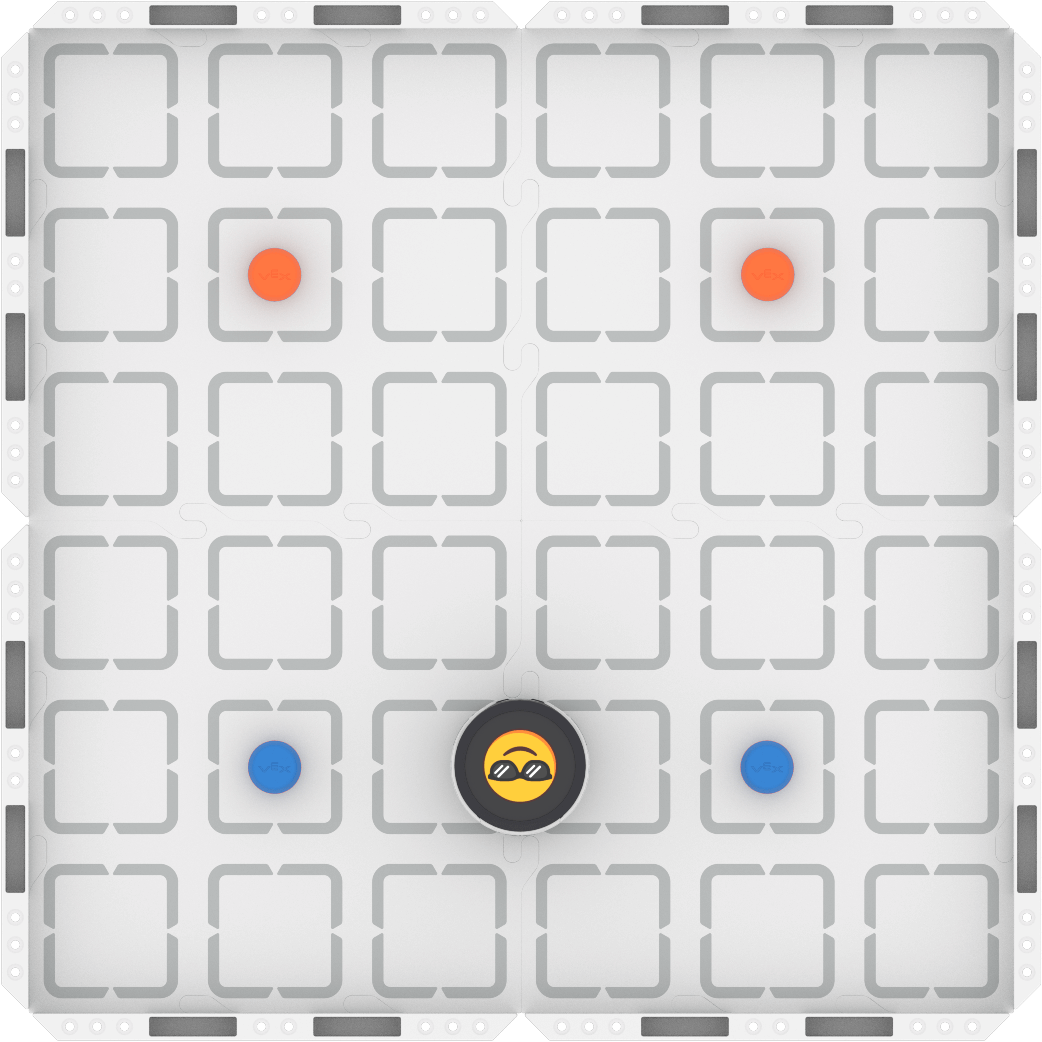
Step 2: Model the movements of the robot needed to complete the task using Drive mode.
- Your task is to drive the robot from the blue barrels to the orange barrels passing between each set. Document your planned path from driving, then, make a plan for how to code that movement.
- Use this task card (Google / .docx / .pdf) to guide your practice.
- Pro Tip: Make sure that each member of the group has a turn to both drive and record, so that you can have meaningful collaborative discussions as you create a shared plan.
Step 3: Code the robot to complete the task.
- Your task is to use your planned path from Step 2 to code the robot in VEXcode AIM to move from the blue barrels to the orange barrels, passing between each set.
- Use this task card (Google / .docx / .pdf) to guide your practice.
- Pro Tip: Move back to Step 2 and do additional practice driving if you get stuck while coding the robot. Driving can help you to solve problems like determining the distance to move between the barrels.
Step 4: Explore! Move between driving and coding to iterate on your project and improve your solution.
- Together with your group, brainstorm ways to make your project better.
- Drive the robot to test out your ideas, and choose one to start with.
- Iterate on your project to make it match the new driven behaviors.
- Continue to move between driving and coding to iterate on your project and find the best strategy to complete the task!
Resources for Practice:
The articles linked here are available if you need additional support while completing the activity.
Now that you have learned about and discussed coding the robot, it is your turn to practice!
Step 1: Set up the field as shown below.

Step 2: Model the movements of the robot needed to complete the task using Drive mode.
- Your task is to drive the robot from the blue barrels to the orange barrels passing between each set. Document your planned path from driving, then, make a plan for how to code that movement.
- Use this task card (Google / .docx / .pdf) to guide your practice.
- Pro Tip: Make sure that each member of the group has a turn to both drive and record, so that you can have meaningful collaborative discussions as you create a shared plan.
Step 3: Code the robot to complete the task.
- Your task is to use your planned path from Step 2 to code the robot in VEXcode AIM to move from the blue barrels to the orange barrels, passing between each set.
- Use this task card (Google / .docx / .pdf) to guide your practice.
- Pro Tip: Move back to Step 2 and do additional practice driving if you get stuck while coding the robot. Driving can help you to solve problems like determining the distance to move between the barrels.
Step 4: Explore! Move between driving and coding to iterate on your project and improve your solution.
- Together with your group, brainstorm ways to make your project better.
- Drive the robot to test out your ideas, and choose one to start with.
- Iterate on your project to make it match the new driven behaviors.
- Continue to move between driving and coding to iterate on your project and find the best strategy to complete the task!
Resources for Practice:
The articles linked here are available if you need additional support while completing the activity.
Foreground the group work expectations at the start. Ask questions like:
- How is your group going to get started?
- How can you take turns while driving your robot? Coding your robot?
- What is something you can do to be helpful if it is not your turn to drive or code?
In the following lessons, students use two task cards during guided practice to integrate driving and coding. Driving helps students build a mental model of the robot's physical movements. They then translate this understanding into a computational model through coding. By moving between these modes, students continuously refine their solutions, deepening their conceptual understanding. To learn more about computational thinking in education, read this VEX PD+ Insights Article.
For guidance on facilitating transitions between driving and coding, see this VEX Library article: Facilitating the Cycle of Driving and Coding.
Distribute the Step 2 task card to each student (Google / .docx / .pdf). As students are completing this task card, circulate around the room and engage students in discussions to learn about their progress and understandings. Ask questions like:
- How do you know when to start or stop the movement of the robot while you're driving?
- What details about your driving are you documenting to create your planned path? Why? What else might be important?
- How are you collaborating to create a plan? How is each group member involved?
After students complete their physical models, they will check in to share their progress with you. Once students have demonstrated that they have met all success criteria, distribute the Step 3 task card (Google / .docx / .pdf). Students will then begin to apply their learning from the Drive mode practice to coding in VEXcode. Because this is their first exploration in VEXcode AIM, be prepared to guide students through classroom procedures including:
- Where they should save projects on their device
- What format their project names should have (i.e. Last Name Unit # Lesson #)
As students are coding the robot, circulate around the room and engage students in discussions to learn about their coding progress and understandings. Ask questions like:
- What do you notice about the movement of the robot when you code it versus when you drove? How does the robot start or stop moving?
- What questions do you have about using VEXcode AIM? Are there procedures you think would be helpful to note in your journal?
- How did you figure out the parameters you needed in your project?
Step 4 is designed to promote student iteration and exploration by freely moving between driving and coding to improve their projects and find the best strategy for the task. Students are not “done” once they have coded the robot once, but can always find ways to improve their project or strategy. As students explore, ask questions like:
- Did your ideas work as intended when you drove them? Why or why not?
- How did your group choose what to change together?
- How does coding help your driving? How does driving help your coding?
Wrap-Up
Now that you have practiced, it is time to share what you learned. Answer the following questions in your journal to help you reflect on your learning and prepare for a whole-class discussion:
- What was your strategy for completing practice? How does that strategy relate to your planned path? Why do you think it was successful? Be specific in your answers.
- How did you use both Drive mode and VEXcode to complete the task? How did your group collaborate on driving, coding, and iterating on your project?
- Now that you have created your first VEXcode project, what did you notice about coding with VEXcode that is different than Button Coding? What did you notice that is similar to Button Coding?
- What is something you learned through practice that built onto what you saw in the video?
Now that you have practiced, it is time to share what you learned. Answer the following questions in your journal to help you reflect on your learning and prepare for a whole-class discussion:
- What was your strategy for completing practice? How does that strategy relate to your planned path? Why do you think it was successful? Be specific in your answers.
- How did you use both Drive mode and VEXcode to complete the task? How did your group collaborate on driving, coding, and iterating on your project?
- Now that you have created your first VEXcode project, what did you notice about coding with VEXcode that is different than Button Coding? What did you notice that is similar to Button Coding?
- What is something you learned through practice that built onto what you saw in the video?
Guide students to share their learning in a whole-class discussion. Help students reflect on their learning through practice to converge on shared understanding or learning targets.
Use the questions students answered in their journals as the starting point for the discussion. As you listen to students' contributions, ask follow up questions to guide their understanding:
- For strategy sharing:
- Did another group approach practice similarly or differently? Do you think your strategy was better or worse? Why? What evidence do you have to support that assertion?
- For coding:
- How did moving between Drive mode and VEXcode help you complete the challenge? What did you learn about documenting your driving that helped you create a successful coding project?
- Now that you have created your first VEXcode project, how would you add to or change what we noted about the differences between driving with the controller, Button Coding and coding with VEXcode AIM?
- What did you learn about using VEXcode with your robot that will help you moving forward? What ideas do we have in common about using VEXcode?
Create a table comparing driving, Button Coding and Coding in VEXcode AIM using students ideas.
Select Next > to move on to the next lesson.