It’s time to level up your challenge! In this lesson, you'll explore coding your VEX AIM Coding Robot in four directions using VEXcode AIM. You’ll build on what you learned in the previous lessons to code the robot to move left and right. Then you'll create a project to navigate the robot around the obstacles on the field, and back to its starting location!
Watch the video below to learn about:
- Changing the direction parameter to left and right in a Move for block.
- Sequencing multiple blocks based on your plan.
- Basic debugging such as finding and fixing an error in a project.
- Using measurements to determine parameters.
Now that you have watched the video, capture your thoughts in your journal. Answer these questions to guide your thinking and help you prepare for a whole-class discussion:
- What similarities or differences do you notice between using Move for block, Button Coding, and Drive mode to move the robot?
- What did you see in the video to support your ideas?
- What do you notice about the order and parameters of the blocks? Write at least three observations.
- List at least two questions you have about using VEXcode to move around the four barrels.
- What is a skill you have that you think will help you be successful with debugging in VEXcode?
Now that you have watched the video, capture your thoughts in your journal. Answer these questions to guide your thinking and help you prepare for a whole-class discussion:
- What similarities or differences do you notice between using Move for block, Button Coding, and Drive mode to move the robot?
- What did you see in the video to support your ideas?
- What do you notice about the order and parameters of the blocks? Write at least three observations.
- List at least two questions you have about using VEXcode to move around the four barrels.
- What is a skill you have that you think will help you be successful with debugging in VEXcode?
After students watch the video and before practicing, come together for a whole-class discussion. Use student answers to the questions provided as the basis for discussion.
When discussing, encourage students will to reference previous methods of moving the robot like Button Coding and Drive mode. Create a comparison chart for the similarities and differences of the movements. Use this artifact through the rest of the unit.
- Make note of the difference between rotation and the side-to-side movements. You can ask students follow-up questions about these movements on how they think the robot is able to move in these ways.
- Reference the Unit 1 Lesson 2 video where the three wheels of the robot are shown and explained for how this creates the robot's ability to move in any direction. This information will be important when transitioning to the following unit.
Encourage students to reference their journals or a visual from the video if they need help articulating their thoughts. Remember, the journal is a tool to support students' metacognition.
Guided Practice
Now that you have learned about and discussed coding the robot to move in all four directions, it is your turn to practice!
Step 1: Set up the field as shown below.
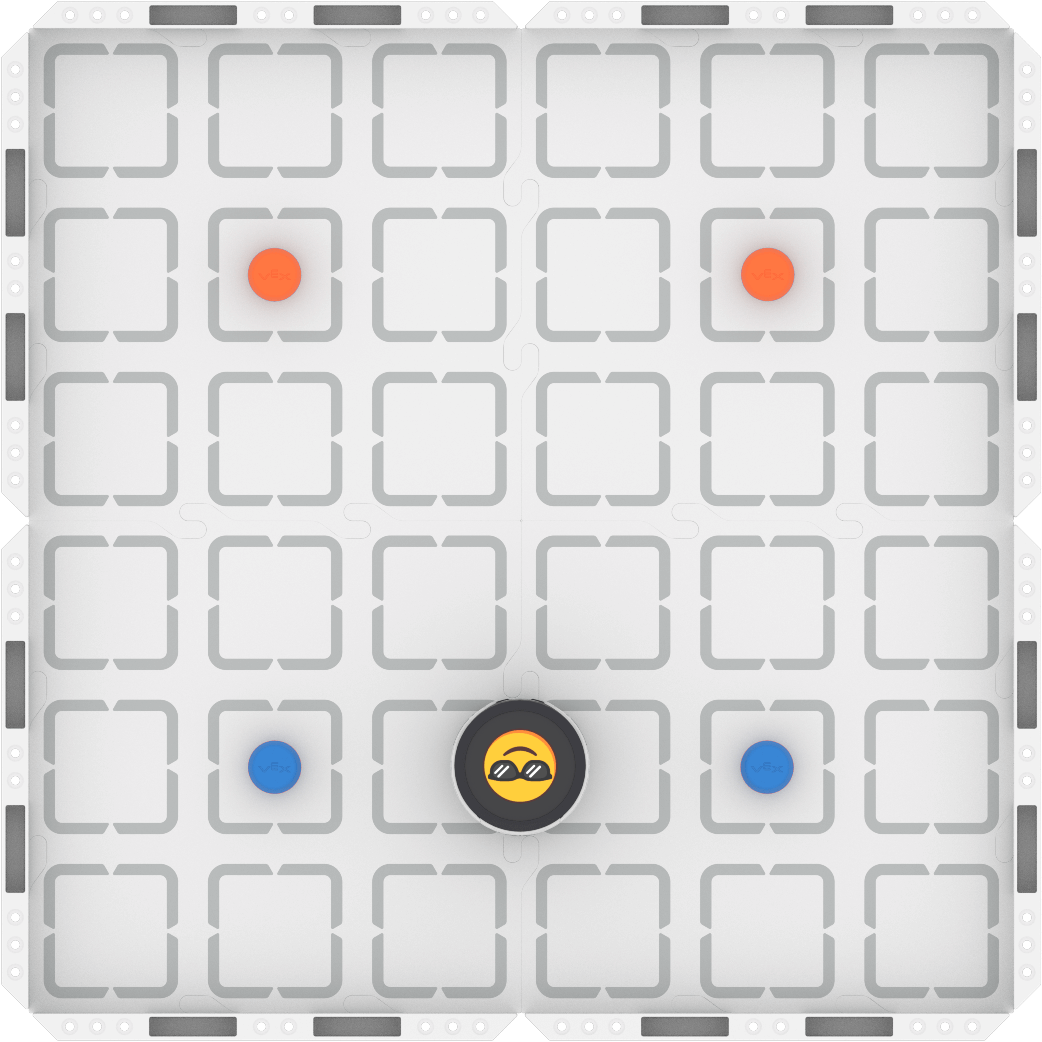
Step 2: Model the movements of the robot needed to complete the task using Drive mode.
- Your task is to drive the robot from the blue barrels to the orange barrels passing between each set, then navigate around the outside of all four barrels, and return to the starting position. Document your driving, then plan how to code that movement.
- Use this task card (Google / .docx / .pdf) to guide your practice.
- Pro Tip: Make sure that each member of the group has a turn to both drive and record, so that you can have meaningful collaborative discussions as you create a shared plan.
Step 3: Code the robot to complete the task.
- Your task is to use your planned path from Step 2 to code the robot in VEXcode AIM to move from the blue barrels to the orange barrels, then navigate around the outside of all four barrels, and then return to the starting position.
- Use this task card (Google / .docx / .pdf) to guide your practice.
- Pro Tip: Build and test your project in small chunks, to ensure the robot is moving as intended. This makes it much easier to find and fix errors in your project.
Step 4: Explore! Move between driving and coding to iterate on your project and improve your strategy.
- Together with your group, brainstorm ways to make your project better.
- Drive the robot to test out your ideas, and choose one to start with.
- Iterate on your project to make it match the new driven behaviors.
- Continue to move between driving and coding frequently to iterate on your project and find the best strategy to complete the task!
Resources for Practice:
The articles linked here are available if you need additional support while completing the activity.
Now that you have learned about and discussed coding the robot to move in all four directions, it is your turn to practice!
Step 1: Set up the field as shown below.

Step 2: Model the movements of the robot needed to complete the task using Drive mode.
- Your task is to drive the robot from the blue barrels to the orange barrels passing between each set, then navigate around the outside of all four barrels, and return to the starting position. Document your driving, then plan how to code that movement.
- Use this task card (Google / .docx / .pdf) to guide your practice.
- Pro Tip: Make sure that each member of the group has a turn to both drive and record, so that you can have meaningful collaborative discussions as you create a shared plan.
Step 3: Code the robot to complete the task.
- Your task is to use your planned path from Step 2 to code the robot in VEXcode AIM to move from the blue barrels to the orange barrels, then navigate around the outside of all four barrels, and then return to the starting position.
- Use this task card (Google / .docx / .pdf) to guide your practice.
- Pro Tip: Build and test your project in small chunks, to ensure the robot is moving as intended. This makes it much easier to find and fix errors in your project.
Step 4: Explore! Move between driving and coding to iterate on your project and improve your strategy.
- Together with your group, brainstorm ways to make your project better.
- Drive the robot to test out your ideas, and choose one to start with.
- Iterate on your project to make it match the new driven behaviors.
- Continue to move between driving and coding frequently to iterate on your project and find the best strategy to complete the task!
Resources for Practice:
The articles linked here are available if you need additional support while completing the activity.
Remind students of group work expectations at the start. You can use the roles in this pair programming VEX Library article to help you establish good habits with students.
Distribute the Step 2 task card (Google / .docx / .pdf) to each student. Remind students that the goal of driving is to ensure that all group members have a mental model how the robot should move to complete the task successfully. Encourage students to be mindful of how they document their driving, as they will use their practice as documentation to build their code.
As students are driving, circulate around the room and check in with students about their learning. Ask questions like:
- How would you describe the movements of the robot needed to complete the task?
- What details about your driving are you documenting? Why? What else might be important?
- How are you collaborating to create a planned path? How is each group member involved?
Distribute the Step 3 task card (Google / .docx / .pdf) to each student after they have met the success criteria for driving, and shared their planned path with you. Students will then use their plan to build their initial VEXcode projects. Encourage students to build and test their projects incrementally, to make it easier to find and fix bugs.
As students are coding the robot, circulate around the room and check in with students to discuss their progress and learning. Ask questions like:
- Where are you in your path so far? What block or behavior do you need next? How do you know?
- How does the order of blocks affect the movement of the robot? How did you decide on the sequence of blocks?
- What do you do if the robot doesn't move the way you intended? How do you solve that problem?
Once students have an initial coding project that completes the task, they should move on to Step 4 and begin iterating. Encourage students to think about how they are defining “better” as a group, so they can suggest changes that are aimed at the same goal. Students should move freely and frequently between driving and coding, as they learn how to use both strategies to best meet their needs.
As students are exploring and iterating, circulate around the room to check in about their process. Ask questions like:
- What is the goal of your iteration? Why do you think that will make your project better?
- Tell me about one of the ideas you tried. Was it successful? Why or why not?
- How are you working together to explore and iterate on your project?
Additional resources for teachers:
- Using the Share and Feedback Buttons - Students can use the Share button in VEXcode AIM to share their project with you. View this article to learn more.
Wrap-Up
Now that you have practiced, it is time to share what you learned. Answer the following questions in your journal to help you reflect on your learning and prepare for a whole-class discussion:
- What was your strategy for completing the task? Why do you think it was successful? Be specific in your answers.
- How did you use both Drive mode and VEXcode to complete the task? How did your group collaborate on both parts of practice?
- What is something you learned through practice that built onto what you saw in the video?
Now that you have practiced, it is time to share what you learned. Answer the following questions in your journal to help you reflect on your learning and prepare for a whole-class discussion:
- What was your strategy for completing the task? Why do you think it was successful? Be specific in your answers.
- How did you use both Drive mode and VEXcode to complete the task? How did your group collaborate on both parts of practice?
- What is something you learned through practice that built onto what you saw in the video?
Guide students to share their learning in a whole-class discussion. Help students reflect on their learning through practice to converge on shared understanding or learning targets.
Use the questions students answered in their journals as the starting point for the discussion. As you listen to students' contributions, ask follow up questions to guide their understanding:
- For strategy sharing:
- Did your group approach the task similarly or differently? Do you think your strategy was better or worse? Why? What evidence do you have to support that assertion?
- For coding:
- How did moving between the Drive mode and VEXcode help you complete the challenge? What did you learn about documenting your driving that helped you create a successful coding project?
- What did you learn about the sequence of blocks?
- Did you face any coding errors or bugs? How did you fix them?
Create a shared list of practices or procedures for building and running VEXcode projects based on what students share, to help create artifacts that reflect students' shared understanding of VEXcode so far.
Select Next > to explore an example project.