
Play
Part 1 - Step by Step
- InstructInstruct students that they are going to participate in the Sensor Delivery Competition with their Hero Robots. First, they will practice for the competition by remote control driving the Hero Robot to move sensors to the Underwater Lab on the Field. View the video below to learn more about the game elements and considerations for the Sensor Delivery activities. The end of the video shows an example of how a Hero Robot could be driven to accomplish the task.
NOTE: You can choose how students interact with the video content. The video is embedded within the Lab 1 Image Slideshow to share easily with student. Or, you may choose to watch the video yourself and present the information to your students in class.
- ModelModel for students how to remote control drive the Hero Robot to move game objects such as sensors on the Field. The goal of this practice is to move the sensors to the Underwater Laboratory on the Field.
- First, model for students how to launch VEXcode GO, connect their Brain to their device, and open the Drive tab.

Select the Drive tab Note: When you first connect your robot to your device, the Gyro built into the Brain may calibrate, causing the robot to move on its own for a moment. This is an expected behavior, do not touch the robot while it's calibrating.
- Next, model for students how to select the Motor option in Port 2, to control the arm motor on the Hero Robot.
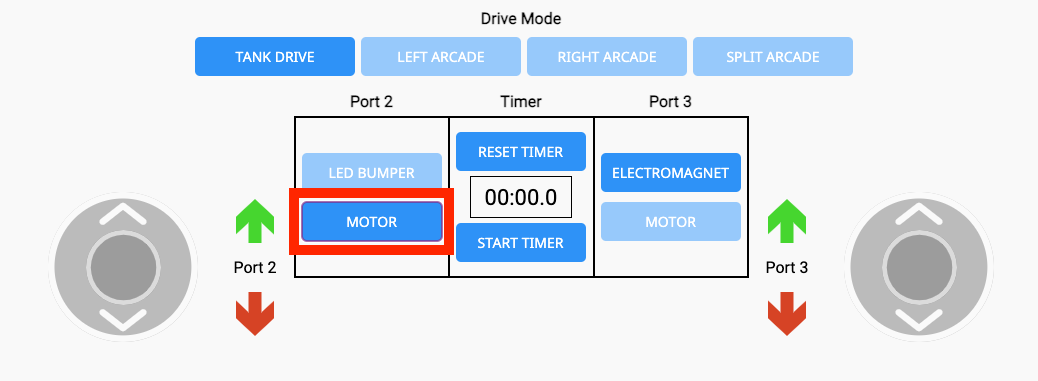
Select the Motor option for Port 2 - Model for students how to change the Drive Mode by selecting the buttons – Tank Drive, Left Arcade, Right Arcade, or Split Arcade. View the video clip below to see the movement of the joysticks as each Drive Mode is selected.
Video file- For reference, the Drive Modes correspond to the following controls:
- Tank Drive: Each joystick controls a different motor.
- Left Arcade: One joystick that controls both motors. The joystick is on the left-hand side of the screen.
- Right Arcade: One joystick that controls both motors. The joystick is on the right-hand side of the screen.
- Split Arcade: Two joysticks. One controls left and right movements and the other controls forward and reverse movements.
- Model for students how to raise and lower the arm motor using the green and red arrows around Port 2.
- Note: The arrows correspond to the direction the motor is spinning, not necessarily the up and down movements of the arm itself.
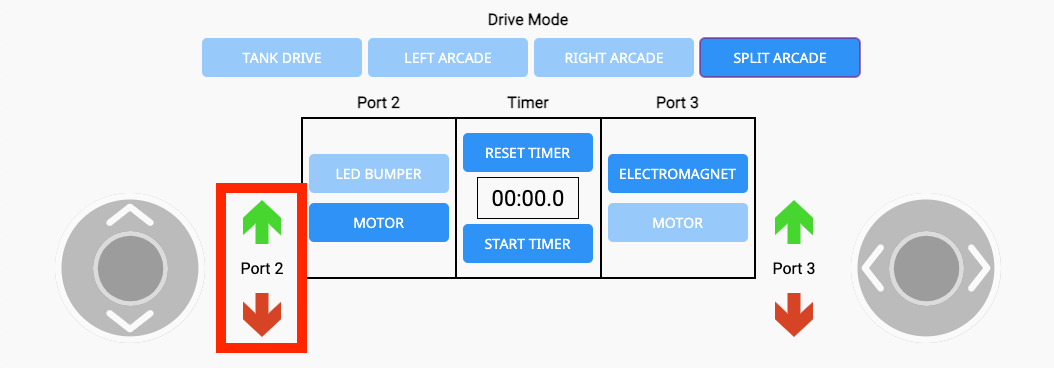
Port 2 Motor controls - Next, set the Hero Robot on the green starting Tile, and model how to drive and move a sensor using the Drive tab, as shown in the video in the Instruct step.
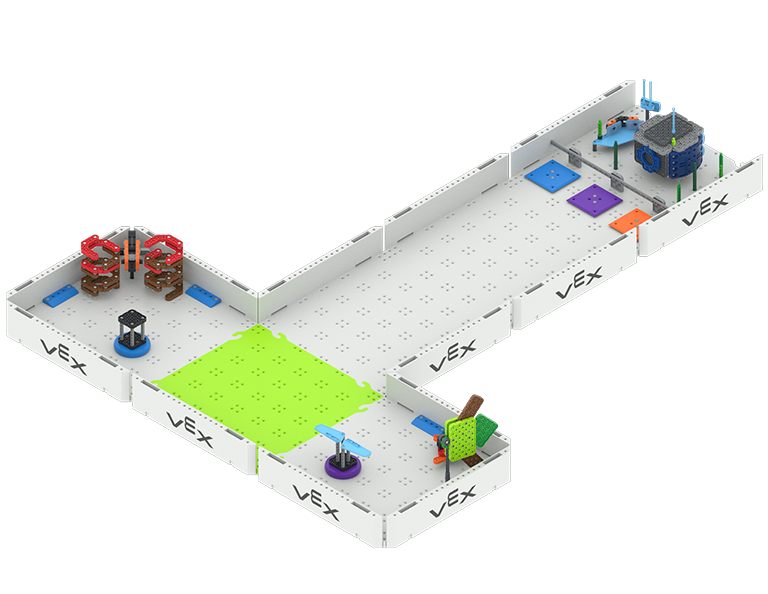
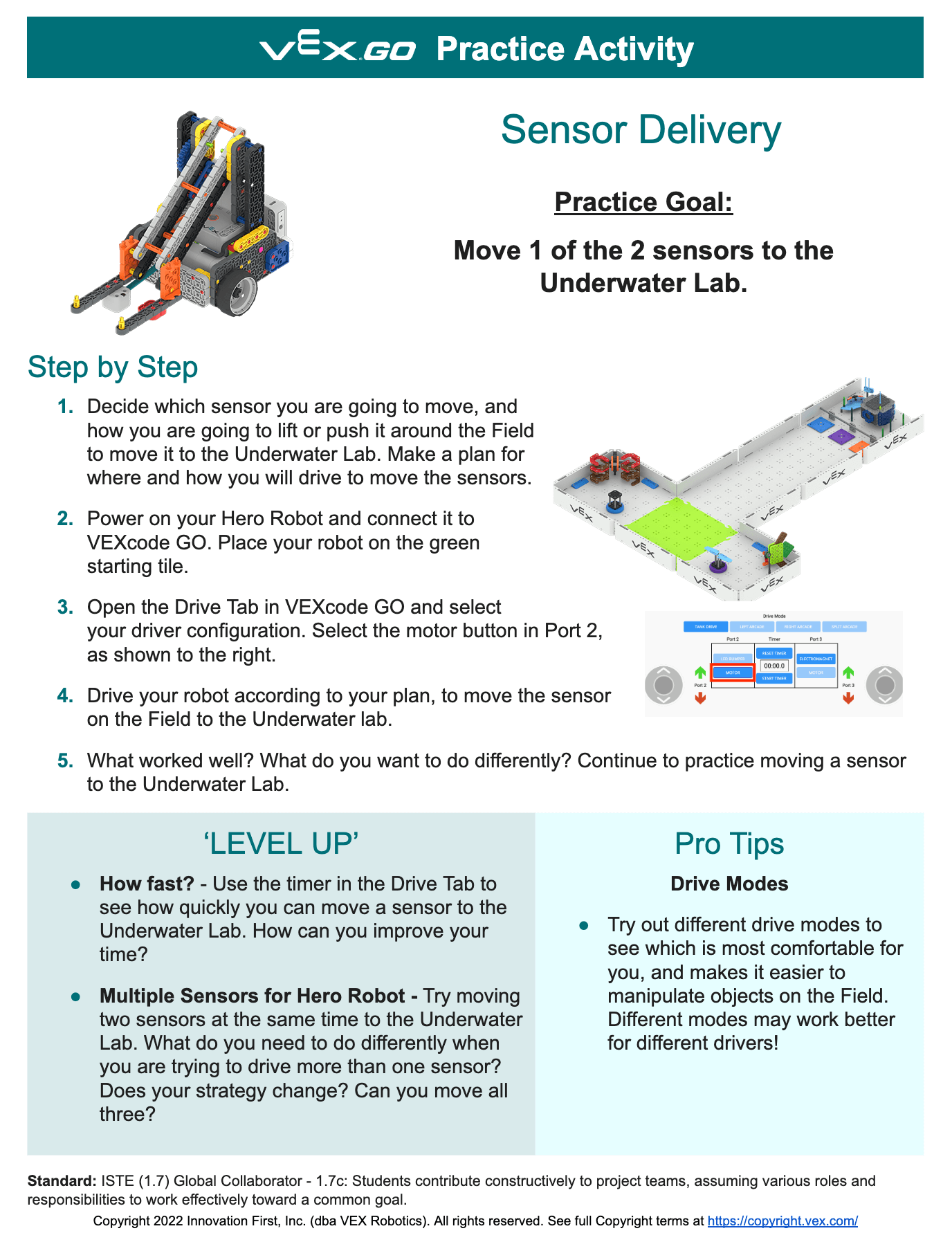
Ocean Science Exploration - Stage 1 Field - As students are practicing driving the Hero Robot to move a sensor to the Underwater Lab on the Field, you can use the Sensor Delivery Practice Activity (Google / .docx / .pdf) to guide them through how to practice.
-
If students finish the practice tasks early, and need an additional challenge, have them try one of the 'Level Up' extensions on the Sensor Delivery Practice Activity.
-
- FacilitateFacilitate turn taking and collaboration between and among teams as they are practicing driving their Hero Robots. As you circulate around the room, ask questions like:
- How are you taking turns driving on your team, so everyone has a chance to practice?
- What is easier for each of you to move – the purple or blue sensor? Why?
- What is similar about your driving styles? What is different? What can you learn from each other to make you both better drivers?
- What is one challenge you are working together to solve? What problem solving strategies have you tried so far? What will you try next?
You may want to have multiple areas for practice set up around the room. The Stage 1 Field can be broken up into individual tiles, so that you can spread out the practice areas around the classroom. Or, just offer students the sensors to practice moving on a flat surface, like the floor or a large table.
Facilitate conversations about driver strategy as students are practicing. You may want to allow extra time for Play Part 1, to enable all students to have enough time to get comfortable driving, so that they can begin to think about strategy. Encourage teams to look at what others are doing around the room, so that they can learn from other teams' experiences as well.
- What have they figured out through practice that has helped them be successful?
- What helps them move a sensor more quickly?
- Which sensor are you choosing first to move?
- RemindRemind students to try different Drive Modes to figure out which works best for them. Different Drive Modes may work better for different drivers.
Remind students that the goal of this activity is to move just one sensor to the Underwater Lab. Encourage them to try to move different sensors to see if a certain sensor's location is easier for them. They can choose which game objects they move in practice, as well as in the competition.
- AskAsk students about how the actions they are doing with their Hero Robot may be connected to actual activities that are being researched with the ROV (Remote Operated Vehicle) underwater this year. Why might sensors be difficult to move underwater using the ROV?
Mid-Play Break & Group Discussion
As soon as every group has successfully moved a sample to the Underwater Lab, come together for a brief conversation.
Now that students have practiced driving their Hero Robots to move objects on the Field, talk about how that practice can help them be successful in a Sensor Delivery competition.
First, introduce the Sensor Delivery competition:
- The goal of the competition is to score as many points as you can by moving sensors to the Underwater Lab in a one minute match.
- Each game object that is successfully moved to the Underwater Lab on the specific matching color at the end of the match is worth one point.
- Teams will apply what they learned in practice to help them score the most points they can in the competition!
Then, talk about how students can apply their learning to help them be successful in competition.
- What is one thing you learned from practicing that will help you score points in the competition?
- What is something that helped you move objects more quickly?
- In practice, you moved only one sensor to the Underwater Lab. How do you think you will try to move more sensors in the competition?
- How will your Hero Robot move on the Field in order to score points during a match? Is there anything you want to avoid?
Part 2 - Step by Step
- InstructInstruct students that they are now going to participate in the Sensor Delivery competition! The goal of the competition is to score as many points as you can by moving sensors to the Underwater Lab in a one minute match.
Use the Sensor Delivery Competition Activity (Google / .docx / .pdf) as a guide for students as you engage in the competition.

- ModelModel for students how they will participate in the competition matches, and how the competition will run in the classroom.
To learn more about organizing a VEX GO Classroom Competition, see this article.
- Model how to setup the Hero Robot on the Field to begin the match.
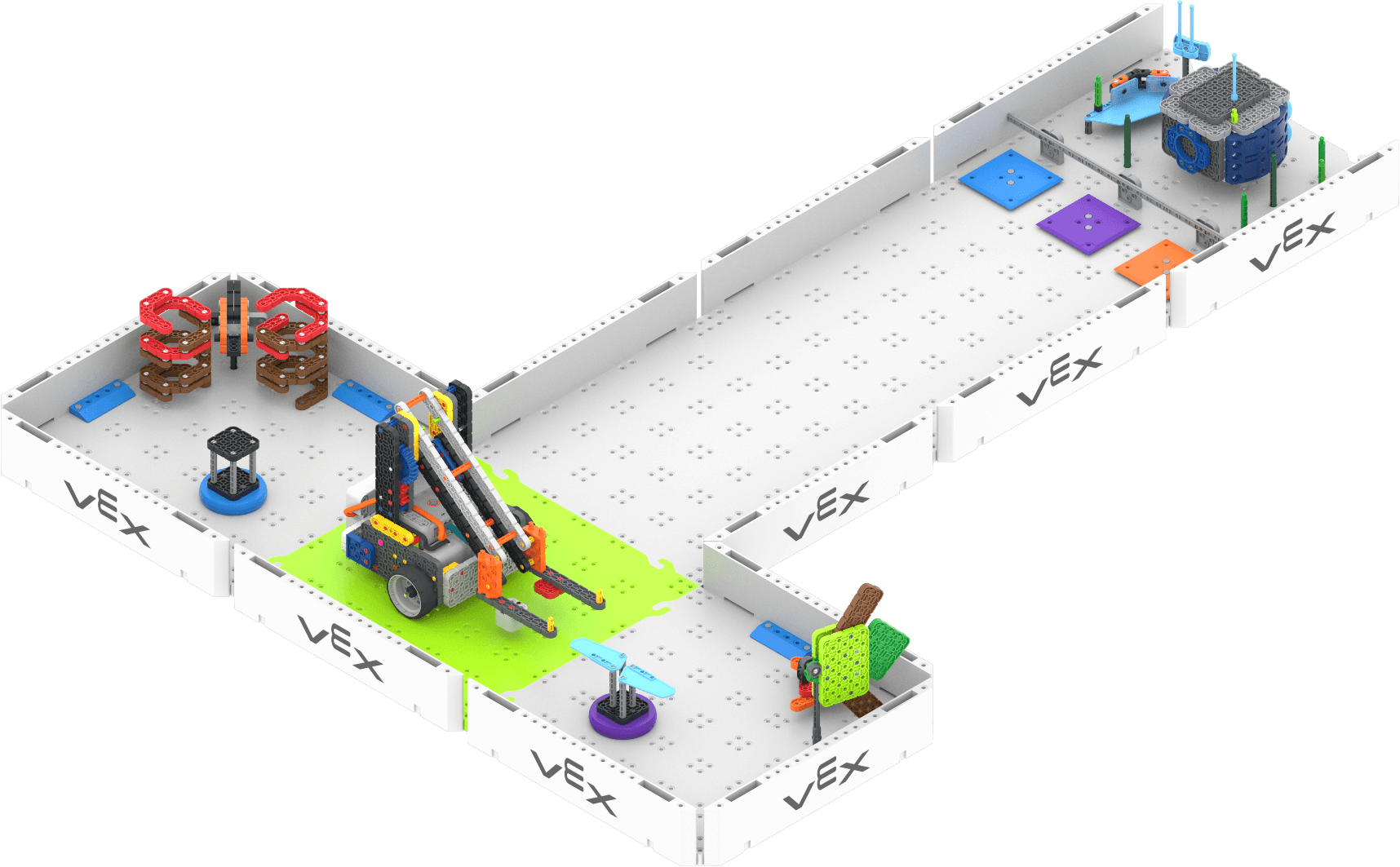
- Share with students the match order and expectations, so that they know what they should be doing during the competition before and after their turn to drive.
-
You can use this Match Order template (Google / .docx / .pdf) to show teams the order in which they will be competing. You can also use this sheet as a way to keep track of the score after each match. Try to have enough matches so that each student gets a chance to drive the robot at least once.
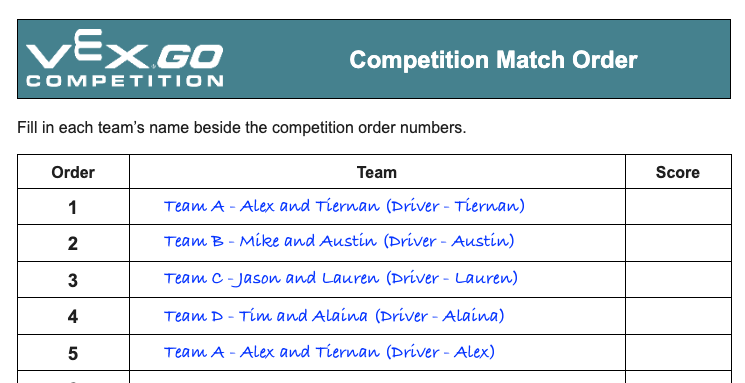
Example of a match order sheet - Demonstrate for students how you will operate the timer, and what to look and listen for to know when to start and stop driving their robots on the Field.
- Show students where they can be seated during the competition matches. If you have practice areas or other spaces students can be in during the competition, show them these areas as well, and explain how they are to be used.
- Review expectations for how to be a respectful participant in the competition. Encourage students to cheer for one another, and to be excited about the competition – this is meant to be a fun classroom experience! Be sure that students are showing good sportsmanship before, during, and after each matches.
-
- Model how a match is run. Start the timer, and drive the Hero Robot on the Field to move the sensors to the Underwater Lab. When the timer reaches one minute, stop driving. At the end of the demonstration, count the number of sensors that are in the Underwater Lab on the correct color, and total the score with students.
- If you are using a VEX GO Leaderboard, show students how the scores will be entered and displayed on the Leaderboard.
- Model how to reset the Field for the next match. The sensors should be on the fish and seaweed tiles as shown in the image above.
- FacilitateFacilitate the classroom competition matches, and engage students in conversations about their driving and collaboration between matches. Use discussion prompts like:
- Before the start of a match:
- Which team member will be driving? Can you explain your strategy, or what you are going to try to do, in this match?
- What is one thing you are going to try to do the same as your practice or previous match? Why?
- What is one thing you are going to try to do differently than your practice or previous match? Why?
- During a match:
- Watch how the driver is controlling the speed of the robot. What do you notice?
- Watch how the driver is using the arm of the robot? What do you notice?
- Watch how the driver is moving around the craters? What do you notice?
- After a match:
- What is something you learned from your driving that you will use in your next match?
- What is something you learned from watching another driver that can help you in your match?
- Before the start of a match:
- RemindRemind students that watching the matches can help them learn things about their own strategy. They may see things they want to try, or objects they want to avoid, by watching how other teams approach the competition. Just because it is not their turn to drive, does not mean they have nothing to do.
You may want to give students a way to take notes as they are watching the competition, using the Blueprint Worksheet (Google / .docx / .pdf) or the Data Collection Sheet (Google / .docx / .pdf). This way they can have a tangible way to keep track of strategy ideas as they prepare for their next match.
- AskAsk students to think about how their experience in this competition can help them the next time they are on a team or participating in a competition. What have they learned about being a good teammate that can be applied to the next VEX GO competition? What have they learned about being a spectator that they can use the next time they are watching a competition of any kind?