When coding your robot to pick up and place objects, the orientation of your robot is key. In this lesson, you will learn to move and turn your robot with precision to pick up an object. You will also learn how to use the Place object block to deliver it to a specific location.
Watch the video below to learn about:
- How the orientation of your robot depends on the direction the robot's kicker is facing.
- How to code your robot to pick up and place objects with precision.
Now that you have watched the video, capture your thoughts in your journal. Answer these questions to guide your thinking and help you prepare for a whole-class discussion:
- What considerations do you think will be important when coding the robot to pick up and place objects? List at least two ideas.
- How do you think the robot needs to move in order to pick up an object with the magnet successfully? Be specific.
- What evidence do you have from the video that supports your ideas?
What are some questions you have about coding the robot to pick up and place objects?
Now that you have watched the video, capture your thoughts in your journal. Answer these questions to guide your thinking and help you prepare for a whole-class discussion:
- What considerations do you think will be important when coding the robot to pick up and place objects? List at least two ideas.
- How do you think the robot needs to move in order to pick up an object with the magnet successfully? Be specific.
- What evidence do you have from the video that supports your ideas?
What are some questions you have about coding the robot to pick up and place objects?
After students watch the video and before practicing, come together for a whole-class discussion. Use student answers to the questions provided as the basis for discussion.
When coding the robot to pick up objects, it is essential to orient the robot so the kicker is aligned with the object to be picked up. Remind students about the position of the magnet and how they will need to essentially “drive through” the object to pick it up. Guide students to consider how they would need to code the robot to pick up and move an object that is not directly in front of the robot.
Guided Practice
Now that you have watched and discussed the video, it is your turn to practice!
Step 1: Set up your field as shown in the image below.
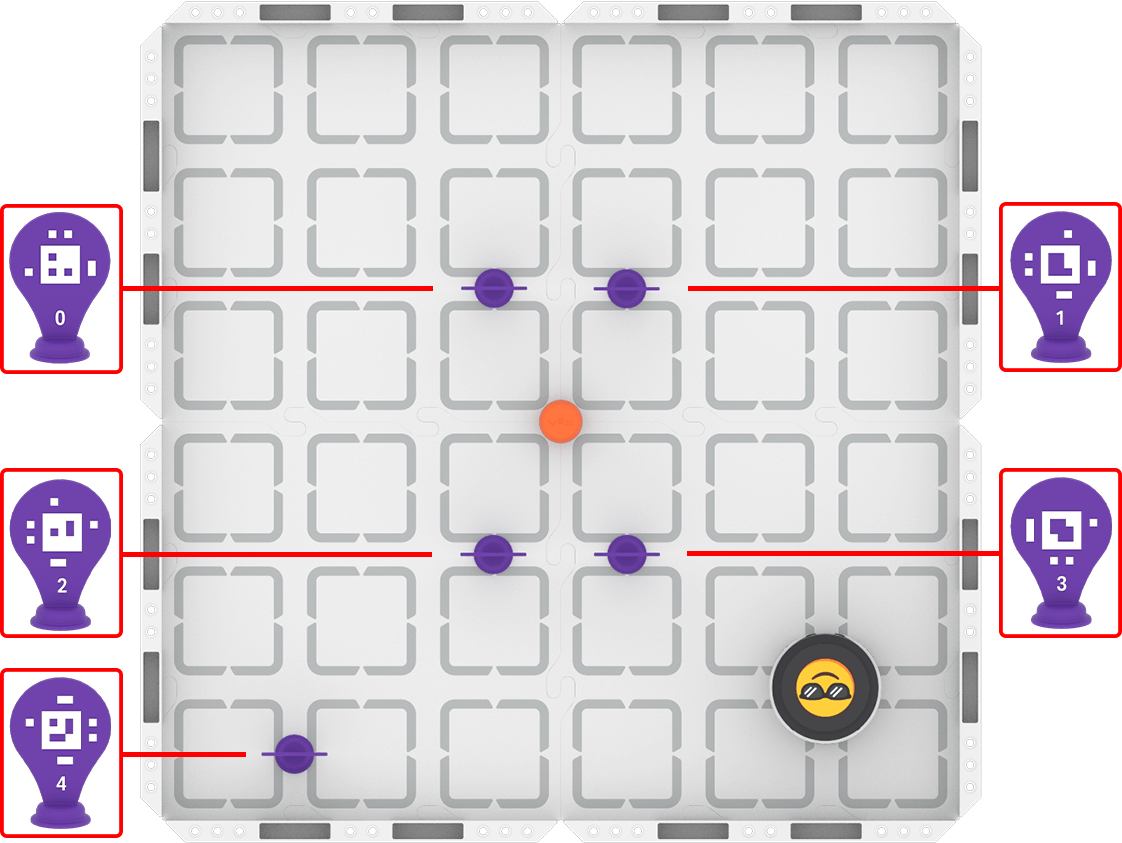
Step 2: Use Drive mode to model the movements your robot needs to make to complete the task.
- Your task is to drive the robot between the AprilTags to pick up the barrel and place it in front of AprilTag ID 4. Document your driving, then plan how to code that movement.
- Use this task card (Google / .docx / .pdf) to guide your practice.
- Pro Tip: Pay close attention to the way the robot must be oriented to successfully pick up the barrel, and to drop it off in front of AprilTag ID 4.
Step 3: Code the robot to complete the task.
- Your task is to use your path plan from Step 2 to code the robot to drive between the AprilTags to pick up the barrel, and then deliver it to AprilTag ID 4.
- Use this task card (Google / .docx / .pdf) to guide your practice.
- Pro Tip: Consider how you will code your robot to turn with precision in this challenge, using previous knowledge from the course.
Step 4: Use the Predict-Drive-Measure-Code process to iterate on and improve the precision of the robot's movements as it picks up and delivers objects.
- Predict
- Choose the first measurement you need to adjust. Make a group prediction about how to improve either the distance measurement or angle using this sentence stem, and record it in your journal:
- We think the distance/angle should be about ____________ millimeters/inches/degrees.
- Choose the first measurement you need to adjust. Make a group prediction about how to improve either the distance measurement or angle using this sentence stem, and record it in your journal:
- Drive
- Test your prediction by driving your robot. Document any observations you make while driving that could help you to improve your precision.
- Measure
- Place your Robot Protractor under the robot, or use a ruler to measure the point at which the robot stopped driving.
- Code
- Use you adjusted measurement in your coding project! Run it to test. Does the adjustment you made improve improve your precision and make picking up and placing the barrel easier? If not, repeat the process and try again. Be sure to record your measurements and observations in your journal as you go.
Resources for Practice:
The articles linked here are available if you need additional support while completing the activity.
Now that you have watched and discussed the video, it is your turn to practice!
Step 1: Set up your field as shown in the image below.

Step 2: Use Drive mode to model the movements your robot needs to make to complete the task.
- Your task is to drive the robot between the AprilTags to pick up the barrel and place it in front of AprilTag ID 4. Document your driving, then plan how to code that movement.
- Use this task card (Google / .docx / .pdf) to guide your practice.
- Pro Tip: Pay close attention to the way the robot must be oriented to successfully pick up the barrel, and to drop it off in front of AprilTag ID 4.
Step 3: Code the robot to complete the task.
- Your task is to use your path plan from Step 2 to code the robot to drive between the AprilTags to pick up the barrel, and then deliver it to AprilTag ID 4.
- Use this task card (Google / .docx / .pdf) to guide your practice.
- Pro Tip: Consider how you will code your robot to turn with precision in this challenge, using previous knowledge from the course.
Step 4: Use the Predict-Drive-Measure-Code process to iterate on and improve the precision of the robot's movements as it picks up and delivers objects.
- Predict
- Choose the first measurement you need to adjust. Make a group prediction about how to improve either the distance measurement or angle using this sentence stem, and record it in your journal:
- We think the distance/angle should be about ____________ millimeters/inches/degrees.
- Choose the first measurement you need to adjust. Make a group prediction about how to improve either the distance measurement or angle using this sentence stem, and record it in your journal:
- Drive
- Test your prediction by driving your robot. Document any observations you make while driving that could help you to improve your precision.
- Measure
- Place your Robot Protractor under the robot, or use a ruler to measure the point at which the robot stopped driving.
- Code
- Use you adjusted measurement in your coding project! Run it to test. Does the adjustment you made improve improve your precision and make picking up and placing the barrel easier? If not, repeat the process and try again. Be sure to record your measurements and observations in your journal as you go.
Resources for Practice:
The articles linked here are available if you need additional support while completing the activity.
Remind students of their established group work expectations before beginning.
Distribute the Step 2 task card (Google / .docx / .pdf) to each student. Remind students that the goal of driving is to ensure everyone in the group develops a shared mental model of how the robot should move to complete the task successfully. Encourage students to be mindful of how they document their driving, as they will use their practice as documentation to build their code.
As students are driving, circulate around the room and check in with students about their learning. Ask questions like:
- What specific movements does your robot need to make to successfully complete the task?
- What details about your robot’s movements are you recording? Why did you choose those? Are there other important details you should include?
- How is your group working together to plan the robot’s path? What role is each person playing?
Distribute the Step 3 task card (Google / .docx / .pdf) to each student after they have met the success criteria for driving, and shared their planned path with you. Students will then use their plan to build their initial VEXcode projects. Remind them to build and test their projects incrementally.
As students are coding the robot, circulate around the room and check in with students to discuss their progress and learning. Ask questions like:
- At this point in your project, what movement have you coded? What comes next, and how can you tell?
- Why is the order of your blocks important for the robot’s movement? How did your group choose this sequence?
- What steps can you take if the robot moves differently than you expected? How do you approach solving this?
Once students have an initial coding project that completes the task, they should move on to Step 4 and begin iterating. Students should use the Predict-Drive-Measure-Code process to help them improve one thing about their robot's movement at a time, to achieve the precision needed to pick up and move the barrel. To facilitate this process, ask questions like:
- How does predicting needed measurements before you drive help you to improve the precision of your robot's movements?
- Explain how the adjustments you are making improves the robot's ability to pick up and place the barrel.
- How have your measurements improved or changed over multiple attempts, and what have you learned from these iterations?
- How are you making collaborative decisions about what parts of your project to change? How are you agreeing on what change to make?
Wrap-Up
Now that you have practiced, it is time to share what you learned. Answer the following questions in your journal to help you reflect on your learning and prepare for a whole-class discussion:
- What was your strategy for picking up and placing the barrel to complete the challenge? Be thorough in your explanation. Why do you think your strategy was successful?
- How did you use both Drive mode and VEXcode to complete the task? How did your group collaborate on both parts of practice?
- What advice would you give to someone learning to code the robot to pick up and place objects for the first time? Why do you think your advice would be helpful?
Now that you have practiced, it is time to share what you learned. Answer the following questions in your journal to help you reflect on your learning and prepare for a whole-class discussion:
- What was your strategy for picking up and placing the barrel to complete the challenge? Be thorough in your explanation. Why do you think your strategy was successful?
- How did you use both Drive mode and VEXcode to complete the task? How did your group collaborate on both parts of practice?
- What advice would you give to someone learning to code the robot to pick up and place objects for the first time? Why do you think your advice would be helpful?
Guide students to share their learning in a whole-class discussion. Help students reflect on their learning through practice to converge on shared understanding or learning targets.
Use the questions students answered in their journals as the starting point for the discussion. As you listen to students' contributions, ask follow up questions to guide their understanding:
- For strategy sharing:
What were some challenges your group faced when picking up and placing the barrel, and how did you overcome them?
What other strategy ideas did you consider before making your decision? Why did you choose that particular strategy?
- For coding:
- Can you describe a moment where driving the robot helped you make a better coding decision?
- What blocks did you use to code the robot to orient precisely on the barrel and the AprilTag?
- For collaboration:
- How did each member of your group contribute to driving and coding?
Create a shared list of advice for coding the robot to pick up and place objects. This list can be a living document, as students can add to it and revise it as their understanding grows.
Select Next > to move on to the next lesson.