Now that you’ve explored how changing angle parameters can improve your coding projects, you’ll build on this knowledge by coding your robot to navigate around a set of barrels as quickly as possible. You’ll focus on adjusting angles to improve both the precision and speed of your robot’s movement.
Watch the video below to learn about:
- Using small angle adjustments for precision.
- Adjusting angles to navigate around obstacles placed at different distances from the robot.
Now that you have watched the video, capture your thoughts in your journal. Answer these questions to guide your thinking and help you prepare for a whole-class discussion:
- List at least two questions you have about how angle and distance parameters vary based on how far objects are from the robot.
- How would you use small angle adjustments for precision?
- What did you observe in the video that supports your thinking?
- What is something you’ve learned about coding or VEXcode that will help you in this lesson?
Now that you have watched the video, capture your thoughts in your journal. Answer these questions to guide your thinking and help you prepare for a whole-class discussion:
- List at least two questions you have about how angle and distance parameters vary based on how far objects are from the robot.
- How would you use small angle adjustments for precision?
- What did you observe in the video that supports your thinking?
- What is something you’ve learned about coding or VEXcode that will help you in this lesson?
After students watch the video and before practicing, come together for a whole-class discussion. Use student answers to the questions provided as the basis for discussion.
Note student contributions on the board so everyone can see and build upon each other’s ideas. Remind them to refer to their journals or visuals from the video to help them express their ideas with clarity.
Guided Practice
Now that you have watched and discussed the video, it is your turn to practice!
Step 1: Set up the field as shown below.
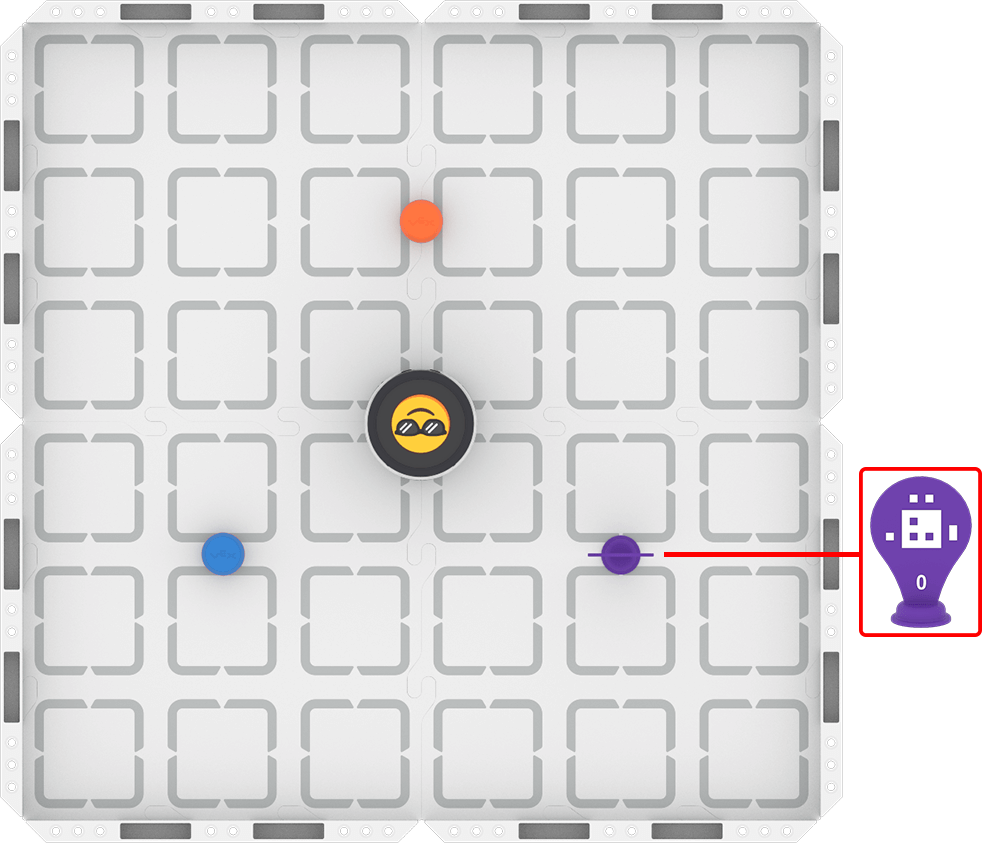
Step 2: Model the movements of the robot needed to complete the task using Drive mode.
- Your task is to drive the robot around the three obstacles as quickly as you can. Document your driving, then plan how to code that movement.
- Use this task card (Google / .docx / .pdf) to guide your practice.
- Pro Tip: Consider the details you used in the previous lesson to build your coding project. Pay attention to each angle and distance while avoiding the obstacles, and document your driving in detail to create you path plan.
Step 3: Code the robot to complete the task.
- Use your planned path from Step 2 to code the robot to move around the three obstacles as quickly as possible.
- Use this task card (Google / .docx / .pdf) to guide your practice.
- Pro Tip: Use the Robot Protractor and a ruler to help you get started determining your angle and distance parameters.
Step 4: Use the Predict-Drive-Measure-Code process to improve your robot's speed as it moves around both barrels:
- Predict
- Choose one angle to make a small adjustment to in order to improve your robot's speed. Make a group prediction about how to improve the angle using this sentence stem, and record it in your journal:
- We think the angle should be about ____________ degrees.
- Choose one angle to make a small adjustment to in order to improve your robot's speed. Make a group prediction about how to improve the angle using this sentence stem, and record it in your journal:
- Drive
- Test your prediction by driving your robot at your predicted angle. If it feels off, what do you think you need to change to make it more accurate? If not, what feels right about it?
- Measure
- Place your Robot Protractor under the robot. At what angle did you actually drive the robot?
- Code
- Use your new angle in your coding project! Adjust your project, then run it to test. Does the precision of the new angle improve your robot's speed? If not, use your Robot Protractor to help you change the angle and try again. Be sure to record your angle measurements and observations in your journal as you go.
Resources for Practice:
The articles linked here are available if you need additional support while completing the activity.
Now that you have watched and discussed the video, it is your turn to practice!
Step 1: Set up the field as shown below.

Step 2: Model the movements of the robot needed to complete the task using Drive mode.
- Your task is to drive the robot around the three obstacles as quickly as you can. Document your driving, then plan how to code that movement.
- Use this task card (Google / .docx / .pdf) to guide your practice.
- Pro Tip: Consider the details you used in the previous lesson to build your coding project. Pay attention to each angle and distance while avoiding the obstacles, and document your driving in detail to create you path plan.
Step 3: Code the robot to complete the task.
- Use your planned path from Step 2 to code the robot to move around the three obstacles as quickly as possible.
- Use this task card (Google / .docx / .pdf) to guide your practice.
- Pro Tip: Use the Robot Protractor and a ruler to help you get started determining your angle and distance parameters.
Step 4: Use the Predict-Drive-Measure-Code process to improve your robot's speed as it moves around both barrels:
- Predict
- Choose one angle to make a small adjustment to in order to improve your robot's speed. Make a group prediction about how to improve the angle using this sentence stem, and record it in your journal:
- We think the angle should be about ____________ degrees.
- Choose one angle to make a small adjustment to in order to improve your robot's speed. Make a group prediction about how to improve the angle using this sentence stem, and record it in your journal:
- Drive
- Test your prediction by driving your robot at your predicted angle. If it feels off, what do you think you need to change to make it more accurate? If not, what feels right about it?
- Measure
- Place your Robot Protractor under the robot. At what angle did you actually drive the robot?
- Code
- Use your new angle in your coding project! Adjust your project, then run it to test. Does the precision of the new angle improve your robot's speed? If not, use your Robot Protractor to help you change the angle and try again. Be sure to record your angle measurements and observations in your journal as you go.
Resources for Practice:
The articles linked here are available if you need additional support while completing the activity.
Foreground group work expectations at the start. To learn more about roles for collaboration in coding, view this article about pair programming. Ask questions like:
- How is your group going to get started on this activity?
- How will you make sure everyone contributes to driving and coding?
Distribute the Step 2 task card to each student (Google / .docx / .pdf). Remember, the goal of driving the robot to complete the task is for students to develop a physical model of the task, from which they will build a computational model when they begin coding. Ensure that all students are taking the time necessary to drive, document, and path plan during the driven portion of Guided Practice. Establishing good habits with simple tasks will help later on as the tasks get more complex.
As students complete their driving practice, circulate around the room and check in with students about their learning. Ask questions like:
- What is something you're paying attention to while driving that you think will help you to code? Why is that important to you?
- Did everyone drive and document the same way? What is similar or different? How can you combine your ideas into a shared plan?
Distribute the Step 3 task card to each student after they have met the success criteria for driving, and shared their path plan with you (Google / .docx / .pdf). Students will then use their plans as the basis for building their VEXcode projects. Encourage students to add to their driving documentation as they build and test their projects, to help them identify what strategies and details are most helpful. They can also use undo and redo button to help them. Remind students that they can return to driving at any time to help them code their project successfully.
Students are encouraged to use the Robot Protractor printed out while planning their path. If students do not have access to a printer, print this for them.
As students are coding the robot, circulate around the room and engage students in discussions to learn about their coding progress and understandings. Ask questions like:
- How are you using what you learned in the lesson to choose your angle measurements?
- How do you think precision and the speed at which the robot travels are related?
- How did your group collaborate to complete this task together?
Step 4 is designed to promote student iteration and exploration by moving between driving and coding to improve their projects and find the best strategy for the task. Students should use the Predict-Drive-Measure-Code process to help them improve one thing about their robot's movement at a time, focusing on small angle adjustments to precision, which will improve their overall speed. They should cycle through the process repeatedly to improve their project. To facilitate this process, ask questions like:
- Did the results of your testing match your prediction? What adjustments do you need to make?
- How does predicting the angle before you drive help you to improve the precision of your robot's movements?
- Is improving the precision of your angles helping your robot to drive around all three barrels more quickly? How do you know?
- What have you documented in your journal throughout this process? How can you improve your documentation process?
Wrap-Up
Now that you have practiced, it is time to share what you learned. Answer the following questions in your journal to help you reflect on your learning and prepare for a whole-class discussion:
- What is something you learned while driving that helped you in coding? How did you document that learning?
- What is something you learned about optimizing your time to complete the task?
- How did you collaborate with your group to determine the best angle and distance measurements?
Now that you have practiced, it is time to share what you learned. Answer the following questions in your journal to help you reflect on your learning and prepare for a whole-class discussion:
- What is something you learned while driving that helped you in coding? How did you document that learning?
- What is something you learned about optimizing your time to complete the task?
- How did you collaborate with your group to determine the best angle and distance measurements?
Guide students to share their learning in a whole-class discussion. The questions students answered in their journal are the starting point for discussion. Ask follow-up questions to guide students to converge their thinking around shared understandings. Follow up with questions like:
- If someone asked you to explain your strategy for completing the timed challenge, what would you say?
- How did you find your angles and distances? What are some of the different ways? How do you think this lesson might help you moving forward?
- What do you know about coding your robot now that you didn't know before practicing? What evidence do you have to support that?
Add to the shared list of VEXcode coding practices from Lesson 2, based on what students share. These artifacts should reflect the class’s current understanding of coding their robots.
Select Next > to move on to the Unit Challenge.