Time to build onto your Button Coding skills! In this lesson, you’ll code your VEX AIM Coding Robot to collect and place barrels at a target location—starting with one, then adding on to tackle a second. As you build and test your code, you’ll see why breaking a big task into smaller steps makes a difference.
Watch the video below to learn how to pick up and place objects with Button Coding.
Now that you have watched the video, capture your thoughts in your journal. Answer these questions to guide your thinking and help you prepare for a whole-class discussion:
- Explain how to pick up and place a barrel using Button Coding. Be specific in your description.
- What did you see in the video to support your description?
- Write down at least two questions that you have about moving a barrel with Button Coding.
- Do you think there are other ways to approach moving the barrel with Button Coding? Why or why not?
Now that you have watched the video, capture your thoughts in your journal. Answer these questions to guide your thinking and help you prepare for a whole-class discussion:
- Explain how to pick up and place a barrel using Button Coding. Be specific in your description.
- What did you see in the video to support your description?
- Write down at least two questions that you have about moving a barrel with Button Coding.
- Do you think there are other ways to approach moving the barrel with Button Coding? Why or why not?
After students watch the video and before practicing, come together for a whole-class discussion. Use student answers to the questions provided as the basis for discussion.
As you engage in the discussion with students, model the skills and dispositions to support meaningful discourse.
- Guide students to cite evidence from the video to support their claims about how to move objects. Encourage them to be specific, like how the robot's magnet is related to the process.
- Remind students to listen and respond respectfully, and with their own evidence.
Note students' contributions on the board so students can see and build upon each other's ideas. Remind them to refer to their journals to help them express their ideas with clarity.
Guided Practice
Now that you have watched and discussed the video, it is your turn to practice!
Step 1: Set up the Field as shown below.
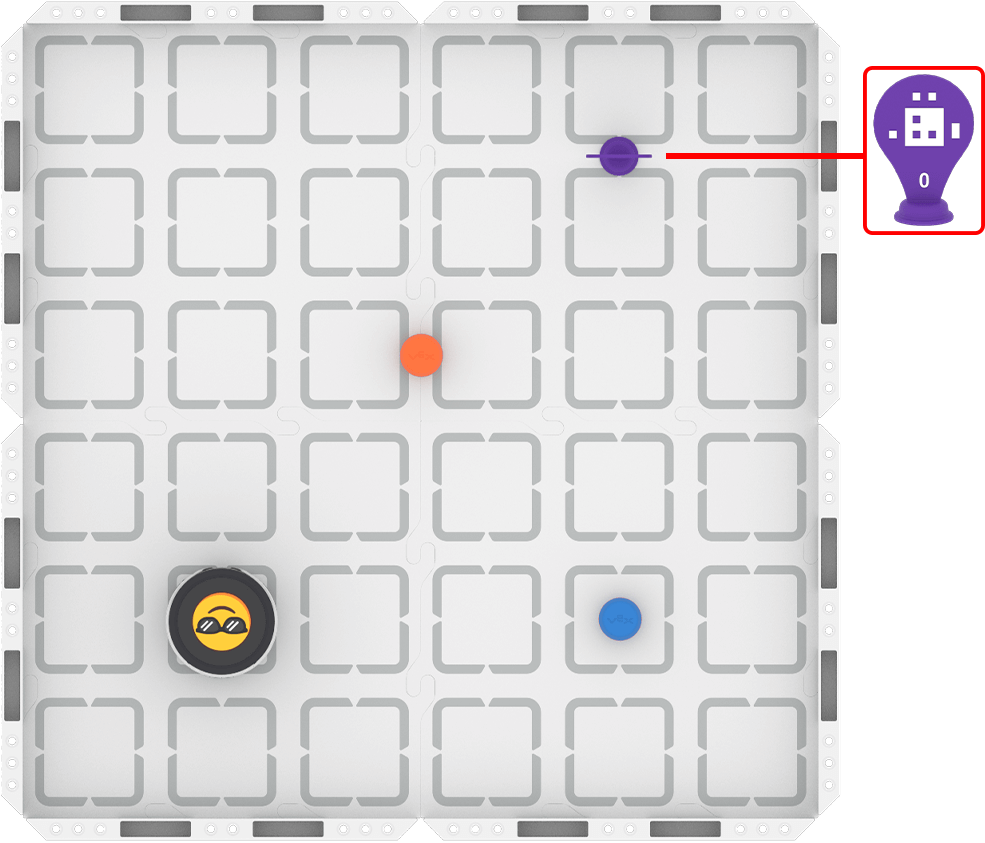
Step 2: Start the activity.
- Your task is to plan and code the robot to pick up the orange barrel and place it in front of AprilTag ID 0, then add to your project to place the blue barrel as well.
- Use this task card (Google / .docx / .pdf) to guide your practice.
- Pro Tip: Think about how the magnet on the kicker is going to interact with the barrel when you plan your path. Be sure to code the robot to drive directly into the barrel in order to collect it successfully.
Resources for Practice:
The article linked here is available if you need additional support while completing the activity.
Now that you have watched and discussed the video, it is your turn to practice!
Step 1: Set up the Field as shown below.

Step 2: Start the activity.
- Your task is to plan and code the robot to pick up the orange barrel and place it in front of AprilTag ID 0, then add to your project to place the blue barrel as well.
- Use this task card (Google / .docx / .pdf) to guide your practice.
- Pro Tip: Think about how the magnet on the kicker is going to interact with the barrel when you plan your path. Be sure to code the robot to drive directly into the barrel in order to collect it successfully.
Resources for Practice:
The article linked here is available if you need additional support while completing the activity.
Foreground group work expectations at the start. Ask questions like:
- How is your group going to get started on this activity?
- How will you make sure everyone contributes to planning and coding?
Distribute task cards to each student. Remember, the task card (Google / .docx / .pdf) provided serves as the basis for this activity and is in an editable format. You can adapt it to best meet the needs of your students.
Make sure students build and test their project in increments.
- Button Coding is additive, meaning students can build, test, and then add on to their projects without losing their previous work. This will make debugging their project much easier.
- Help students view debugging as a normal part of coding by encouraging them to share how they have found and fixed bugs in their code.
Circulate the room as students engage in the practice activity in their groups to discuss their progress and understanding. Ask questions like:
- Describe the path you planned for your robot. Why did you choose that particular route?
- What has been challenging for you during this activity so far? How did you overcome that challenge?
- Is there anything you need to know that could make this activity easier for you?
Wrap-Up
Now that you have practiced coding and testing your project, it is time to share what you learned. Answer the following questions in your journal to help you reflect on your learning and prepare for a whole-class discussion:
- How did you move your robot to complete the task?
- Why do you think your strategy was successful? Use evidence from your journal to support your claim.
- What is something you learned while problem solving through a challenge during practice? How does that change your thinking about using Button Coding?
Now that you have practiced coding and testing your project, it is time to share what you learned. Answer the following questions in your journal to help you reflect on your learning and prepare for a whole-class discussion:
- How did you move your robot to complete the task?
- Why do you think your strategy was successful? Use evidence from your journal to support your claim.
- What is something you learned while problem solving through a challenge during practice? How does that change your thinking about using Button Coding?
Guide students to share their learning in a whole-class discussion. The questions students answered in their journal are the starting point for discussion. Ask follow-up questions to guide students to converge their thinking around shared understandings. Follow up with questions like:
- For strategy sharing:
- Did your group have a similar or different strategy? Do you think it was more or less effective? Why? What evidence do you have to support that claim?
- What makes a strategy or path the “best” one? What makes you say that?
- For learning from challenges:
- Did another group learn something similar or different? How will that learning help you moving forward into the unit challenge?
Note shared ideas about Button Coding that emerge from this conversation for students to reference during the unit challenge.
Select Next > to move on to the unit challenge.