
Now that you've explored coding with the AI Vision Sensor on your VEX AIM Coding Robot, it's time to put your skills to the test! In this unit you learned about how the AI Vision Sensor can use visual data to interact with objects in its environment. You turned to and got barrels, and moved them to AprilTags using sensor data. Now it's time to apply everything you've learned to a sports ball challenge! You will collaborate with your group to strategize how to pick up and kick both sports balls through the goal. Then you will work together to code the robot to complete the challenge, iterating on your project to score both goals as quickly as possible.
Review the challenge by watching the video below, and think about how you will complete the challenge with your group.
Now that you have watched the video, capture your thoughts in your journal. Answer the questions below to guide your thinking and help you prepare for a whole-class discussion.
- What are your initial ideas for completing the challenge? List at least two ideas in your journal with details.
- Why do you think that strategy will be successful? Use what you have learned throughout the unit and course to back up your assertions.
- Do you think there are other ways to complete the challenge? Why or why not?
- What questions do you have about the challenge? List at least two in your journal.
Complete the Challenge
Now that you've discussed the challenge, it's time to try it!
Step 1: Set up your field as shown here. 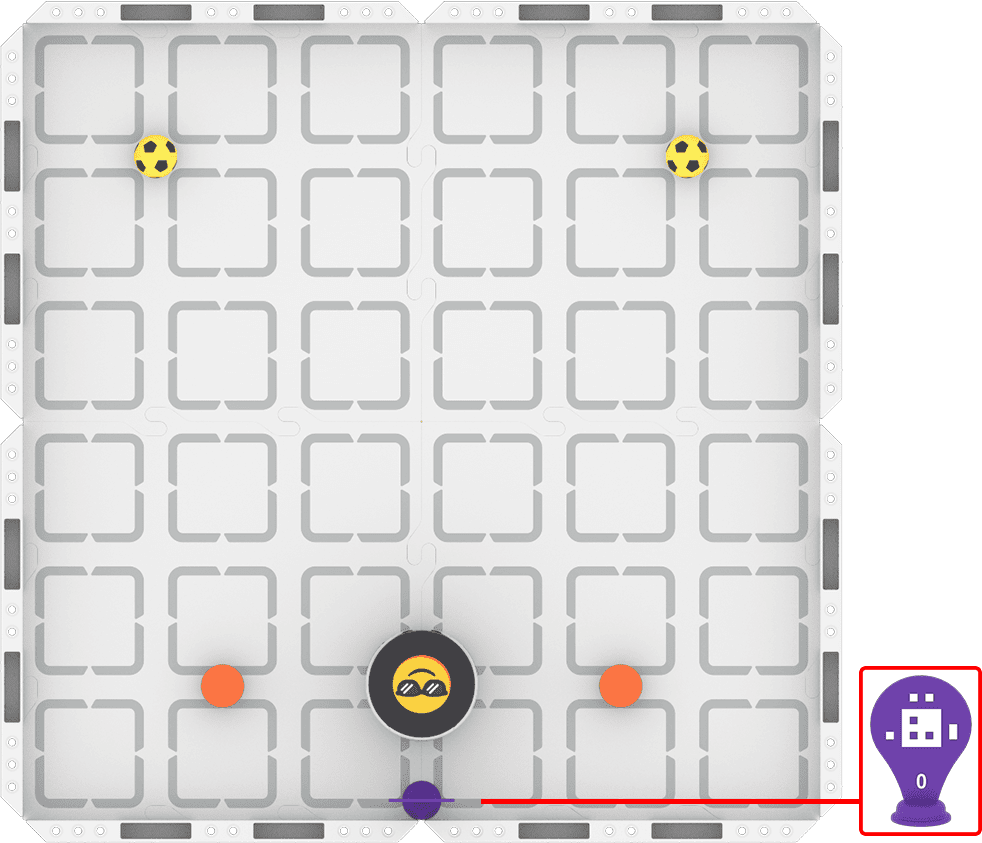
Step 2: Model the movements of the robot needed to complete the challenge using Drive mode.
- Your task is to drive the robot to pick up and score both sports balls by kicking them between the orange barrels as quickly as possible. Document your driving strategy, and plan how you will code those movements.
- Use this task card (Google / .docx / .pdf) to guide your strategy development.
- Pro Tip: Document how you are moving the robot—when are you using AI Vision with the Up button versus driving it manually? This can help you develop your plan.
Step 3: Code the robot to complete the challenge.
- Your task is to use the shared strategy and plan you developed in Step 2 to code the robot to pick up and kick both sports balls between the orange barrels as quickly as possible.
- Use this task card (Google / .docx / .pdf) to guide your coding process.
- Pro Tip: Remember to consider the velocity your robot is moving and turning if you are having trouble detecting objects reliably. Try lowering the velocity to improve the sensor's reliability.
Step 4: Explore! Move between driving and coding to iterate on your project and improve your time!
- Brainstorm with your group ways to improve the reliability and accuracy of your goal kicks.
- Drive the robot to test out different ideas, and explore what AI Vision data you can use for scoring.
- Iterate on your project and run it repeatedly to see if the reliability and overall speed improved as you intended.
- Continue to move between driving and coding to find the best strategy to complete the challenge as quickly as possible!
Share Your Strategy
Once everyone has completed the challenge, it's time to share your strategy with the class. To prepare for this sharing session, answer the following questions in your journal:
- Describe your strategy for this challenge. Why do you think it was successful?
- What was the most impactful iteration you made to your project? Why was it helpful?
- How did you apply what you've learned about the AI Vision Sensor to complete the challenge?
- Do you think your strategy was the best way to complete the challenge? Why or why not?
Reflect and Share
At the start of this unit, you co-created learning targets with your teacher. Once you have completed the challenge, it is time to reflect on your progress toward those learning targets.
For each of your learning targets, complete the following sentences in your journal:
- To begin, I thought ________ because ________.
- Now that we've completed the unit challenge, I understand ________.
- My evidence for this understanding is ________, which shows ________.
Check in with your teacher when you have completed the sentences for each learning target. This reflection will help you share your learning.
Select Return to Units > to go back to all units.