Now that you've explored coding with the AI Vision Sensor on your VEX AIM Coding Robot, it's time to put your skills to the test! In this unit you learned about how the AI Vision Sensor can use visual data to interact with objects in its environment. You turned to and got barrels, and moved them to AprilTags using sensor data. Now it's time to apply everything you've learned to a sports ball challenge! You will collaborate with your group to strategize how to pick up and kick both sports balls through the goal. Then you will work together to code the robot to complete the challenge, iterating on your project to score both goals as quickly as possible.
Review the challenge by watching the video below, and think about how you will complete the challenge with your group.
Now that you have watched the video, capture your thoughts in your journal. Answer the questions below to guide your thinking and help you prepare for a whole-class discussion.
- What are your initial ideas for completing the challenge? List at least two ideas in your journal with details.
- Why do you think that strategy will be successful? Use what you have learned throughout the unit and course to back up your assertions.
- Do you think there are other ways to complete the challenge? Why or why not?
- What questions do you have about the challenge? List at least two in your journal.
Now that you have watched the video, capture your thoughts in your journal. Answer the questions below to guide your thinking and help you prepare for a whole-class discussion.
- What are your initial ideas for completing the challenge? List at least two ideas in your journal with details.
- Why do you think that strategy will be successful? Use what you have learned throughout the unit and course to back up your assertions.
- Do you think there are other ways to complete the challenge? Why or why not?
- What questions do you have about the challenge? List at least two in your journal.
After students have viewed the video, come together for a whole-class discussion. Ensure students clearly understand the challenge goal before beginning, and use their answers to the questions as the basis for discussion.
Guide students to think about ways they could control how quickly they kick the sports balls through the goal. How can they apply what they learned about efficiency, precision, and robot movements to help them as they work on a timed challenge.
Remind students that they can reference all notes in their journals from the whole course to inform their collaborative efforts and discussions during the challenge.
Complete the Challenge
Now that you've discussed the challenge, it's time to try it!
Step 1: Set up your field as shown here. 
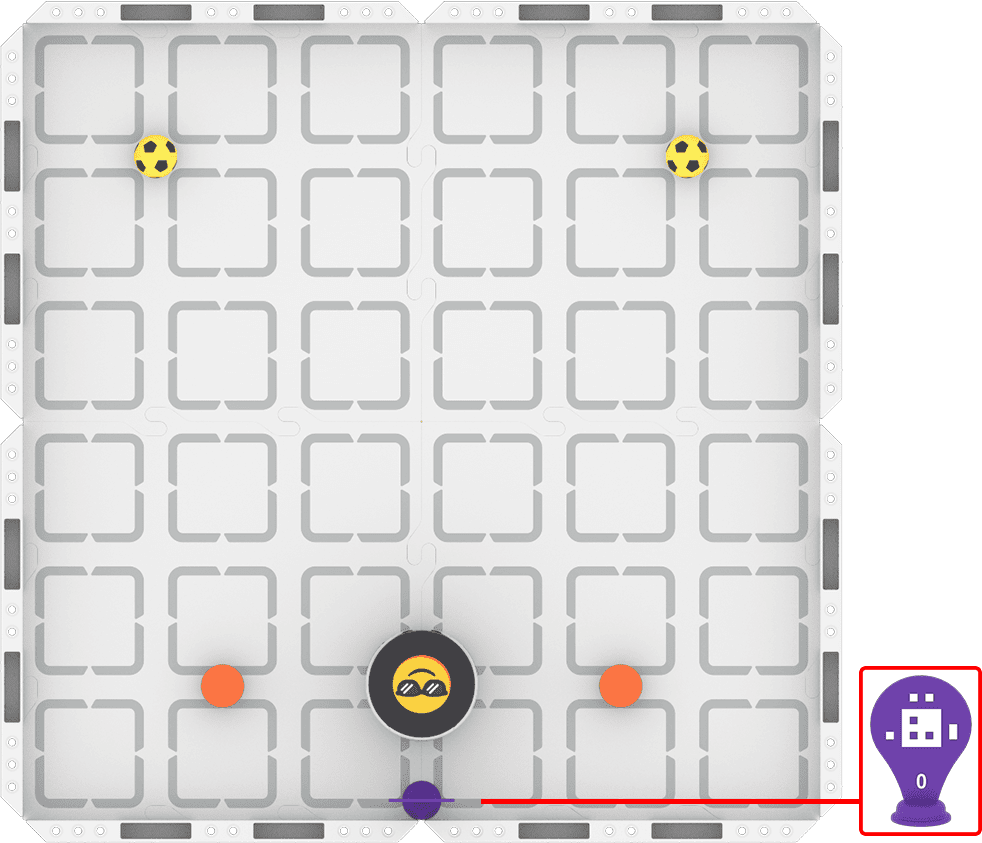
Step 2: Model the movements of the robot needed to complete the challenge using Drive mode.
- Your task is to drive the robot to pick up and score both sports balls by kicking them between the orange barrels as quickly as possible. Document your driving strategy, and plan how you will code those movements.
- Use this task card (Google / .docx / .pdf) to guide your strategy development.
- Pro Tip: Document how you are moving the robot—when are you using AI Vision with the Up button versus driving it manually? This can help you develop your plan.
Step 3: Code the robot to complete the challenge.
- Your task is to use the shared strategy and plan you developed in Step 2 to code the robot to pick up and kick both sports balls between the orange barrels as quickly as possible.
- Use this task card (Google / .docx / .pdf) to guide your coding process.
- Pro Tip: Remember to consider the velocity your robot is moving and turning if you are having trouble detecting objects reliably. Try lowering the velocity to improve the sensor's reliability.
Step 4: Explore! Move between driving and coding to iterate on your project and improve your time!
- Brainstorm with your group ways to improve the reliability and accuracy of your goal kicks.
- Drive the robot to test out different ideas, and explore what AI Vision data you can use for scoring.
- Iterate on your project and run it repeatedly to see if the reliability and overall speed improved as you intended.
- Continue to move between driving and coding to find the best strategy to complete the challenge as quickly as possible!
Now that you've discussed the challenge, it's time to try it!
Step 1: Set up your field as shown here. 
Step 2: Model the movements of the robot needed to complete the challenge using Drive mode.
- Your task is to drive the robot to pick up and score both sports balls by kicking them between the orange barrels as quickly as possible. Document your driving strategy, and plan how you will code those movements.
- Use this task card (Google / .docx / .pdf) to guide your strategy development.
- Pro Tip: Document how you are moving the robot—when are you using AI Vision with the Up button versus driving it manually? This can help you develop your plan.
Step 3: Code the robot to complete the challenge.
- Your task is to use the shared strategy and plan you developed in Step 2 to code the robot to pick up and kick both sports balls between the orange barrels as quickly as possible.
- Use this task card (Google / .docx / .pdf) to guide your coding process.
- Pro Tip: Remember to consider the velocity your robot is moving and turning if you are having trouble detecting objects reliably. Try lowering the velocity to improve the sensor's reliability.
Step 4: Explore! Move between driving and coding to iterate on your project and improve your time!
- Brainstorm with your group ways to improve the reliability and accuracy of your goal kicks.
- Drive the robot to test out different ideas, and explore what AI Vision data you can use for scoring.
- Iterate on your project and run it repeatedly to see if the reliability and overall speed improved as you intended.
- Continue to move between driving and coding to find the best strategy to complete the challenge as quickly as possible!
Be sure students are clear on challenge expectations – both for collaboration and the flow of the challenge. Remind students of roles and decision-making strategies that have been successful during previous challenges.
Distribute the Step 2 task card (Google / .docx / .pdf) to students to guide them through the driving and planning part of the challenge. Remind students that they can review lesson videos or notes at any time to revisit concepts or content to help them complete the challenge.
As students are driving and strategizing, circulate around the room to engage in discussions about their understanding of the AI Vision Sensor. Ask questions like:
- Describe how the AI Vision Sensor is working as you're completing the task. How do you know?
- How does using a sensor impact the way you develop and document your strategy?
- How are you applying what you've learned about precision to complete this task? Do you need to consider precision when using a sensor? Why or why not?
Distribute the Step 3 task card (Google / .docx / .pdf) to students once they have checked in with you and met the success criteria for driving and planning.
Circulate around the room as students are building and testing their projects, to check in on their process and progress with the challenge. Ask questions like:
- How many sports balls have you kicked successfully? What is your next step to complete the challenge?
- How is your project using data from the AI Vision Sensor to complete a task? How do you know that?
- Are there other ways you can use the AI Vision Sensor to complete this challenge? Why or why not?
Students can move on to Step 4 once they have a coding project that completes the challenge. They should move between brainstorming, driving, and coding to iterate on their projects to complete the task in less time, or improve their project's reliability or accuracy. Ensure groups agree on what they’re trying to improve before testing their ideas.
As you move around the room while students are iterating, ask questions like:
- How reliably does your robot score both sports balls? If you run your project multiple times, is the timing the same each time? Why or why not?
- How can you apply what you know about the movement of the robot to help you make your project more efficient?
- Describe the goal for your iteration idea. Why do you think that change will accomplish that goal?
In a unit challenge, you can determine when it is time to end the challenge and transition students into sharing their learning. Once you feel that all groups have had time to complete the challenge effectively and iteratively, wrap up the challenge phase and move on to strategy sharing.
Share Your Strategy
Once everyone has completed the challenge, it's time to share your strategy with the class. To prepare for this sharing session, answer the following questions in your journal:
- Describe your strategy for this challenge. Why do you think it was successful?
- What was the most impactful iteration you made to your project? Why was it helpful?
- How did you apply what you've learned about the AI Vision Sensor to complete the challenge?
- Do you think your strategy was the best way to complete the challenge? Why or why not?
Once everyone has completed the challenge, it's time to share your strategy with the class. To prepare for this sharing session, answer the following questions in your journal:
- Describe your strategy for this challenge. Why do you think it was successful?
- What was the most impactful iteration you made to your project? Why was it helpful?
- How did you apply what you've learned about the AI Vision Sensor to complete the challenge?
- Do you think your strategy was the best way to complete the challenge? Why or why not?
Once everyone has completed the challenge, come together for a whole-class strategy sharing session and discussion. Remind students of expectations for respectful discourse and active listening strategies.
By the end of the discussion, students should have viewed all of the strategies and engaged in discourse to come to consensus about what the best approach for this challenge means for them. Encourage students to think about what “best” means in the context of this challenge. Timing is important, but what other factors or criteria could also be used? If students struggle to identify other criteria, ask what they would use as a tiebreaker if two projects finished at the same time.
Reflect and Share
At the start of this unit, you co-created learning targets with your teacher. Once you have completed the challenge, it is time to reflect on your progress toward those learning targets.
For each of your learning targets, complete the following sentences in your journal:
- To begin, I thought ________ because ________.
- Now that we've completed the unit challenge, I understand ________.
- My evidence for this understanding is ________, which shows ________.
Check in with your teacher when you have completed the sentences for each learning target. This reflection will help you share your learning.
At the start of this unit, you co-created learning targets with your teacher. Once you have completed the challenge, it is time to reflect on your progress toward those learning targets.
For each of your learning targets, complete the following sentences in your journal:
- To begin, I thought ________ because ________.
- Now that we've completed the unit challenge, I understand ________.
- My evidence for this understanding is ________, which shows ________.
Check in with your teacher when you have completed the sentences for each learning target. This reflection will help you share your learning.
Once students have completed their reflections in their journals, come together for a whole-class discussion. Invite students to share what they wrote in their journals, and guide students toward shared conclusions about each of the unit understandings or learning targets. Ask questions like:
- Does that explanation align with what you observed and documented in the unit? Why or why not?
- Are there other details we could add to that explanation to make it better? What are they and why is that helpful?
- Can we agree on one shared idea based on our combined evidence and discussions throughout the unit? Why or why not?
Once you have guided students to converge their thinking around unit understandings, you may want to create or add to the evidence of students' learning around the classroom, for students to refer to moving forward.
Finally, students should relate their learning to the real-world connections they brainstormed at the beginning of the unit. Guide the discussion with questions like:
- How does our learning in this unit better help us understand the real-world examples we talked about earlier?
- How would you describe how a real-world sensor works to someone who didn't know about robotics, based on your experience with the AI Vision Sensor? (Student answers will vary depending on their relevant experience.)
Select Return to Units > to go back to all units.