
Play
Part 1 - Step by Step
- InstructInstruct students that they will begin by decoding the starter password on the robot. This will help them learn about how the password is coded on the robot. Tell students that the starter password consists of three numbers. Show students the animation below, and ask them to observe the LED Bumper carefully.
In the animation, the Code Base is sitting in the center of a Tile. The LED Bumper flashes red 8 times, green 3 times, and then red again 5 times.
Video file - ModelModel how to decode the first number in the password, using the flashes on the LED Bumper.
- Using the animation or one group's setup, have students watch one robot as the project is run. Be sure that all students can see the LED Bumper. Guide students to pay attention to the LED Bumper flash pattern using the questions like:
- How do you think the LED Bumper can represent a number in the password?
- What colors did the LED Bumper show in the animation? How do you think the colors align to numbers in the password?
- The first set of flashes is red, which number in the password do you think that represents? Why?
- How can we know which numbers are in the password? What can we count?
- Run the project, and call students' attention to counting the first set of red flashes on the LED Bumper.
- If necessary, show students how to connect the Brain on their Super Code Base to their device in VEXcode GO. Because connection steps vary between devices, see the Connecting articles of the VEXcode GO VEX Library for specific steps to connect the VEX GO Brain to your computer or tablet.
-
Select 'Start' in VEXcode GO to test the project.
Select 'Start' to run the project -
Select 'Stop' to stop the project after the first Repeat block has run and shown the first number in the password.
Select 'Stop'
- Ask students what they think the first number in the password is, and why. Write the number(s) on the board as students share their answers.
- Run the project a second time to check the answer. This time, count the flashes together as a group while the project is running.
- Stop the project after the first Repeat block is run, and the first set of red flashes has concluded.
-
The first number in the password is 8. The number matches the parameter in the first Repeat block in the project, as shown here.
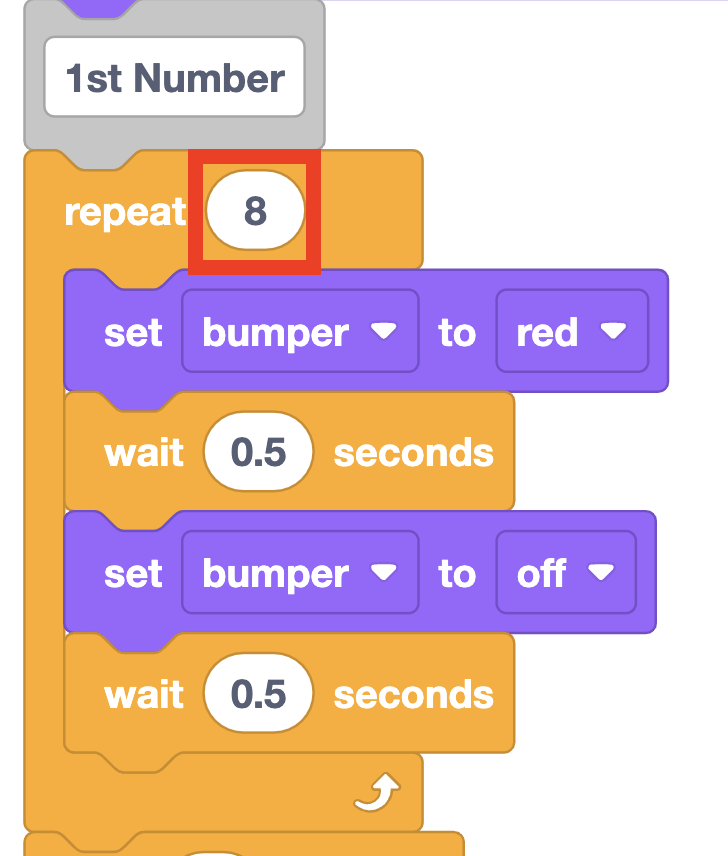
First number in the password
- Now that students have decoded the first number in the password, have them find the remaining two numbers in their groups.
- Using the animation or one group's setup, have students watch one robot as the project is run. Be sure that all students can see the LED Bumper. Guide students to pay attention to the LED Bumper flash pattern using the questions like:
- FacilitateFacilitate students running the project and determining the starter password in their groups.
- Encourage students to pay attention to just one color of flashes at a time, as they run the project. Remind students to run the project multiple times so they can find the number, then check their answer. Ask questions to guide them through the decoding process:
- Which color is the second number in the password?
- How are you determining the number? What are you counting?
- If you and your partner disagree on the number, what will you do to help you determine the password together?
-
If students are struggling to keep track of the numbers as the project is running, have them tally the flashes as the project is running to help them determine the password. Each number in the password should correspond to the tally marks, as shown in this example using a Blueprint Worksheet.
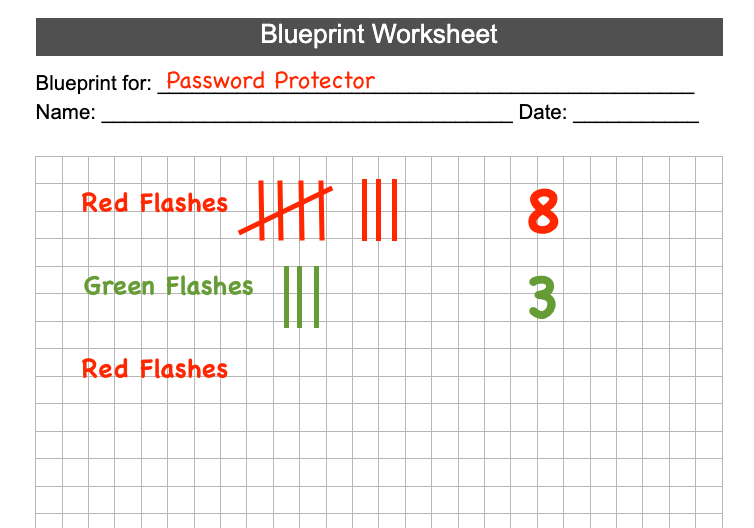
Example tally of flashes - If students disagree about the numbers in the password, help them to reach consensus with strategies like:
- Making a tally of the flashes while the project is run
- Counting the flashes out loud together
- Taking turns starting and stopping the project, and counting the flashes (so the attention is focused on one or the other)
- Only counting one set of flashes at a time.
- Teacher Tip: The starter password is 8 - 3 - 5. If students are struggling to decode the correct numbers, check their project to be sure that they have the correct parameters in the Repeat blocks. The first Repeat block should have a parameter of 8, the second should read 3, and the final should read 5.
- Once students have figured out all three numbers, help them begin to connect their code to the numbers in the password. Ask questions like:
- Do you see the numbers you decoded in the project anywhere?
- What do you think the parameter of the Repeat block is doing?
- Why is the Repeat block parameter the same as the number in the password? What behaviors does that block control?
- Encourage students to pay attention to just one color of flashes at a time, as they run the project. Remind students to run the project multiple times so they can find the number, then check their answer. Ask questions to guide them through the decoding process:
- RemindRemind students that they can start and stop the project as many times as needed to successfully decode the password in their groups.
- AskAsk students to think about other passwords that they use in their daily lives. What strategies do they use to remember their passwords and keep them safe and secure?
Mid-Play Break & Group Discussion
As soon as every group has decoded all three numbers of the starter password, come together for a brief conversation.
Have groups share the starter password that they decoded.
- You may want to have groups write the password they decoded, and hold them up for everyone to see at the same time, or go around the classroom so each group can share.
- If there are groups with differing passwords, run the project or show the animation again, to count all the flashes together as a class, to 'check' the password together.
Once the class has determined the password to be 8 - 3 - 5, connect the numbers in the starter password to the project.
- Now that we know the numbers in our starter password, let's connect them to our project. Where do you think the numbers 8, 3, and 5 will be? Why?
-
Let's look together at the project. Where do you see the numbers in the password?
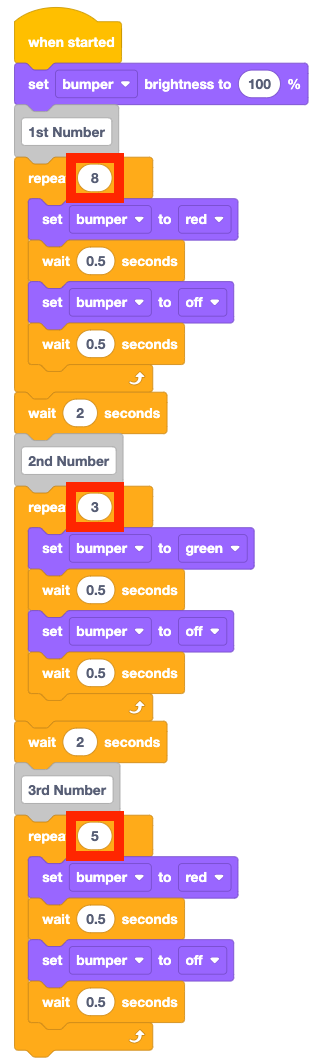
Password numbers correspond to the Repeat block parameters - Why does the Repeat block parameter cause the LED Bumper to flash 8, 3, or 5 times? What behaviors does the Repeat block control?
- When we change our passwords to make them unique, which parameters will we need to change in the project? Why?
Talk about why students are going to change their passwords so they are different from one another.
- Right now, all of the cooling couriers have the same password to the lab. Is that a good idea? Why or why not?
- Why do you think it's important to have unique passwords to keep the cooling cell lab safe and secure?
- What if your password and another group's is similar? Is that ok? Why or why not?
Before we change our passwords in our projects, we need to choose a new password with our partner. Help students think about how to develop a safe, unique password collaboratively by asking questions like:
- What are some things we want to think about when choosing a password?
- Should our password be easy for anyone to guess? Why or why not?
- Should our password be easy for us to remember? Why or why not?
- What is a strategy your group can use to help you choose a password together? Why is it important for the group to agree on the password?
- Should you write your password down to help you remember it? Why or why not? What is something else you can do to remember a password and keep it safe?
Part 2 - Step by Step
- InstructInstruct students that they will now code a new password for their robot. They will need to be able to remember the password without writing it down, so they will use their VEX GO Kits to help them do so. They will represent the numbers in the new password they choose using VEX GO pieces. Then they will edit their code to show the new password with the LED Bumper.
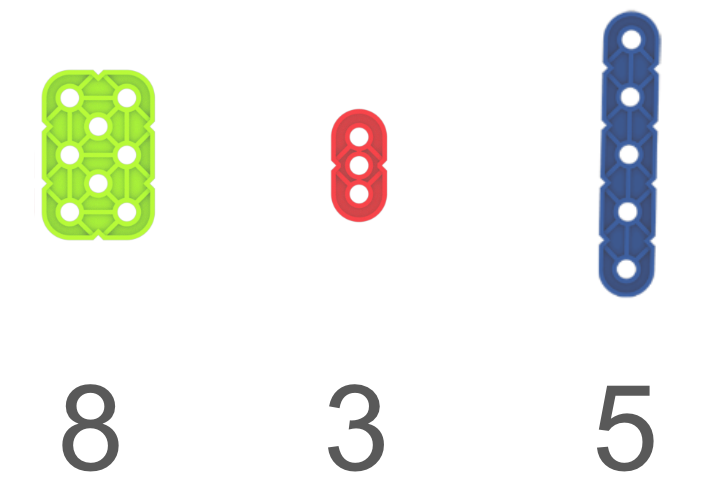
Example strategy with VEX GO pieces - ModelModel for students how to use pieces in the VEX GO Kit to help them remember a password without writing it down. In the example strategy, the password numbers are represented by the number of holes in each of the VEX GO pieces.
- Begin with the starter password, as the example. Show students the images in the Lab 2 Image Slideshow, and ask them why they think each of those pieces corresponds to the number beneath it. Ask questions to guide students to identifying the number of holes on each piece as the strategy, like:
- This strategy uses the same feature on each of the pieces to represent the numbers in the password. What features do the pieces have in common?
-
Look at the first piece, the Green Large Beam. It corresponds to the number eight in the starter password. Does that piece have eight of something?
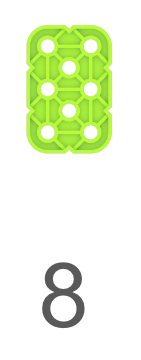
How does this piece represent the number 8? -
Look at the Red Beam, which corresponds to the number three. What does it have three of?
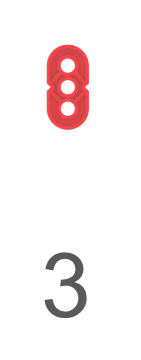
How does this piece represent the number 3? -
Do you notice five of something on the Blue Beam?
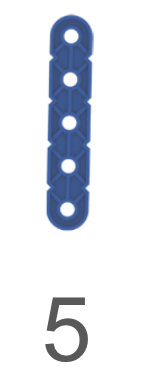
How does this piece represent the number 5?
- There are many strategies that can be used to represent numbers in a password with VEX GO pieces. Students will need to choose a strategy that works for their group. Give students an opportunity to explore this concept by identifying other pieces that could be used to represent the number eight.
- Have students share their ideas and explain why they represent the number 8 to them.
-
The important thing about the strategies is that they are memorable to the students using them. Just as there were many ways to get the robot to deliver the cooling cells in the previous Lab, there will be many ways to represent a password with the VEX GO Kit.
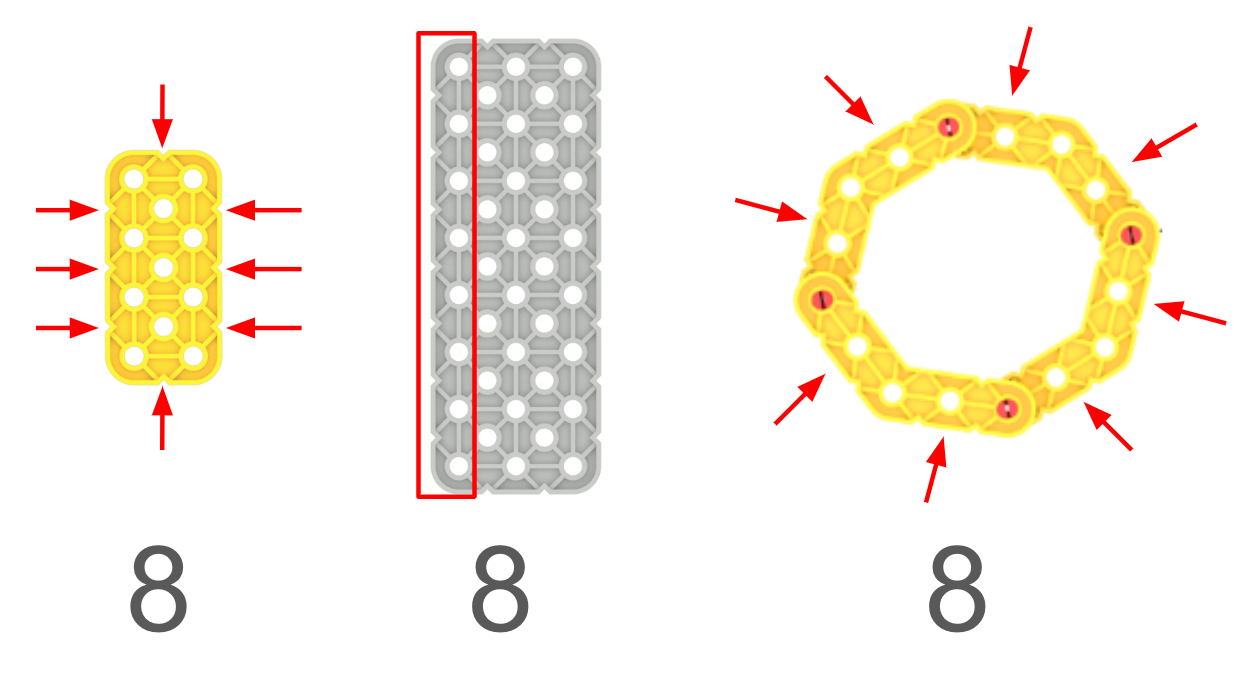
Examples of representations of the number 8
- Have students work in their groups to choose new numbers for their password. They should then represent those numbers using VEX GO Kit pieces. Once each group has a new password chosen and represented with pieces, they should check in with you to explain their strategy, before editing their project.
- After checking in with you, groups can edit their project to show the new password with the LED Bumper.
- They should edit the project, then run it to test it. Be sure groups are changing the parameters in each of the Repeat blocks to show the numbers in their password in the correct order.
-
Students can use the Comment blocks to help them find the associated Repeat parameter for each number in the password.
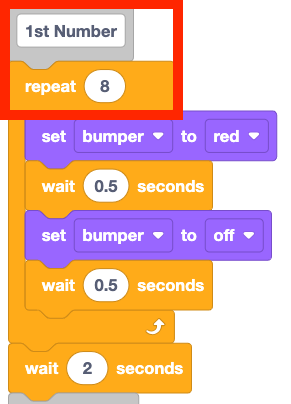
Use the comments to help edit the project
-
- Students can use the same method for decoding from Play Part 1, to ensure that the LED Bumper is flashing the correct number of times to represent the new password.
- Groups should check in with you to show you their completed password project. Remind students to rename and save their project to store their new password.
- They should edit the project, then run it to test it. Be sure groups are changing the parameters in each of the Repeat blocks to show the numbers in their password in the correct order.
- Begin with the starter password, as the example. Show students the images in the Lab 2 Image Slideshow, and ask them why they think each of those pieces corresponds to the number beneath it. Ask questions to guide students to identifying the number of holes on each piece as the strategy, like:
- FacilitateFacilitate students working in their groups to develop their new passwords and strategies for remembering them. Once students can effectively explain their strategy and how it connects to the numbers in their new password, then they can edit their projects.
- Facilitate conversations about how students are choosing the numbers in their new password. Remind them that the password should be something that is not easily guessed by others (like a birthdate), but something they can remember. Ask questions like:
- How did you decide on the numbers in your password?
- Do you think someone who knows you would be able to guess this password easily? Why or why not?
- Encourage students to be creative in their memory strategies. Remembering passwords is unique to everyone, so the strategy should make sense to the students using it, but does not need to be shared by multiple groups. Help students consider how password management strategies can be different for different people by asking questions like:
- If you had a different partner, do you think you would use the same pieces to remember your password? Why or why not?
- What if you needed to help someone who could not see remember the password? What pieces in the VEX GO Kit would you use to represent the password?
- If you had another student join your group how would you explain your strategy? What would you do if they needed to have a different representation in order to remember the password? How could you learn about what their needs were to make a strategy that works for everyone?
- Have students check in with you again once they have coded their password. Be sure that the parameters of the Repeat block correspond to the numbers in their new password.
- Once students have finished coding their password, they should record the answers to the following questions on a Blueprint Worksheet. (Students can share their answers as part of the discussion in the Share section of the Lab.)
- How do you know your password is secure?
-
What strategy did you use for remembering your password without writing it down?
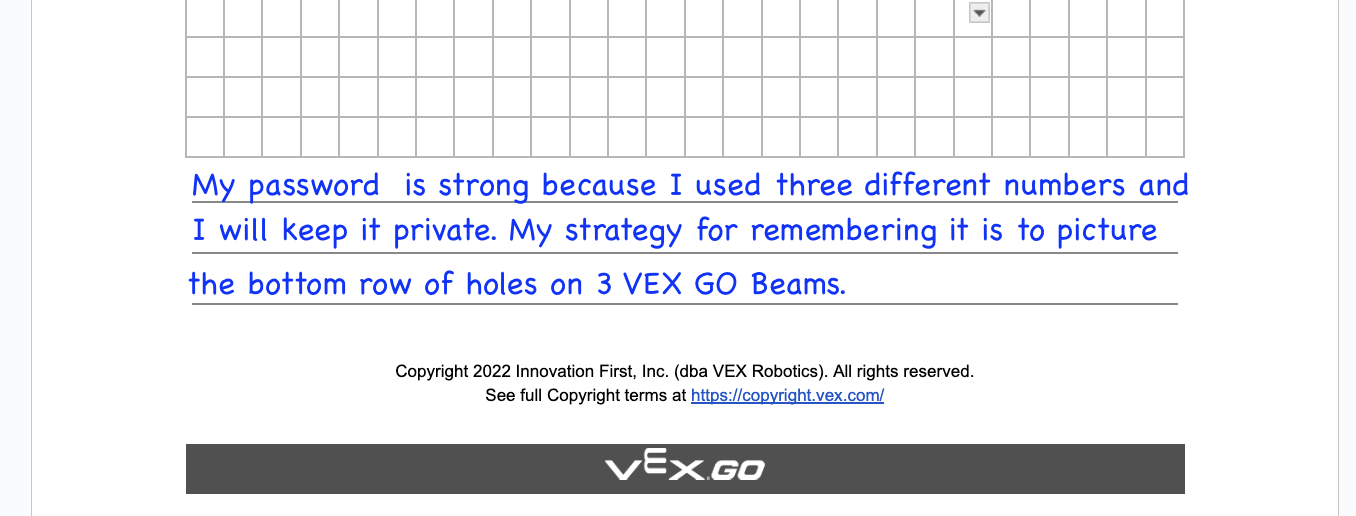
Example of answers to password safety questions
- If students finish quickly and need an additional challenge, ask them to create a different password representation using the pieces in their Kit.
- You could challenge them to think about people with diverse needs and abilities, and adapt their strategy to meet the needs of someone who:
- has visual impairment
- has fine motor challenges and cannot build with VEX GO pieces themselves
- has auditory difficulties, and can't hear well
- You could challenge them to think about people with diverse needs and abilities, and adapt their strategy to meet the needs of someone who:
- Facilitate conversations about how students are choosing the numbers in their new password. Remind them that the password should be something that is not easily guessed by others (like a birthdate), but something they can remember. Ask questions like:
- RemindRemind students that remembering passwords without writing them down is important for keeping passwords safe and secure. This is a great opportunity to talk about sharing passwords as well. Ask questions like:
- As a cooling courier, what if someone asked you to share your password to the lab? Should you share it with them? Why or why not?
- What would you do if a grown up that you didn't know asked you for your password to a website you use at home? Should you share it with them? Why or why not?
- What should you do if a parent or teacher asks for a password to help you with a school assignment? Should you share it with them? Why or why not?
- AskAsk students what other things they do to help manage their passwords and devices and keep them secure. You can talk about how strategies like logging out/off of a device when you finished with it, or using different passwords for different devices or logins is important.