
Engage
Launch the Engage Section
ACTS is what the teacher will do and ASKS is how the teacher will facilitate.
| ACTS | ASKS |
|---|---|
|
|
Engage
-
InstructInstruct
students that they are going to create projects that have their 123 Robots act out “Calm Down Codes” they can use to practice calm down strategies alongside their robots. First, they are going to practice by coding one calm down strategy together. The animation below shows an example calm down strategy, like taking a deep breath, using the colors of the 123 Robot to represent breathing in and out. The doorbell sound signals the end of the breath. Turn on sound for this animation.
Video file
- DistributeDistribute 123 Robot, Coder and Coder cards, and a Field for demonstration purposes. Students will collect their materials after the demonstration.
-
FacilitateFacilitate
a discussion of breaking calm down strategies into each human action, and then representing them with Coder cards. You can use the strategy from the example, or a different strategy of your choice, and guide students to select Coder cards to represent each human action in the strategy.

Example Calm Down strategy project - Be sure that the whole class can see the 123 Robot and Field setup, as well as the Coder cards when shown.
-
Help students to link Coder Cards to each action included in a calm down strategy by listing them side-by-side on the board. For example, Breathe in = Glow blue and Wait 2 seconds, and Breathe out = Glow green.
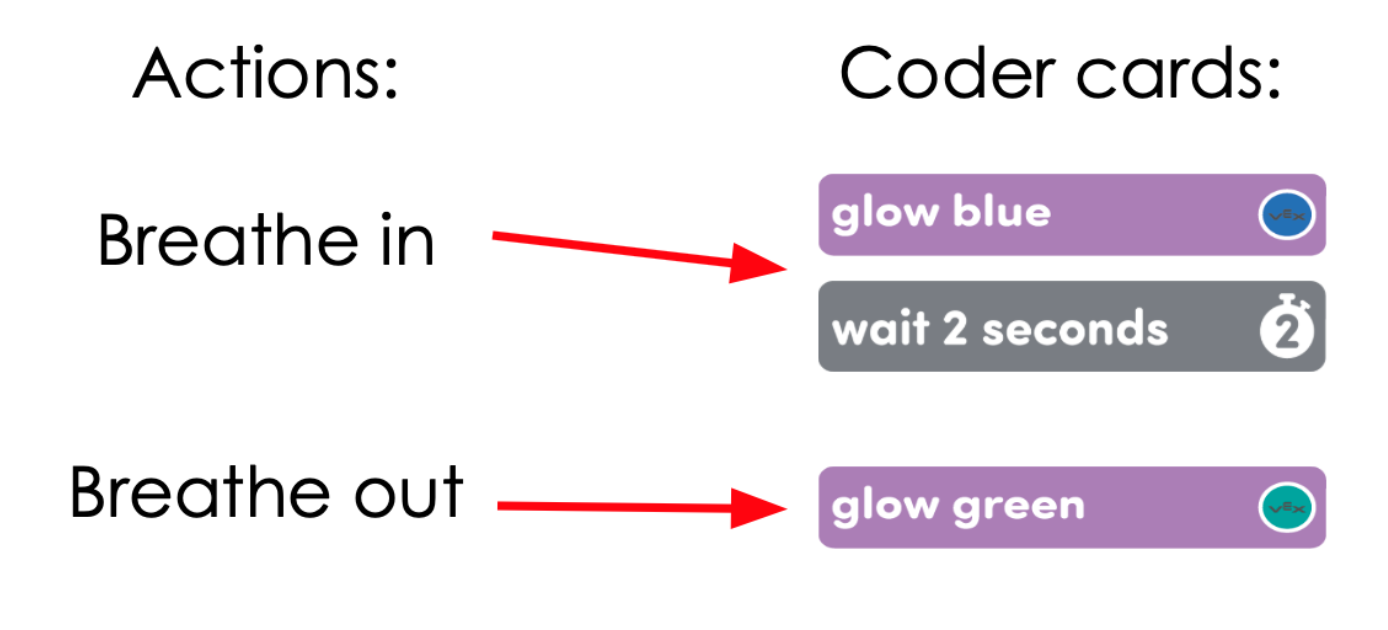
Match Coder cards to actions - As students suggest Coder cards to match with human actions, ask students to explain why they think the Coder cards are a good match for that action. Students may have different ideas for representations, and that is ok. Encourage students to be thoughtful and considerate as they listen to each other's ideas.
- Demonstrate adding Coder cards to the coder, and start the project to test it. Facilitate students connecting Coder cards to 123 Robot behaviors by showing them the Coder and asking them to predict what the 123 Robot is going to do first when the project is started.
- As the project runs, verbalize the human behavior that each robot action corresponds to.
- Start the project a second time, and have the class carry out the actions in the strategy alongside the 123 Robot, as the project runs.
- OfferOffer positive reinforcement for good listening skills and active engagement in discussion.

Teacher Troubleshooting
- If students are having trouble coming up with calm down strategies, practice several together with the class before creating your demonstration project. Discuss which Coder cards could be used to represent those strategies.
- If students are having difficulty making decisions about which Coder cards to use to represent their desired behavior, try limiting their choices of Coder cards available. Give students discrete choices, like Glow blue OR Play honk. Or, pair common actions with types of Coder cards, like Looks cards connect to opening or closing eyes, and Motion cards connect to breathing.
- Remind students that the Coder cards will run in order, from top to bottom, in the order in which they are inserted in the Coder. If they want to change the sequence of behaviors, they can reorder the Coder cards.
- For more information on using the Coder, see the Using the VEX Coder VEX Library article.
- For additional information on working with the 123 Robot including charging, waking and coding the robot, see the Using the VEX 123 Robot VEX Library article.
Facilitation Strategies
- Social-Emotional Learning Beyond the Lab - Reinforce the use of calm-down strategies by finding time to practice a variety of calm-down strategies throughout the school day. You can ask students to choose a calm-down strategy, or you can choose one for them.
- Robot Calm-Down Corner - Create a calm-down learning corner in your classroom by setting up a field with a 123 Robot and Coder. Post some of the students’ calm-down codes for them to use when they need to take a break or calm down. Have students practice the strategies alongside the 123 Robot.
- Human - Robot Behavior Connections - Encourage students to act out the human behaviors they are trying to represent with the 123 Robot, to help make the connection between them more clear.
- Take Turns - Throughout the Lab, students should take turns in their groups. Suggestions for facilitating this include:
- To get started with the 123 Robot and Coder, one student can wake up the 123 Robot, while the other pairs the Coder.
- During Play, have one student insert the Coder cards, and the other start the project.
- Use Coder card posters to reinforce learning with the Coder - Highlight specific Coder cards, or refer to cards as you are teaching with the Coder card posters.
Students can use these posters to review terminology as they are working with VEX 123. See the Using Coder Cards Posters in the Classroom VEX Library article to access these printable posters and to see more strategies for using them in your learning environment.