
Alternate Coding Methods
Adapt this Unit to Use an Alternate Coding Method
This STEM Lab Unit is written specifically to aid in the transition from coding using the Touch buttons to coding using the Coder and Coder cards. However, you could adapt the activities in this Unit to aid in the transition from coding using the Coder and Coder cards, to coding using VEXcode 123. For instance, wherever there are references to coding with Touch buttons, you would refer to the Coder and Coder cards. Then, just as students make the connections between Touch button commands and Coder cards, you would guide students to connect Coder cards to VEXcode 123 Blocks.
If using this Unit to transition to VEXcode 123, students can use the [Drive for] and [Turn for] blocks to drive the 123 Robot in the coding activities. For more information on how to work with VEXcode 123, see the VEXcode 123 Section of the STEM Library.
| VEXcode 123 Block | Behavior |
|---|---|
 |
The [Drive for] block moves the 123 Robot forward or in reverse a given distance. Set how far the 123 Robot will move by entering a value into the oval. |
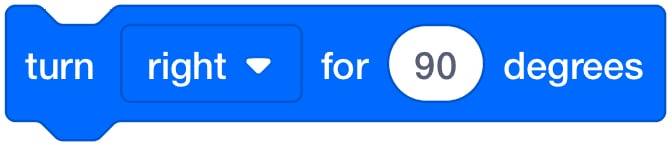 |
The [Turn for] block turns the 123 Robot in place to the left or right for a specified number of degrees. |
-
If transitioning from the Coder and Coder cards to VEXcode 123, guide students to follow a step-by-step process to connect their 123 Robots to VEXcode 123. In Lab 1, students can use the [Drive for] block for Play Part 1, to test that their 123 Robots and devices are successfully connected.
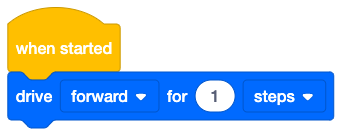
Project to 'test' connection in Play Part 1 -
For Lab 1, Play Part 2, students can add a [Turn for] block and an additional [Drive for] block to drive their 123 Robots to the lions.
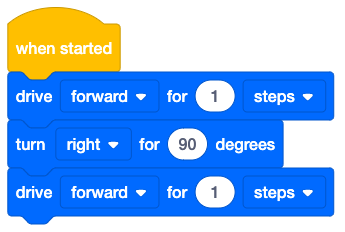
Project to drive to the lion in Play Part 2 -
For Lab 2, students can continue to build on their Lab 1 projects in Play Part 1, to drive the 123 Robot to visit the tigers and bears using additional [Drive for] and [Turn for] blocks.
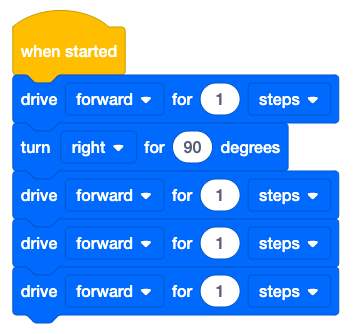
Possible solution to drive to the lions and then the tigers in Play Part 1 -
For Lab 2, Play Part 2, students can add blocks and adjust the parameters in the [Drive for] and [Turn for] blocks to drive their 123 Robot to reach all three animals in the zoo.
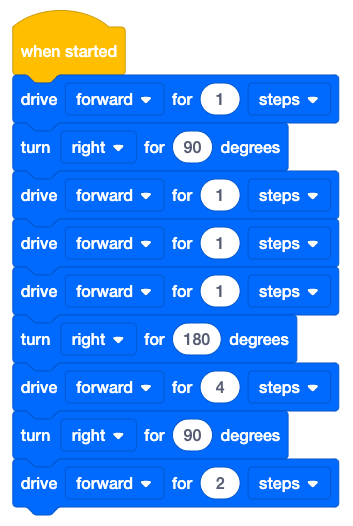
Possible solution to drive to all three zoo animals in Play Part 2