Session 6 Your First V5RC Match
Before you Begin
Before You Begin This Session
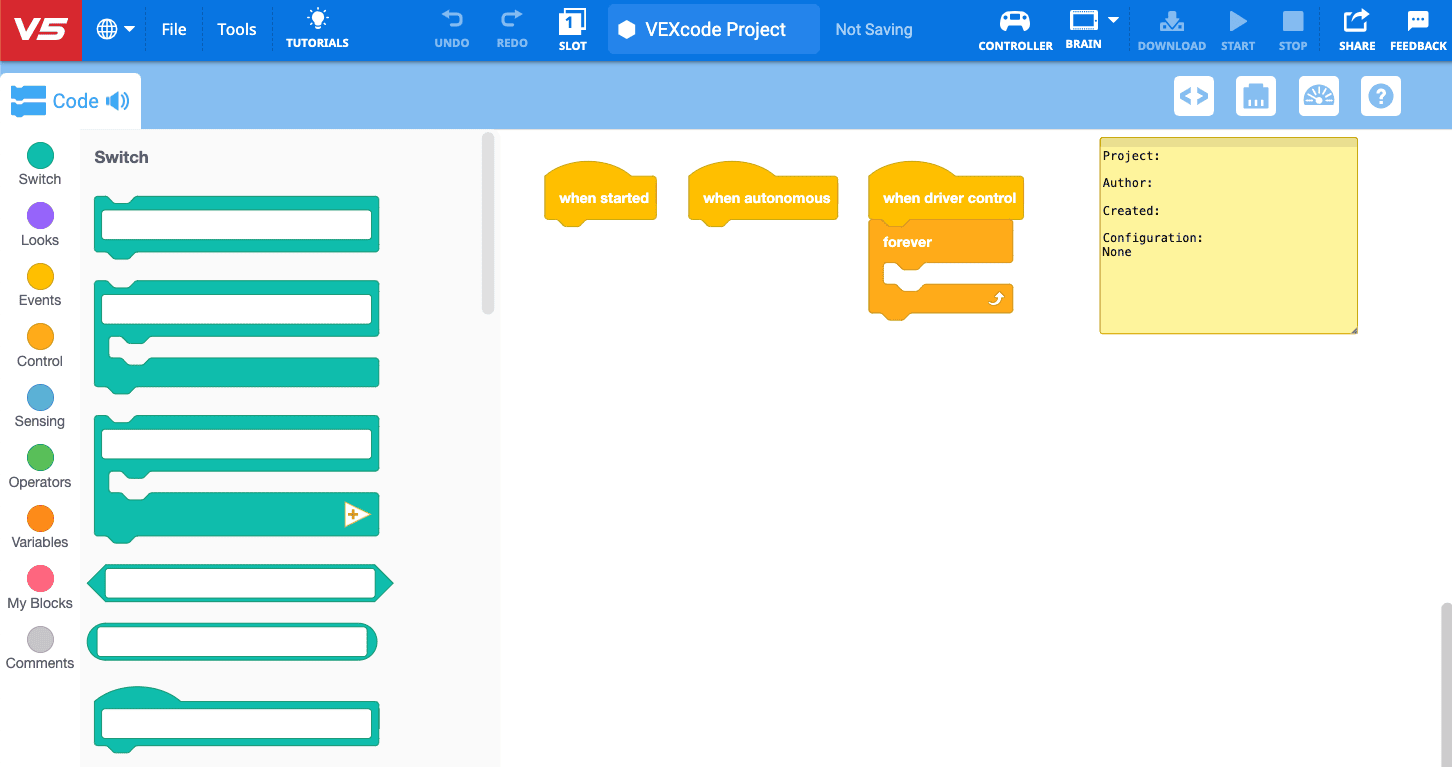
In this session, your team will learn about the structure of a V5RC match while becoming familiar with the Competition Template. The template reflects the structure of a typical match, and students will explore how the two connect as they prepare for their first competition experience.
Students will need to use VEXcode V5 in this session. Be sure that students have a computer with access to VEXcode V5. Go here to learn more about accessing VEXcode V5.
Teams must use the Competition Template during a competition. The Competition Template is an example project in VEXcode V5. It has blocks already included to communicate with the Field Control System during competition, ensuring projects are in compliance with Field regulations to avoid complications and disqualification.
In this session, students will learn about how the parts of the Competition Template relate to the structure of a match. By the end of the session, they will test their project to practice for a match. They will also be guided through how to add blocks to the Competition Template to create their first project for the 15-second autonomous portion of the match.
Have your kit and materials ready for the session before you begin. You will need the following:
- A built Hero Bot.
- Charged controller and batteries.
- A built V5RC Push Back Competition Field.
- VEXcode V5.
- An engineering notebook.
You may want to read the following resources before beginning, for some helpful background information about the Field Control System and Competition Template:
You can also review strategies for implementing this STEM Lab with your team.
- Use the Implementing a Competition 101 STEM Lab article to help you prepare and facilitate this session.
- Read the Making Competition 101 STEM Labs Work For All Students article for ways to adapt, or differentiate, session content to meet varying student needs.
- Review the considerations in the Cultivating a Positive Team Culture article to support your teams' growing collaboration skills.
It's time to prepare for your first V5RC match! In this session, you will learn about the structure of a match so that you can be prepared for what will happen when you get to the Field at a competition. You'll use VEXcode V5 and the Competition Template to create your first V5RC project for a competition match, and learn how to start the project on your Controller.
Before you begin, make sure you have the following ready:
- A built Hero Bot.
- Charged controller and batteries.
- A built V5RC Push Back Competition Field.
- VEXcode V5.
- An engineering notebook.
What is the structure of a V5RC match?
The Competition Template accounts for the three main components of a match:
- Pre-Auton / Set Up Mode: Here the team can code actions such as calibrating a gyro, setting variables, or other device settings. These blocks will run immediately when the program is started, before the autonomous portion of the match begins.
- Autonomous Mode: The first 15 seconds of a match is the autonomous period. Here, your robot performs coded behaviors, and driver control is disabled. You can earn an extra point based on your robot's ability to score in this part of the match.
- User Control Mode: The remaining 1 minute 45 seconds is where you drive your robot in the match. Here your robot runs the code that allows the driver to control the robot during the competition.
The Competition Template is required to be used when competing in a V5RC match. Watch the video below about using the Competition Template to prepare for a match.
In this video you will learn about:
- What each of the stacks in the Competition Template are for.
- Building code for the autonomous period.
- How to configure your Controller in VEXcode V5 for your driving preferences.
- How to run the Competition Template project on your Controller to simulate a match.
It's time to prepare for your first V5RC match! In this session, you will learn about the structure of a match so that you can be prepared for what will happen when you get to the Field at a competition. You'll use VEXcode V5 and the Competition Template to create your first V5RC project for a competition match, and learn how to start the project on your Controller.
Before you begin, make sure you have the following ready:
- A built Hero Bot.
- Charged controller and batteries.
- A built V5RC Push Back Competition Field.
- VEXcode V5.
- An engineering notebook.
What is the structure of a V5RC match?
The Competition Template accounts for the three main components of a match:
- Pre-Auton / Set Up Mode: Here the team can code actions such as calibrating a gyro, setting variables, or other device settings. These blocks will run immediately when the program is started, before the autonomous portion of the match begins.
- Autonomous Mode: The first 15 seconds of a match is the autonomous period. Here, your robot performs coded behaviors, and driver control is disabled. You can earn an extra point based on your robot's ability to score in this part of the match.
- User Control Mode: The remaining 1 minute 45 seconds is where you drive your robot in the match. Here your robot runs the code that allows the driver to control the robot during the competition.
The Competition Template is required to be used when competing in a V5RC match. Watch the video below about using the Competition Template to prepare for a match.
In this video you will learn about:
- What each of the stacks in the Competition Template are for.
- Building code for the autonomous period.
- How to configure your Controller in VEXcode V5 for your driving preferences.
- How to run the Competition Template project on your Controller to simulate a match.
The goal of this session is to help students know what to expect when they get to the Field at a competition. Teams are expected to show up to a match on time and “ready to play”. Ensuring that your team understands the Competition Template, and how that relates to a match will set them up for success on competition day.
To learn more about the Competition Template, read this article.
Activity: Build Your Competition Template
Now that you know what the Competition Template is, it's your turn to build and test your own. 
Use this task card (Google doc / .pdf / .docx) to guide you through building and testing your project.
- Review the sections of the Competition Template with this article.
- For help with configuring your Controller in VEXcode V5, read this article
- If you need help testing your Competition Template, follow the steps in this article.
- To learn more about the blocks in the VEXcode V5 Toolbox, use the VEXcode API Reference.
- For more information about the Competition Template and what you will do at a competition match Field, read this article.
Have fun getting ready for your first match!
Now that you know what the Competition Template is, it's your turn to build and test your own. 
Use this task card (Google doc / .pdf / .docx) to guide you through building and testing your project.
- Review the sections of the Competition Template with this article.
- For help with configuring your Controller in VEXcode V5, read this article
- If you need help testing your Competition Template, follow the steps in this article.
- To learn more about the blocks in the VEXcode V5 Toolbox, use the VEXcode API Reference.
- For more information about the Competition Template and what you will do at a competition match Field, read this article.
Have fun getting ready for your first match!
If this is students' first time using VEXcode V5, the following articles may be helpful as you support your team.
- Using the Blocks Competition Template in VEXcode V5
- Running User Programs with the V5 Controller
- Downloading and Running a Blocks Project in VEXcode V5
To learn more about why the Competition Template is required, and how to code in the Competition Template, watch the following videos from the PD+ Introduction to VEX V5 Masterclass:
Remind your team that they can create and save several different Competition Template projects on their robot. Each drive team can have a unique project that configures the Controller to match their preferences. Follow the steps in this article to learn how to save projects to different slots on the Brain.
Encourage all team members to take turns and practice opening, downloading, and running the Competition Template so that they are comfortable with that process. This will help ensure that all of your drive teams come to the Field “ready to play” when it is their turn.
Select Next Session > to move on to the next session.