
Play
Part 1 - Step by Step
- InstructInstruct groups that they will be driving forward and turning their Steering Super Car with the Switches. They will experiment with different combinations using the Switches to steer their car. Watch the animation below to see how the Switches can be used together to steer the car. When both switches are pressed forwards or backwards simultaneously, the car travels in the direction they are pushed. When one is pushed forwards and one backwards, the car turns.
GO Steering Super Car - ModelModel for the students how to predict the motion of the car, then test and record observations using the Data Collection Sheet.
- Walk through predicting, testing then recording observation using the first two rows of the Data Collection Sheet.
- First, make a prediction and draw or write that prediction in the first row of the worksheet.
- Then, demonstrate testing the first combination: Left Motor- Off, and Right Motor - Forward.
- Document student observations on the sheet.
- Ask students if the prediction was correct.
- Repeat for the second row.
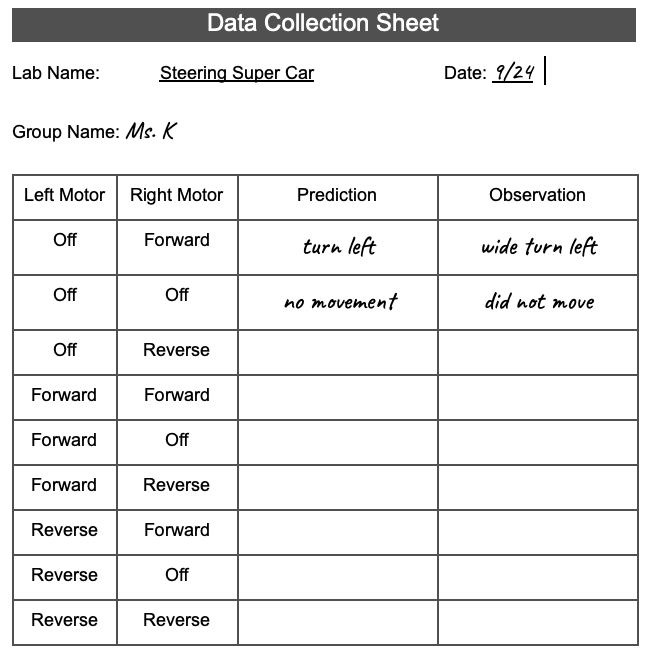
Example Lab 4 Data Collection sheet - After completing the first two rows, have students work with their groups to test the various motor combinations and complete the Data Collection Sheet.
- Walk through predicting, testing then recording observation using the first two rows of the Data Collection Sheet.
- FacilitateFacilitate groups sharing responsibilities and discussions about their observations.
- Builders: Manipulate the motor(s). One builder from each group will control one motor - thus two students should be working together to allow the car to move as a whole.
- Journalists: Document the predictions and observations.
- Begin discussions with students about what they are observing as you circle the room. Encourage all students within the groups to share and express their ideas. Praise students using proper vocabulary terms.

Discuss observations - RemindRemind groups that trial and error are a part of learning, their predictions may not be accurate at first, but if they look for patterns, their predictions will likely improve as they complete more tests.
- Ask students if they are noticing any patterns as they move through the different combinations of the left and right motor.
- How can they apply their understanding of these patterns to better predict the motion of the Steering Super Car?
- AskAsk questions that to foster a growth mindset with students. Help students appreciate that there is much to learn when the Steering Super Car doesn't move as expected.
- The car did not move as expected? Great! What happened? What can you do differently next time?
Mid-Play Break & Group Discussion
As soon as every group has completed the Data Collection Sheet, come together for a brief conversation.
- Why did you have to work with another group to make your car turn?
- Did you recognize any patterns? Did this help you to make better predictions on how the cars would move together?
Part 2 - Step by Step
- InstructInstruct students to gather at a certain area of the room where a Driver Test course is set up. There can be more than one course if space allows. Present the students the challenge of who can navigate through the course the fastest, while still maintaining control. Watch the animation below to see an example of a Steering Super Car driving and turning using the Switches to complete the course.
An example of what the course could look like - ModelModel how to navigate the course by using turning movements. Watch the animation below to see how the Switches can be used to turn the Steering Super Car in place. The video shows a close-up of the two switches in a horizontal position, with the robot to the right. The top switch is pushed forward, and the robot turns towards the right.
Video file
- FacilitateFacilitate as each group is navigating the course. Ensure students are working together properly.
- RemindRemind groups that they are to be working in their assigned roles as described in the Robotics Roles & Routines worksheet:
- Builders: navigate the course using the combined car.
- Journalists: take turns timing the car through the course.
- AskAsk students to strategize how they can navigate the course faster by planning a strategy with their partner before starting. Engage students in a discussion by asking them how they had to strategize and work with a partner to get the car to move correctly by having a strong understanding of how the combined car moves.