
Facing the right direction matters — especially when your robot has a job to do! In this lesson, you'll learn how to use the Turn to heading block to control exactly which way your VEX AIM Coding Robot faces. Then you'll practice this skill by coding your robot to deliver a barrel through your slalom course!
Watch the video below to learn about:
- The difference between moving the robot at an angle and turning to a heading.
- How to determine your desired heading.
- Coding the robot to turn to a heading.
Now that you have watched the video, capture your thoughts in your journal. Answer these questions to guide your thinking and help you prepare for a whole-class discussion:
- What do you notice about the movement of the robot here, as opposed to other ways you've moved the robot? List at least two observations.
- What did you see in the video that supports your statements?
- What questions do you have about coding the robot to turn and move?
- How do you think attention to precision affects your ability to navigate while transporting an object?
Guided Practice
Now that you have watched and discussed the video, it is your turn to practice!
Step 1: Set up the field to create a slalom course. You can use the same course you used in the previous unit, or the one shown here.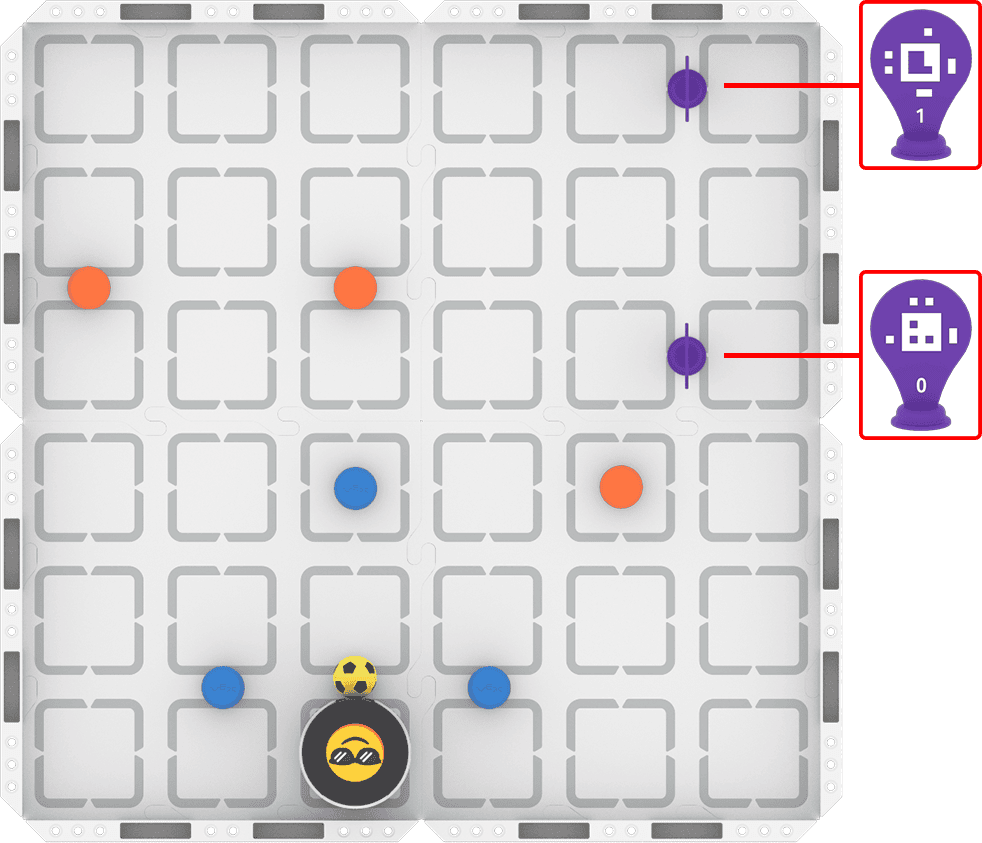
Step 2: Use Drive mode to model the movements your robot needs to complete the task.
- Your task is to drive the robot to transport the sports ball through each gate, ending with the AprilTag gate. Document your driving, then plan how to code that movement.
- Use this task card (Google / .docx / .pdf) to guide your practice.
- Pro Tip: Use your project from the previous unit as the basis for this practice task. Change the blocks in the project as needed to navigate your robot to deliver the sports ball successfully.
Step 3: Code the robot to complete the task.
- Your task is to use your path plan from Step 2 to code the robot to transport the sports ball through each gate and deliver it to the finish line.
- Use this task card (Google / .docx / .pdf) to guide your practice.
- Pro Tip: Note the 0 degree heading when your robot is in your starting position. Remember to orient your Robot Protractor to match that orientation from the start of the project.
Step 4: Use the Predict-Drive-Measure-Code process to iterate on and improve your project to navigate the slalom with the sports ball:
- Predict
- Choose the first heading you need to adjust. Make a group prediction about how to improve the heading using this sentence stem, and record it in your journal:
- We think the heading should be about ____________ degrees.
- Choose the first heading you need to adjust. Make a group prediction about how to improve the heading using this sentence stem, and record it in your journal:
- Drive
- Test your prediction by driving your robot at your predicted heading. If it feels off, what could you change to make it more accurate? If not, what feels right about it?
- Measure
- Place your Robot Protractor under the robot. At what heading did you actually drive the robot?
- Code
- Use your new heading in your coding project! Adjust your project, then run it to test. Does the adjusted heading improve your robot's ability to complete the course? If not, use your Robot Protractor to help you change the heading and try again. Be sure to record your heading measurement and all observations in your journal as you go.
Resources for Practice:
The articles linked here are available if you need additional support while completing the activity.
Wrap-Up
Now that you have practiced, it is time to share what you learned. Answer the following questions in your journal to help you reflect on your learning and prepare for a whole-class discussion:
- How important is precision to driving, path planning, and coding? Is it different for each? Why or why not?
- How did moving between driving and coding help you to iterate on your project?
- What is something you learned through practice that you did not know from just watching the video?
Select Next > to move on to the next lesson.