Facing the right direction matters — especially when your robot has a job to do! In this lesson, you'll learn how to use the Turn to heading block to control exactly which way your VEX AIM Coding Robot faces. Then you'll practice this skill by coding your robot to deliver a barrel through your slalom course!
Watch the video below to learn about:
- The difference between moving the robot at an angle and turning to a heading.
- How to determine your desired heading.
- Coding the robot to turn to a heading.
Now that you have watched the video, capture your thoughts in your journal. Answer these questions to guide your thinking and help you prepare for a whole-class discussion:
- What do you notice about the movement of the robot here, as opposed to other ways you've moved the robot? List at least two observations.
- What did you see in the video that supports your statements?
- What questions do you have about coding the robot to turn and move?
- How do you think attention to precision affects your ability to navigate while transporting an object?
Now that you have watched the video, capture your thoughts in your journal. Answer these questions to guide your thinking and help you prepare for a whole-class discussion:
- What do you notice about the movement of the robot here, as opposed to other ways you've moved the robot? List at least two observations.
- What did you see in the video that supports your statements?
- What questions do you have about coding the robot to turn and move?
- How do you think attention to precision affects your ability to navigate while transporting an object?
After students watch the video and before practicing, come together for a whole-class discussion. Use student answers to the questions provided as the basis for discussion.
Remember, students used similar movements when Button Coding, as the robot moved so that it was always facing forward. They had to create separate steps for turning then moving in their path planning previously. Guide students to compare and contrast coding the robot in this way with their previous experiences. Highlight how using the turn to heading block enables them to have greater control over the turns they are making, and talk about why that is useful.
Guided Practice
Now that you have watched and discussed the video, it is your turn to practice!
Step 1: Set up the field to create a slalom course. You can use the same course you used in the previous unit, or the one shown here.
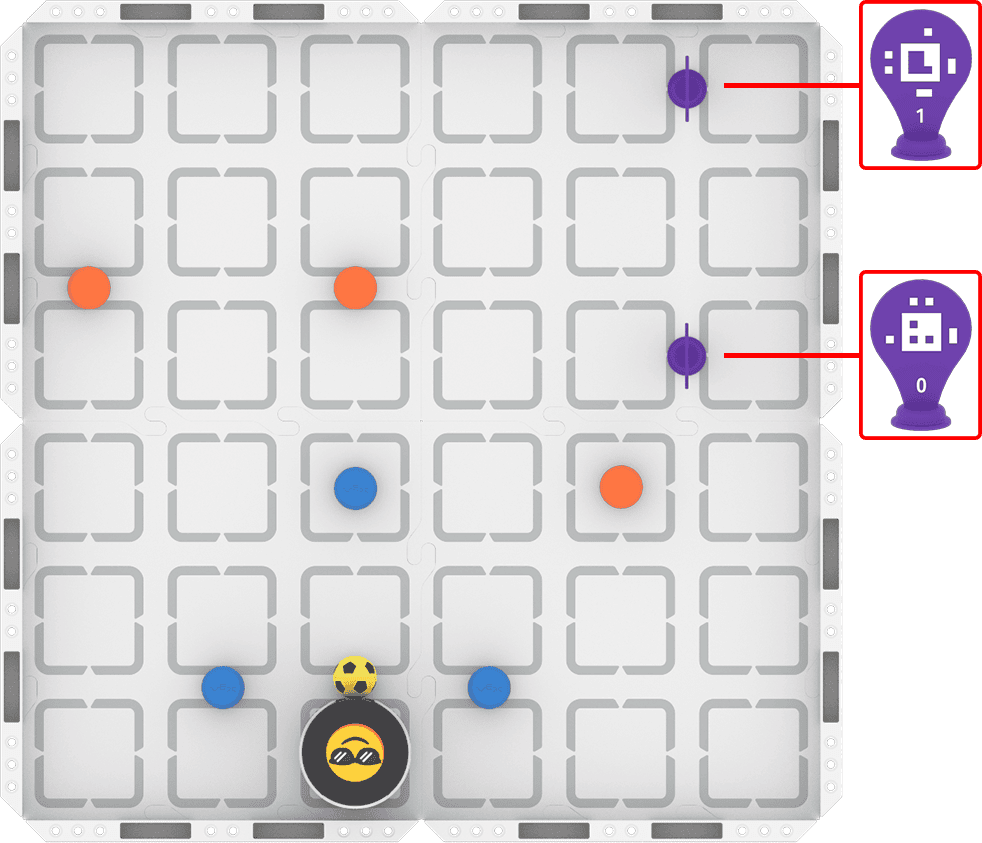
Step 2: Use Drive mode to model the movements your robot needs to complete the task.
- Your task is to drive the robot to transport the sports ball through each gate, ending with the AprilTag gate. Document your driving, then plan how to code that movement.
- Use this task card (Google / .docx / .pdf) to guide your practice.
- Pro Tip: Use your project from the previous unit as the basis for this practice task. Change the blocks in the project as needed to navigate your robot to deliver the sports ball successfully.
Step 3: Code the robot to complete the task.
- Your task is to use your path plan from Step 2 to code the robot to transport the sports ball through each gate and deliver it to the finish line.
- Use this task card (Google / .docx / .pdf) to guide your practice.
- Pro Tip: Note the 0 degree heading when your robot is in your starting position. Remember to orient your Robot Protractor to match that orientation from the start of the project.
Step 4: Use the Predict-Drive-Measure-Code process to iterate on and improve your project to navigate the slalom with the sports ball:
- Predict
- Choose the first heading you need to adjust. Make a group prediction about how to improve the heading using this sentence stem, and record it in your journal:
- We think the heading should be about ____________ degrees.
- Choose the first heading you need to adjust. Make a group prediction about how to improve the heading using this sentence stem, and record it in your journal:
- Drive
- Test your prediction by driving your robot at your predicted heading. If it feels off, what could you change to make it more accurate? If not, what feels right about it?
- Measure
- Place your Robot Protractor under the robot. At what heading did you actually drive the robot?
- Code
- Use your new heading in your coding project! Adjust your project, then run it to test. Does the adjusted heading improve your robot's ability to complete the course? If not, use your Robot Protractor to help you change the heading and try again. Be sure to record your heading measurement and all observations in your journal as you go.
Resources for Practice:
The articles linked here are available if you need additional support while completing the activity.
Now that you have watched and discussed the video, it is your turn to practice!
Step 1: Set up the field to create a slalom course. You can use the same course you used in the previous unit, or the one shown here.
Step 2: Use Drive mode to model the movements your robot needs to complete the task.
- Your task is to drive the robot to transport the sports ball through each gate, ending with the AprilTag gate. Document your driving, then plan how to code that movement.
- Use this task card (Google / .docx / .pdf) to guide your practice.
- Pro Tip: Use your project from the previous unit as the basis for this practice task. Change the blocks in the project as needed to navigate your robot to deliver the sports ball successfully.
Step 3: Code the robot to complete the task.
- Your task is to use your path plan from Step 2 to code the robot to transport the sports ball through each gate and deliver it to the finish line.
- Use this task card (Google / .docx / .pdf) to guide your practice.
- Pro Tip: Note the 0 degree heading when your robot is in your starting position. Remember to orient your Robot Protractor to match that orientation from the start of the project.
Step 4: Use the Predict-Drive-Measure-Code process to iterate on and improve your project to navigate the slalom with the sports ball:
- Predict
- Choose the first heading you need to adjust. Make a group prediction about how to improve the heading using this sentence stem, and record it in your journal:
- We think the heading should be about ____________ degrees.
- Choose the first heading you need to adjust. Make a group prediction about how to improve the heading using this sentence stem, and record it in your journal:
- Drive
- Test your prediction by driving your robot at your predicted heading. If it feels off, what could you change to make it more accurate? If not, what feels right about it?
- Measure
- Place your Robot Protractor under the robot. At what heading did you actually drive the robot?
- Code
- Use your new heading in your coding project! Adjust your project, then run it to test. Does the adjusted heading improve your robot's ability to complete the course? If not, use your Robot Protractor to help you change the heading and try again. Be sure to record your heading measurement and all observations in your journal as you go.
Resources for Practice:
The articles linked here are available if you need additional support while completing the activity.
Review expectations for group work to begin. Briefly remind students of their roles to ensure they are set up for success.
Students can reuse their slalom course from the previous unit to complete this task. Guide students to compare the movement angles they used previously and the headings they will turn to in this lesson. Highlight their similarity to help students grasp the concept of heading and how to use it in a project.
Distribute the Step 2 task card to students (Google / .docx / .pdf). Be sure each group has a Robot Protractor to use throughout their practice. As students are driving and path planning, circulate around the room to check in with students and discuss their learning. Ask questions like:
- How does transporting an object affect how you are driving? Is it easier or harder than you thought? Why?
- How are you documenting your path to account for turning?
- What is something you've done previously that is helping you complete this task? How are you applying that learning?
Distribute the Step 3 task card once students have checked in with you and met the success criteria (Google / .docx / .pdf). As students are building, testing, and iterating on their coding projects, circulate around the room and engage students in discussion about their progress and understandings. Ask questions like:
- How far has your robot traveled through the slalom so far? What do you need to figure out next?
- How does your attention to path planning help you build your project successfully?
- What is the most challenging part of this task for you? How is your group working together to solve that problem?
- What other questions do you have about coding your robot to turn?
Step 4 is designed to promote student iteration and exploration by moving between driving and coding to improve their projects and find the best strategy for the task. Students should use the Predict-Drive-Measure-Code process to help them improve one thing about their robot's movement at a time by adjusting the way the robot turns. They should cycle through the process to improve their project. To facilitate this process, ask questions like:
- Did the results of your testing match your prediction? What adjustments do you need to make to improve your turn accuracy?
- How does predicting the heading before you drive help you to navigate more successfully through the slalom?
- What have you documented in your journal throughout this process?
Wrap-Up
Now that you have practiced, it is time to share what you learned. Answer the following questions in your journal to help you reflect on your learning and prepare for a whole-class discussion:
- How important is precision to driving, path planning, and coding? Is it different for each? Why or why not?
- How did moving between driving and coding help you to iterate on your project?
- What is something you learned through practice that you did not know from just watching the video?
Now that you have practiced, it is time to share what you learned. Answer the following questions in your journal to help you reflect on your learning and prepare for a whole-class discussion:
- How important is precision to driving, path planning, and coding? Is it different for each? Why or why not?
- How did moving between driving and coding help you to iterate on your project?
- What is something you learned through practice that you did not know from just watching the video?
Guide students to share their learning in a whole-class discussion. Help students reflect on their learning through practice to converge on shared understandings or learning targets.
Use the questions students answered in their journals as the starting point for the discussion. Ask follow up questions to guide student understanding:
- On precision:
- Do you think you are paying more attention to precision now than you did at the start of the course? Why or why not?
- How does attention to precision affect your group's ability to complete the task together?
- On iteration and learning through practice:
- How would you describe the reasoning behind your iteration for this task? Is that similar or different to another group? Which is the better iteration? Why?
- Was there something you tried that did not work as intended? What did you learn from that practice?
- If someone asked you why you would turn to a heading instead of move at an angle, how would you respond? What evidence do you have to support that explanation?
Note students shared understandings about precision, iteration, and turning their robot to refer back to as they progress through the unit. This way, students can see how their understandings grew from the start of the unit to the end of the challenge, as they explore concepts and understandings related to the essential question.
Select Next > to move on to the next lesson.