It's game time! In this lesson, your challenge is to collect and kick sports balls through a goal using the One Stick Controller. You will learn the Drive mode on your VEX AIM Coding Robot, then try it for yourself. As you practice, you'll find the best way to line up your shots, adjust your driving, and get more comfortable controlling the robot.
Watch the video below to learn about the Drive mode, including:
- Moving the robot with the joystick.
- Kicking a ball with a controller button.
Now that you have watched the video, capture your thoughts in your journal. Use these questions to guide you:
- How do you think the Drive mode moves the robot? How are objects picked up by the robot? Explain your thinking, even if you are unsure.
- What did you observe in the video that supports your thinking?
- List at least two questions about driving the robot and manipulating objects that will help you better understand how to complete a task.
- Is there another way to use the controller to complete the actions shown in the video? Why or why not?
You will use your answers to help you participate in the whole-class discussion.
Now that you have watched the video, capture your thoughts in your journal. Use these questions to guide you:
- How do you think the Drive mode moves the robot? How are objects picked up by the robot? Explain your thinking, even if you are unsure.
- What did you observe in the video that supports your thinking?
- List at least two questions about driving the robot and manipulating objects that will help you better understand how to complete a task.
- Is there another way to use the controller to complete the actions shown in the video? Why or why not?
You will use your answers to help you participate in the whole-class discussion.
After students watch the video and before practicing, come together for a whole-class discussion. Use student answers to the questions provided as the basis for discussion.
As you engage students in the discussion, model the skills and dispositions that support scientific discourse.
- Be mindful of your words and body language to ensure you are modeling qualities of openness and curiosity.
- Use the second question to build students' understanding of using evidence to support a claim.
- Revise student questions with them to help foster productive questioning.
Note, the magnet on the robot will attract the sports balls and barrels on the field, so that the robot can effectively pick them up when they come in contact with the front of the robot. The kicker detaches the object from the magnet when it extends outward. Use students' knowledge of magnetism to help them think more about how the robot is interacting with objects on the field.
The questions are designed to encourage diverse perspectives, so remind students of classroom expectations for respectful discussion. Students should feel empowered to share their thinking, even if they are unsure or have questions, without fear of judgment.
Note students' contributions on the board so students can see and build upon each other’s ideas.
Guided Practice
Now that you have seen and talked about driving your robot, it is your turn to practice!
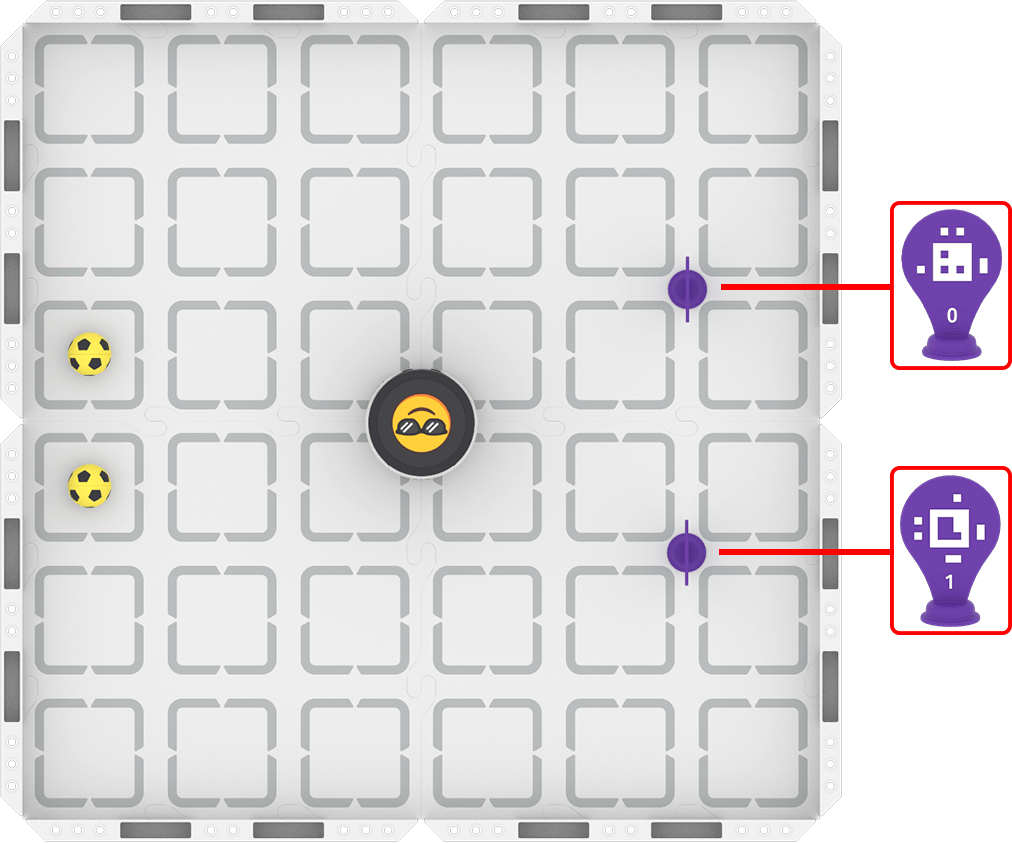
Step 1: Set up the field as shown below.
Step 2: Start the activity.
- Your task is to drive the robot to kick both balls through the goal using the fewest attempts.
- Use the content in this article to guide you through using Drive mode with your robot.
- Use this task card (Google / .docx / .pdf) to guide your practice.
- Pro Tip: Write down where the robot is on the field when you have successfully kicked a ball through a goal. You can use this for reference as you go to kick the second ball.
Resources for Practice:
The articles linked here are available if you need additional support while completing the activity.
Now that you have seen and talked about driving your robot, it is your turn to practice!
Step 1: Set up the field as shown below.

Step 2: Start the activity.
- Your task is to drive the robot to kick both balls through the goal using the fewest attempts.
- Use the content in this article to guide you through using Drive mode with your robot.
- Use this task card (Google / .docx / .pdf) to guide your practice.
- Pro Tip: Write down where the robot is on the field when you have successfully kicked a ball through a goal. You can use this for reference as you go to kick the second ball.
Resources for Practice:
The articles linked here are available if you need additional support while completing the activity.
Foreground the group work expectations at the start. Ask questions like:
- How is your group going to get started?
- How can you take turns while driving your robot?
- What is something you can do to be helpful if it is not your turn to drive?
What is a task card? Task cards are designed for individual student use, as a metacognitive tool to enable students to monitor and communicate their progress and thinking throughout the activity. To learn more about the task card, view this article. Here are some key points about using task cards:
- The provided task card (Google / .docx / .pdf) is the basis for the activity and is in an editable format. Adapt the task card to best meet the needs of your students.
- Each student should have a copy of the task card during the activity. The task card is designed to be interacted with and written on.
- Students should talk about the discussion questions within their group during the activity to help them make sense of what they are doing with the robot.
- Remind students to document their learning on the bottom half of the task card. The sentence stem is provided to prompt students' thinking about what they learned through group discussions.
Circulate around the room as students engage in the practice activity in their groups to discuss student progress and understanding. Ask questions like:
- How are you doing with driving the robot? What is something you've been successful with?
- What is something about driving the robot that is challenging for you?
- What else do you need to know to effectively drive the robot?
Wrap-Up
Now that you have practiced, it is time to share what you learned. Answer the following questions in your journal. You will use your answers in a whole-class discussion.
- What was your strategy for completing the task? Why do you think that strategy was successful?
- What is something you learned through practice that is different than what you saw in the video?
Now that you have practiced, it is time to share what you learned. Answer the following questions in your journal. You will use your answers in a whole-class discussion.
- What was your strategy for completing the task? Why do you think that strategy was successful?
- What is something you learned through practice that is different than what you saw in the video?
Guide students to share their learning in a whole-class discussion. At the start of the lesson, students shared their divergent thinking about driving the robot. The Wrap-Up discussion is your opportunity to guide students toward convergent thinking around shared understandings or learning targets.
The questions students answered in their journal are the starting point for discussion. Ask follow up questions to guide students to shared understandings through discourse. Follow up with questions like:
- For strategy sharing:
- Did your group have a similar or different strategy? Do you think it was better or worse? Why? What evidence do you have to support that assertion?
- For new learning from practice:
- Is that consistent with what other groups discovered during practice? Why or why not?
- What are some common ideas that you hear? How would this new learning have impacted how your group completed the activity?
Create a shared map of the controller, and label the features with their functionality, to help create a tangible artifact that demonstrates students' convergent thinking about the Drive mode so far.
Select Next > to move on to the next lesson.