
Time to level up your driving skills! In this lesson, you’ll explore more ways to control your VEX AIM Coding Robot using the One Stick Controller. You’ll discover how the AI Vision Sensor helps pick up objects automatically and how to use the Left and Right buttons to move side to side—key skills for collecting and placing barrels.
Watch the video below to learn more about using the Drive mode including:
- Picking up objects using the AI Vision Sensor.
- How to use the Left and Right buttons to move side-to-side.
Now that you have watched the video, capture your thoughts in your journal. Use these questions to guide you:
- What do you notice about the robot's movement with the buttons? Write at least two observations.
- What did you see in the video that supports your ideas?
- Write down at least two questions that you have about using the buttons on the controller to collect and move barrels.
- Do you think joystick control or button control will be a better strategy for you? Why?
You will use your answers to help you participate in the whole-class discussion.
Guided Practice
Now that you have seen and talked about using the AI Vision Sensor with Drive mode, it’s your turn to practice!
Step 1: Set up the field as shown here.
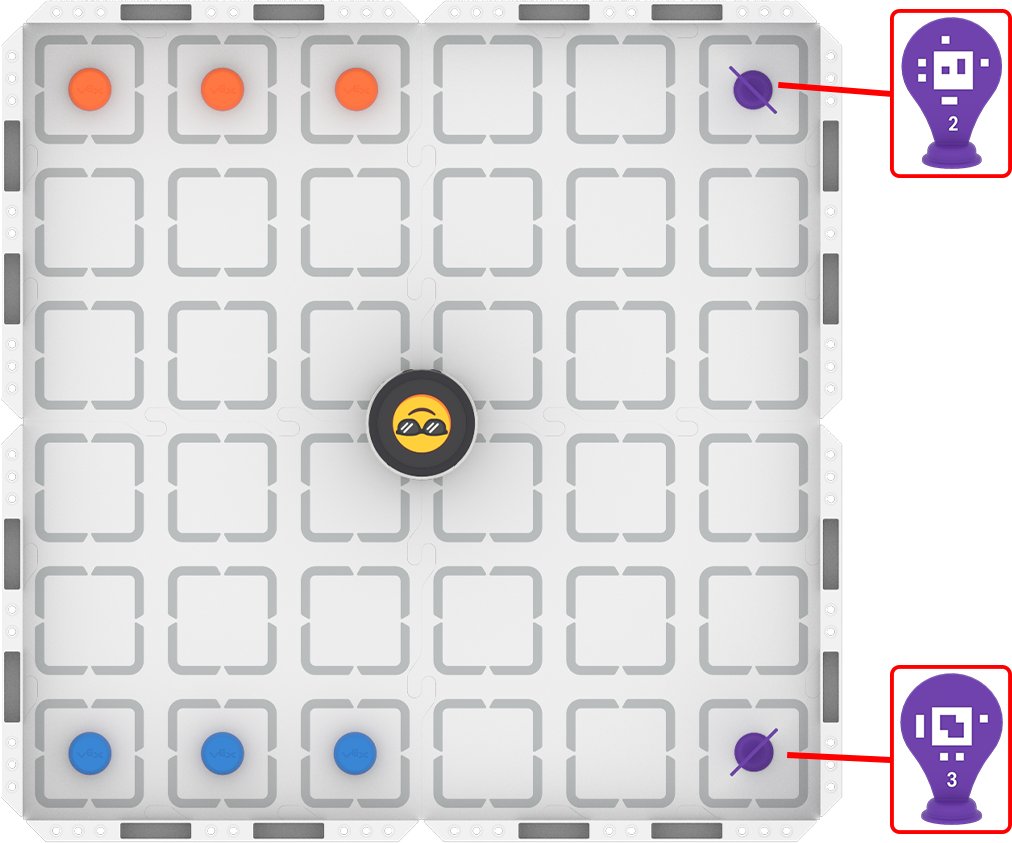
Step 2: Start the activity.
- Your task is to drive the robot to place three orange barrels at AprilTag ID 2 and three blue barrels at AprilTag ID 3.
- Use this task card (Google / .docx / .pdf) to guide your practice.
- Pro Tip: Document the joystick diagram on your task card and record each button's action.
Resources for Practice:
The articles linked here are available if you need additional support while completing the activity.
Wrap-Up
Now that you have practiced using the Drive mode, it is time to share what you learned. Answer the following questions in your journal. You will use your answers in a whole-class discussion.
- What was your strategy for completing the task? Why do you think it was successful? How could it be improved?
- Which button and feature did you use on the robot to complete this challenge?
Select Next > to move on to the Unit Challenge.