You’ve learned how to plan a path, code button sequences, and move barrels with precision—now it’s time to bring it all together! In this unit challenge, you’ll code your VEX AIM Coding Robot to deliver barrels to the AprilTags as quickly as possible. You will work collaboratively with your group to create a strategy, test your code, and fine-tune your plan to complete the challenge!
In this challenge, you will code your robot to:
- Pick up and place two barrels at AprilTag ID 0
- Pick up and place two barrels at AprilTag ID 1
Watch the video to see one way the robot could complete the challenge.
Now that you have watched the video, capture your thoughts in your journal. Answer these questions to guide your thinking and help you prepare for a whole-class discussion:
- What are your initial strategy ideas for completing this challenge? List at least two ideas in your journal.
- What have you learned throughout the course so far that will help you to make the best possible strategy for completing this challenge?
- What questions do you have about completing this challenge?
- Why do you think your strategy will be effective? Support your ideas with reasoning based on what you have learned throughout the unit.
Now that you have watched the video, capture your thoughts in your journal. Answer these questions to guide your thinking and help you prepare for a whole-class discussion:
- What are your initial strategy ideas for completing this challenge? List at least two ideas in your journal.
- What have you learned throughout the course so far that will help you to make the best possible strategy for completing this challenge?
- What questions do you have about completing this challenge?
- Why do you think your strategy will be effective? Support your ideas with reasoning based on what you have learned throughout the unit.
Ensure that all students understand the goals of the challenge before beginning and that they are formulating evidence-based strategies for completing the challenge. After students view the video, have a whole-class discussion about the challenge using the provided student prompts to get started.
Remind students that they can refer to their journaling from previous lessons, in addition to what they saw in the video, to help them formulate their initial thoughts and answer the questions.
Complete the Challenge
Now that you have seen one way to code the robot to complete the challenge, it is time to try it!
Step 1: Set up the field as shown below.
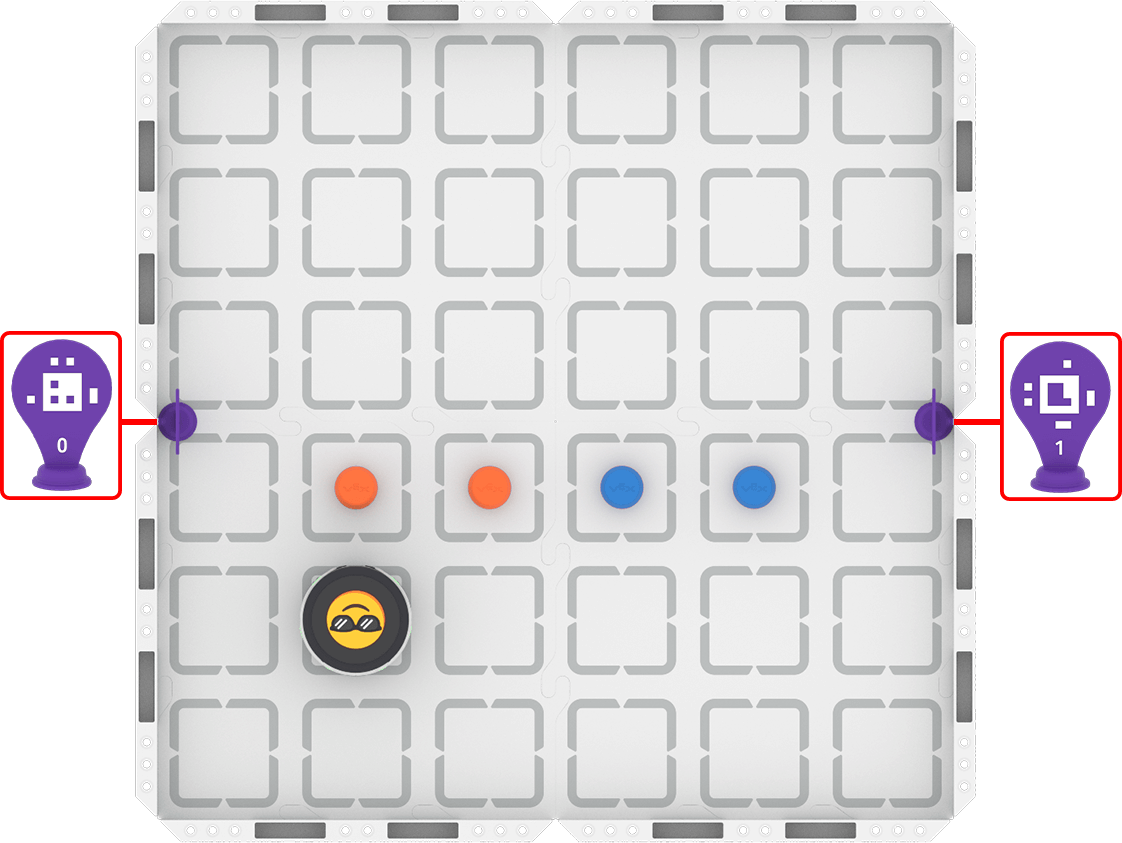
Step 2: Start the challenge! Your task is to:
- Plan a path with your group for the robot to solve the challenge.
- Create a Button Coding project to place two blue barrels near AprilTag ID 0 and two orange barrels near AprilTag ID 1.
- Use this task card (Google/ .docx / .pdf) to guide you as you complete the challenge.
- Pro Tip: Use the strategies you learned in previous lessons to choose a path collaboratively in your group. Take time to document your ideas and decisions both before and during the coding process. This will help your group get on the same page about your approach to solving the challenge, so you can work together to build and test your project.
Now that you have seen one way to code the robot to complete the challenge, it is time to try it!
Step 1: Set up the field as shown below.

Step 2: Start the challenge! Your task is to:
- Plan a path with your group for the robot to solve the challenge.
- Create a Button Coding project to place two blue barrels near AprilTag ID 0 and two orange barrels near AprilTag ID 1.
- Use this task card (Google/ .docx / .pdf) to guide you as you complete the challenge.
- Pro Tip: Use the strategies you learned in previous lessons to choose a path collaboratively in your group. Take time to document your ideas and decisions both before and during the coding process. This will help your group get on the same page about your approach to solving the challenge, so you can work together to build and test your project.
Foreground the challenge expectations at the start.
- Students will complete this challenge collaboratively. Brainstorm with students how they will make sure each group member contributes to the planning and the coding of the project.
Distribute the task card (Google / .docx / .pdf) to students to guide them through the completion of the unit challenge.
As you circulate through the room, check in with each group to understand how they are completing the challenge. Ask questions like:
- What is your strategy to complete the challenge?
- What is one thing you can change about the path you planned to make it more effective? How will you know it is working?
- What challenges are you facing as you work to complete the challenge? How are you assessing the best ways to move forward when you are facing a challenge?
- How is your group collaborating to complete this challenge?
In a unit challenge, you can determine when it is time to end the challenge and transition students into sharing their learning. Once you feel that all groups have had time to complete the challenge effectively and iteratively, wrap up the challenge phase and move on to strategy sharing and reflection.
Share Your Strategy
Once everyone has completed the challenge, you will share your strategy with the class. To prepare for this sharing session, answer the following questions in your journal:
- What strategy did your group use to complete the challenge? Why was it successful?
- How did your group choose that strategy together?
- How did you apply what you learned in the unit to complete the challenge? Be specific in your answers.
- Do you think your strategy was the best way to complete the challenge? Why or why not?
Once everyone has completed the challenge, you will share your strategy with the class. To prepare for this sharing session, answer the following questions in your journal:
- What strategy did your group use to complete the challenge? Why was it successful?
- How did your group choose that strategy together?
- How did you apply what you learned in the unit to complete the challenge? Be specific in your answers.
- Do you think your strategy was the best way to complete the challenge? Why or why not?
Once everyone has completed the challenge, come together for a whole-class strategy sharing session and discussion. This is an opportunity to highlight the different ways to solve a problem, and for students to engage in scientific discourse to make a claim and defend their claim with evidence. The goal of this section is to give students an opportunity to share their success, and to engage in discourse about the different strategies and approaches.
The discussion should center around the final bullet – Do you think your strategy was the best way to complete the challenge? Why or why not? By the end of the discussion, the class should have consensus on what the best approach means to them.
- Begin with one group sharing their strategy or demonstrating their project for the class, and presenting their answers to the questions.
- Each group should respond to what was shared, using their strategy for the project and journal documentation as evidence to support their claim.
- Encourage students to think more deeply about what 'best' means in this challenge. What criteria should be considered? Why?
Remind students about classroom expectations for respectful discourse and encourage them to agree or disagree with evidence and not judgment.
Reflect and Share
At the start of this unit, you co-created learning targets with your teacher. Once you have completed the challenge, it is time to reflect on your progress toward those learning targets.
For each of your learning targets, complete the following sentences in your journal:
- At first, I thought ____________ because ____________.
- Now that we've completed the unit challenge, I understand ____________.
- My evidence for this new understanding is ____________, which shows ____________.
Check in with your teacher when you have completed the sentences for each learning target. This reflection will help you to share your learning.
At the start of this unit, you co-created learning targets with your teacher. Once you have completed the challenge, it is time to reflect on your progress toward those learning targets.
For each of your learning targets, complete the following sentences in your journal:
- At first, I thought ____________ because ____________.
- Now that we've completed the unit challenge, I understand ____________.
- My evidence for this new understanding is ____________, which shows ____________.
Check in with your teacher when you have completed the sentences for each learning target. This reflection will help you to share your learning.
The purpose of Reflect and Share is to guide students to:
- Evaluate their progress toward each learning target, using evidence from their journal.
- Guide the class as a whole to converge their thinking around the unit understandings.
- Relate their learning to real-world applications.
First, students will complete the sentences to reflect on their progress toward each of their learning targets.
Next, engage students in a whole-class discussion by inviting students to share the evaluations they recorded in their journals. Guide students towards shared conclusions about each of the unit understandings, using prompts such as:
- Which explanation best matches the observations we made during the activity? How do we know?
- Is there evidence that makes one explanation stronger than the others?
- Can we agree on one explanation based on our combined evidence? Why or why not?
Once you have guided students' thinking to converge around the unit understandings, you may want to create a class artifact displaying the class's shared understandings for students to refer to throughout the Unit. Ideas for this documentation include:
- Anchor charts
- Concept maps
- Digital learning boards
Finally, students should relate their learning to the real-world examples they brainstormed at the beginning of the unit. Guide the discussion with questions such as:
- What connections can you make between our learning today and the experiences you've had outside the classroom that you shared earlier? (Student answers will vary depending on their relevant experience.)
Select Return to Units > to go back to all Units.