
Play
Part 1 - Step by Step
- InstructInstruct each group to complete the Robot Roles and Reminders, and that they are going to be doing three things in the Play portion of the Lab.
-
First, they will use the Build Instructions to construct a model of a tadpole with the VEX GO Kit.

Tadpole Build - Next, they will place their tadpole in the habitat, and take a photo of it.
-
Last, they will write a description of the tadpole phase of the frog’s life on their Field Journal paper.
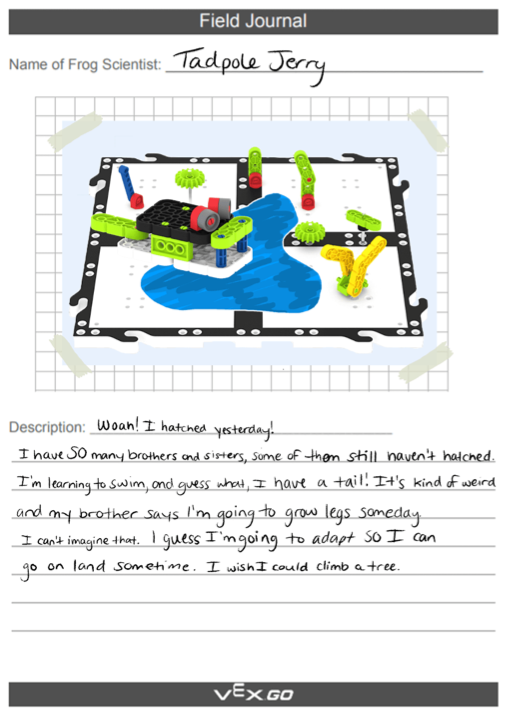
Suggestion for Field Journal Page Set Up - Field Journal: the group will need to choose 1 perspective to write their whole Field Journal in - either a Scientist’s perspective - an detailed and factual observation of the tadpole; or a Frog’s perspective - a creative description in a diary format of the tadpole.
-
- ModelModel by first displaying the image of the completed tadpole build, or a pre-built model.
- Then demonstrate how to place the model into the habitat to photograph it.
- The photo should be close enough so that you don’t see any of the classroom around it.
- Lastly, share a sample Field Journal page.
- Facilitation Note: Each group should gather all kit materials needed for all builds at one time, and the teacher can distribute paper for Field Journal pages and facilitate the camera usage as groups finish their models.
- FacilitateFacilitate conversations about spatial reasoning during the Build, with questions like:

Discuss Building with the VEX GO Kit - How does that connector work?
- Can you explain how the head and tail are oriented?
- Can you explain what the images in the Build Instructions are telling you to do?
- RemindRemind groups to be patient and persistent as they problem solve any issues within the Build. Encourage students to ask each other for explanations or clarity on steps, as others sometimes see things in different ways than we do.
- AskAsk students to share how the use of the Build Instructions helped them to see how the parts came together.
Ask about what creative successes and challenges they had in writing their Field Journals - what will they improve or change for the next phase of their frogs?
Mid-Play Break & Group Discussion
As soon as every group has accomplished their Field Journal page for the tadpole, come together for a brief conversation.
- Build Related:
- How did your build go?
- Are there any questions about the instructions?
- Field Journal Related:
- How did your group describe the tadpole in your journal?
Part 2 - Step by Step
- InstructInstruct each group that they are to switch Roles from Part 1 and are going to follow the same steps they did in Part 1.
However, this time they will be adapting their tadpole build to create the tadpole with back legs - using the VEX GO Kit and Build Instructions.

Build, Photograph, and Describe - First, they will complete the tadpole with back legs build.
- Next they will photograph it in the habitat.
- Then, they will write the description in their Field Journal.
- ModelModel by displaying an image of the completed tadpole with back legs build, or sharing a pre-built model.

Tadpole with Legs Build Remind students of strategies for getting a good Field Journal photograph, and offer samples of the completed Field Journal. Answer any questions students may have about the process and the goals.

Suggestion for Field Journal Page Set Up - FacilitateFacilitate questions about the tadpole with back legs’ interactions within the environment as students work.
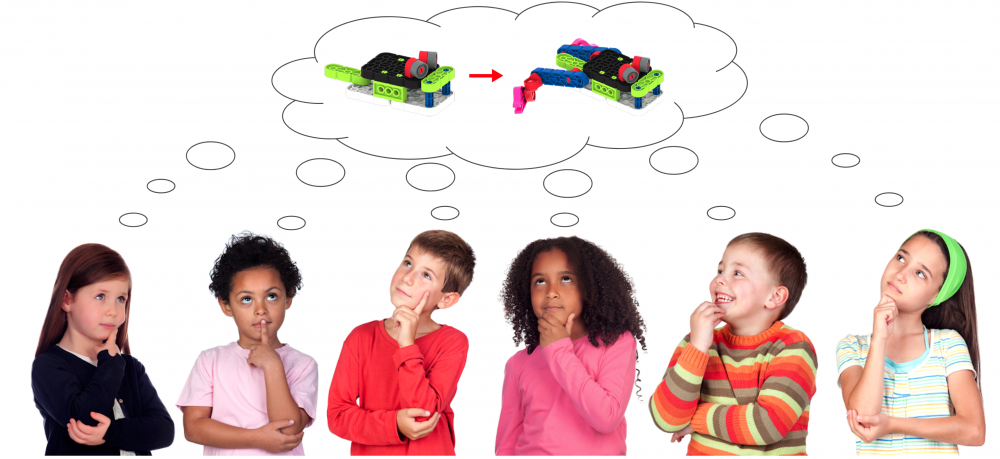
Discuss Changes to the Frog - Why do you think the tadpole grows back legs first?
- How do the legs change how it can move?
- Do you think the tadpole is surprised when its legs start to grow?
- RemindRemind groups to be patient and persistent as they problem solve any issues within the Build.
Encourage students to ask each other for explanations or clarity on steps, or use the 3D Build Instructions to see the steps in a new way.
- AskAsk students to share what went well in their build, photo, writing process and what they could improve for the next time.