
Play
Part 1 - Step by Step
- InstructInstruct students that they are now going to create their own calm down strategy project for the 123 Robot. They will choose one calm down strategy and create a project using Coder cards to represent the human actions that make up the strategy, as you just did together in Engage. The animation below shows an example calm down strategy, like taking a deep breath, using the colors of the 123 Robot to represent breathing in and out. The doorbell sound signals the end of the breath. Turn on sound for this animation.
Video file
- ModelModel for students how to wake their 123 Robots, turn on the Coder, and connect the 123 Robot and Coder.
-
To wake the 123 Robot, push the wheels along a surface until you hear the startup sound, as shown in the animation below. For more information about the 123 Robot, see the Using the VEX 123 Robot VEX Library article.
Video file -
To connect the 123 Robot and Coder, press and hold the Start and Stop buttons on the Coder, and the Left and Right buttons on the 123 Robot for at least 5 seconds, until you hear the connected sound, and the indicator lights flash in time, as shown in the animation below. Turn on sound for this animation. For more information about the Coder, see the Using the VEX 123 Coder VEX Library article.
Video file -
All groups should have the Looks, Sound, Motion, and Wait Coder cards listed in the Environment Setup.
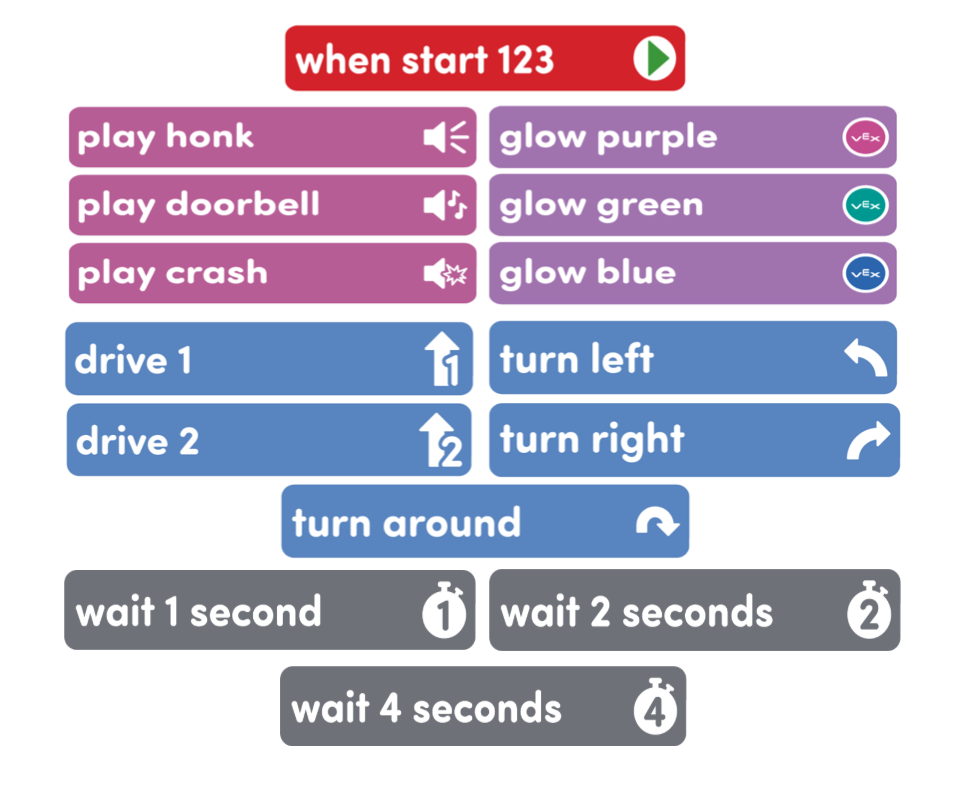
Coder cards needed for Play
Model for students how to create their calm down strategy project, by walking the class through the process of breaking down a strategy into actions, matching those actions to Coder cards, and building their project.
- Guide students to choose a calm down strategy to use for their project. You may allow students to choose their own, or assign them strategies to use.
- Remind students to break the strategy down into each individual behavior. Have students write or draw each action of their strategy.
- Have them choose Coder cards to match each action, and lay them out to plan their project.
-
Remind students that they can use Wait Coder cards to slow down the behavior of the 123 Robot.
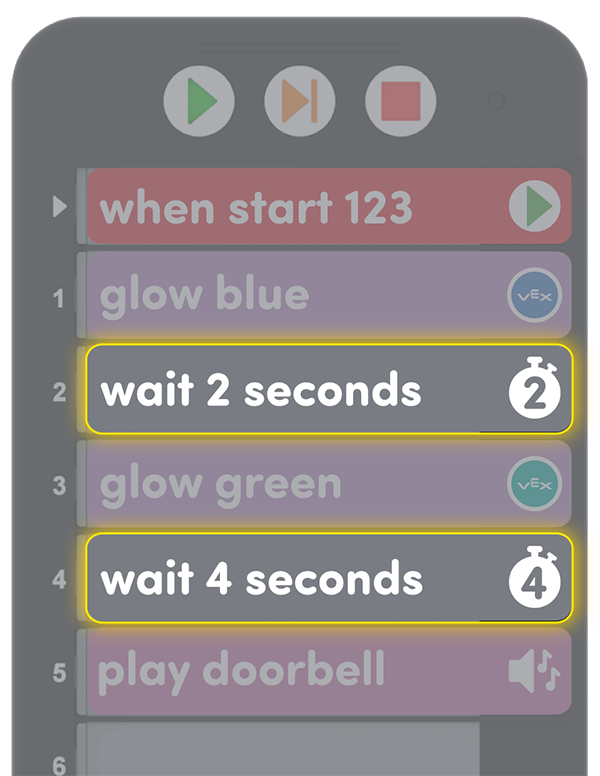
Wait Coder cards in the calm down strategy example - After their plans are created, students can add their Coder cards to the Coder. Then, press “Start” on the Coder to test their projects, and edit as needed.
- For students who finish early, either have them try to represent the same strategy using different Coder cards, or add a second strategy to their project.
-
- FacilitateFacilitate conversations with students while they create and test their calming strategy projects.
- Show me what calm down strategy you want your 123 Robot to do. Have groups demonstrate the calm down strategy themselves, then tell you the actions they just performed.
- What robot behaviors do you think best represent your actions? What Coder cards can you use to make your 123 Robot represent those behaviors?
- Why did your group choose this Coder card? How does that card relate to the action in your calm-down strategy?
- RemindRemind students that not all human behaviors have a robot behavior or Coder card that directly match them. Encourage them to be creative in how they are choosing to represent human actions. Remind them that the Robot’s actions can act as cues for them to help them practice these calm down strategies, so they are ready to use them when they need them.
- AskAsk students to think of situations when they might need to use a calm down strategy. Would they use the strategy they are coding? Why or why not? If they were going to teach someone else how to use the strategy they are coding, how would they do it?
Mid-Play Break & Group Discussion
As soon as every group has created their calm down strategy project, come together for a brief conversation.
Have students share their projects with the class, so they can see the different representations of human behaviors with the 123 Robot. Have the class practice each calm down strategy alongside the robot.
As students share their projects, talk about the strategies that were chosen.
- Do the same calm down strategies work for everyone? Which calm-down strategies work best for you?
- What are some other strategies we can use to calm down?
- If the same calm down strategies don’t work for everyone in your group, what can you do to compromise so everyone is represented in your project?
Part 2 - Step by Step
- InstructInstruct students that now they are going to add additional calm down strategies to their projects to create their own “Calm Down Codes” for their 123 Robots. In the example shown below, additional Coder cards were added to represent stretching side to side by turning the robot left and right with pauses in between.
Video file
- ModelModel for students how to create a “Calm Down Code” using multiple calm down strategies by first asking students to think of times when they have needed more than one calm down strategy to get their behavior under control. Have students act out a Calm Down Code with two calm down strategies in a row to help them prepare to create the project, like the example of taking a deep breath and stretching side to side.

Example Calm Down Code project - Remind students that when adding a new calm down strategy to their projects, they should first break the strategy down into each individual human action, and then match each human action to a Coder card.
- Students should lay their Coder cards out to plan their projects.
- Students can then add their cards to the Coder, then press “Start” on the Coder to test their projects,
- Students should edit projects as needed.
- Remind students that the Coder holds 10 total cards, so they will need to keep this in mind when creating their project by limiting the number of cards used in each strategy added to their “Calm Down Codes”.
- For students who finish early, have them practice acting out their “Calm Down Codes” alongside the robot, or try representing the strategies in their codes with different Coder cards.
- FacilitateFacilitate conversations with students while they create and test their “Calm Down Codes”.
- What calm down strategy are you adding to create your code? Which Coder cards did you choose to represent it, and why?
- Does everyone in your group use the same kind of calm down strategy? If not, how are you making sure that everyone in your group’s needs are being met with your “Calm Down Code?”
- Can you act out your “Calm Down Code” alongside your robot?
- RemindRemind students that they may not agree on 123 Robot representations of human actions, and that is ok. If they have different ideas, encourage students to build and test both versions of the project, and talk about the differences. Have students name at least one thing that they agree with, or like, about each version of the project. Then see if they can agree on a compromise. For instance, taking a breath could combine Glow blue and Drive 1 Coder cards, instead of being just one or the other.
- AskAsk students to think of situations where they might need to use their “Calm Down Codes”. What are some cues that they can look for in themselves and others, to know when to use Calm Down Codes for themselves? What are some thoughts, feelings, or behaviors that can let them know they need to calm down?