
Now that you understand the goal of the Capstone Challenge and have some initial strategy ideas, it’s time to compete! In this challenge, your team must work together to plan and execute a strategy for collecting and sorting cargo according to the matching AprilTag IDs, both autonomously and with Driver Control.
Watch the video below to discover more about the Capstone Challenge. In this video you will learn:
- The rules for the challenge.
- How to score the challenge.
This challenge document provides important details about the Capstone Challenge.
You and your group will use a multi-phase process to complete the challenge, working separately for each run—Driver Control and Autonomous. Keeping the runs separate will help you focus your strategy and allow you to identify similarities and differences in your approaches to both driving and coding.
Phase 1: Brainstorming
The first phase of the process is Brainstorming. The goal of this phase is a list of several ideas your group could use to successfully collect and sort cargo.
To create the list of ideas, do the following:
- Decide if your group will first brainstorm for Driver Control or Autonomous.
- Review the Capstone Challenge document.
- Write a list of several thorough, innovative ideas for completing the challenge in your journal.
- Discuss all ideas as a group. Remove any ideas that are too specific or too broad to be implemented.
- Combine like ideas together to create a starting strategy.
When your group is finished, check in with your teacher by sharing your strategy idea. Do not move on to the next phase until your teacher has approved your idea.
Brainstorming Example
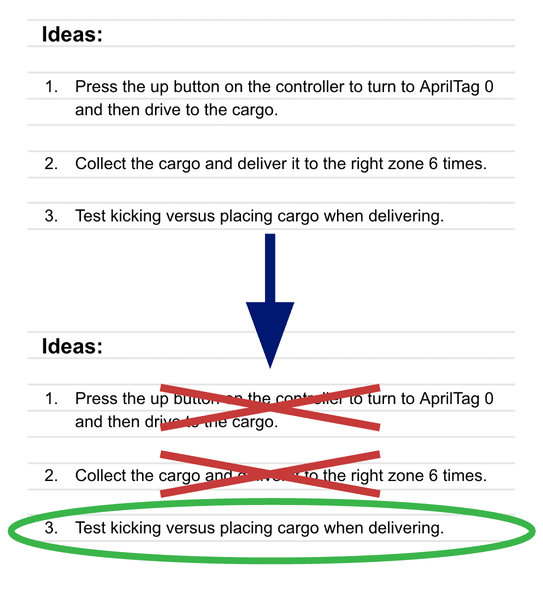
In this example, three ideas are listed. The first idea is crossed out because it is too specific, as it defines a particular button press and the exact robot behaviors that follow that press.
The second idea is crossed out because it is too broad. It simply restates the challenge rather than focusing on one aspect of the challenge and a potential strategy.
The third idea is a good starting point because it can be tested and implemented. Testing whether to kick or place objects could become one element of the team’s larger strategy for Driver Control.
Phase 2: Planning
Now that you have a starting strategy, the next phase is planning.
Create a plan for the strategy your group wants to test using a task card. Your group will create your own task cards to help you organize your testing in the next phase and define what successful testing will look like.
- Use this blank task card as a starting point when creating your own (Google / .docx / .pdf).
- Pro Tip: Look back at old task cards you have used throughout the course. What elements helped you and your group the most? Success criteria, practice checklists, discussion questions, etc. Make sure to incorporate some of those elements so you can determine which strategy idea is best for you.
When your group has their task cards set up for testing, check in with your teacher. Explain the organization of your task cards and how your group will determine when testing is completed.
Planning Example
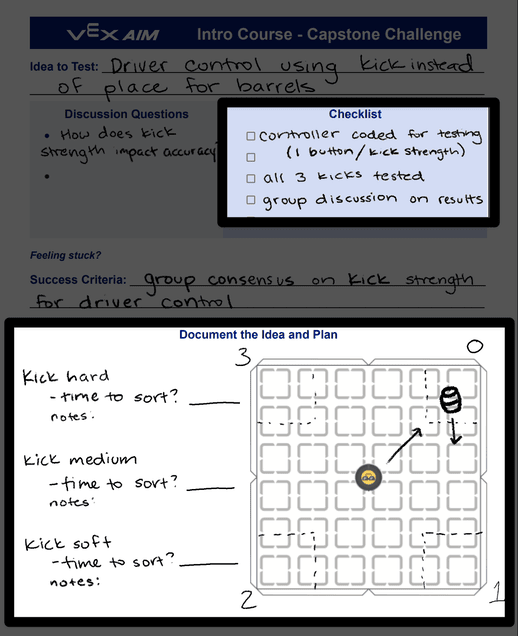
This example task card is filled in to show some of the ways you can start to document your strategy before testing.
Highlighted in the example is both the checklist and the documentation at the bottom of the page. This showcases how the idea that was explored in the previous phase is going to be tested so the group can come up with a data-based decision for how hard to kick or place barrels during Driver Control.
Phase 3: Testing
The next phase of the process is testing your strategy. Use your task card to guide your driving and coding cycle as you build and test your project, just as you have in the Guided Practice activities throughout this course.
- Set up your field to begin testing. Refer to the Capstone Challenge document as needed.
- Be sure to test incrementally. Do not try to build an entire VEXcode project at once before testing. This will make it easier to troubleshoot issues that arise.
- Pro Tip: Refer back to your journal, previous units in this course, VEXcode resources, or other groups to help you problem solve as you build and test your projects.
- While testing, you may realize that your group needs to test another element of your strategy. Move back and forth between planning and testing to continue to iterate on your strategy until you are ready to compete.
Check in with your teacher when you are ready to compete!
Phase 4: Compete and Reflect
Now that you have brainstormed, planned, and practiced, you are ready to compete!
Make sure you know how each run will be timed and scored, and when your group will be responsible for timing and scoring during the competition.
After each timed Autonomous or Driver Control run, meet with your group to discuss what went well and what you could improve on for the next run. Use the following questions to guide your conversation:
- What part(s) of the plan worked as intended?
- How could you apply what worked well into a future run?
- What part(s) of the plan did not work?
- What do you think you need to change in order for that part of the plan to work as intended?
Select Next > to reflect on the challenge.