
Engage
Launch the Engage Section
ACTS is what the teacher will do and ASKS is how the teacher will facilitate.
| ACTS | ASKS |
|---|---|
|
|
Engage
-
InstructInstruct
students that they are going to code their 123 Robots to act out the feeling of a character in a short story, using the emotion codes they created during Lab 1. First, they are going to listen to a short story, then they will decide how the character feels, and insert the matching emotion code’s Coder cards into the Coder. The image below shows several example emotion codes that could be used.
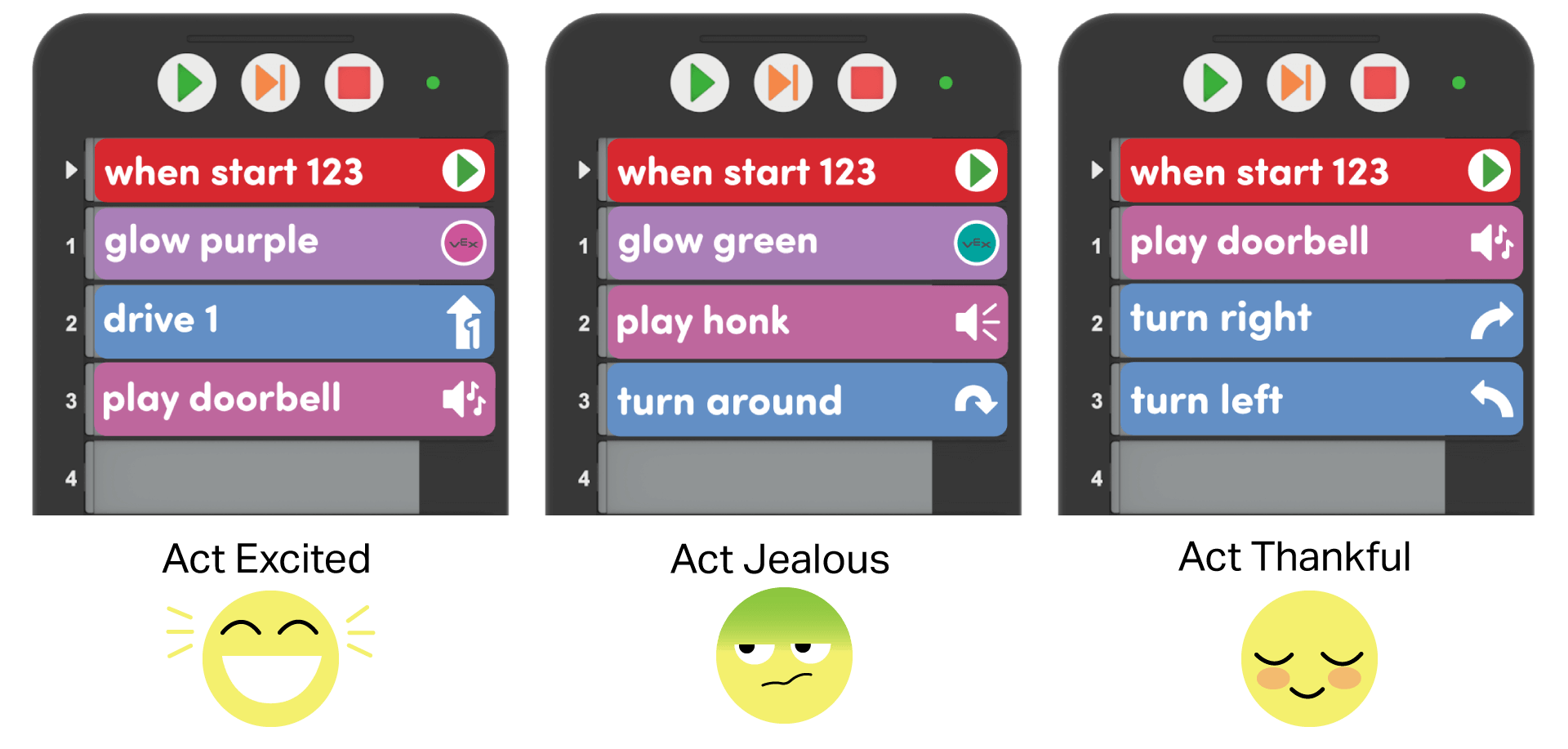
Example Emotion Codes - DistributeDistribute just one 123 Robot, Coder, Coder cards, and emotion codes for demonstration purposes. You will distribute materials to each group after the demonstration.
-
FacilitateFacilitate
students listening to the story, then choosing an emotion code that matches the character in the story.
- Read a story from the Story Prompts, and ask the students how the character feels.
- Note a few suggestions from students (you may want to guide them to choosing from the emotions you coded previously), and vote or choose one to code into the Coder.
- Look at the chosen emotion code to see which cards are needed, and model how to select those cards, and insert them into the Coder.
- Push the 123 Robot on the Field to wake it up, turn on the Coder, and connect the 123 Robot and Coder if needed. Then press “Start” to test the project.
-
To wake the 123 Robot, push the wheels along a surface until you hear the startup sound, as shown in the animation below. Turn on sound for this animation. For more information about the 123 Robot, see the Using the VEX 123 Robot VEX Library article.
Video file - To connect the 123 Robot and Coder, press and hold the Start and Stop buttons on the Coder, and the Left and Right buttons on the 123 Robot for at least 5 seconds, until you hear the connected sound, and the indicator lights flash in time, as shown in the animation below. Turn on sound for this animation. For more information about the Coder, see the Using the VEX 123 Coder VEX Library article.
-
Video file- Ask students if they are ready to try this in their groups and if they have any other questions.
- OfferOffer suggestions for emotion codes that help students branch out from the basics of “happy” or “sad.” Offer positive reinforcement for thoughtful responses, and following directions.

Teacher Troubleshooting
- Think about how you will Emotion Codes from Lab 1 — You may want to share the emotion codes students created in Lab 1 in a central location, like on the board so that all students can access them. Or, you can distribute paper copies or images of the codes to each group for reference.
- Quiet on the Set! — When using the Sound Coder cards, students should be reminded to be quiet, so that they are able to hear the 123 Robot’s sounds well. Too much noise in the classroom could result in students’ mishearing the 123 Robot, or thinking that their code is not working —when they just need to listen more carefully.
Facilitation Strategies
- Use real classroom situations as Story Prompts — Feel free to draw on common social situations that occur in your classroom as story prompts during the Lab. By taking out students’ names, and retelling a story that occurred in your classroom, you give students the opportunity to reflect on a relevant and meaningful scenario, without feeling personally responsible.
- For older students, or accelerated readers — Give groups a written or printed Story Prompt in Play Part 1, and have them read it for themselves, and code the emotion of a character. Students then have the opportunity to practice their reading comprehension and can engage in the Lab activity more independently.
- Take Turns — Encourage students to take turns throughout the Lab. Strategies for facilitating this include:
- During Play Part 1, have one student insert the Coder cards and the other place the 123 Robot and start the project. Switch roles in Play Part 2.
- During Play Part 2, have students take turns drawing or writing elements of their story.
- Use printables as manipulative to support project planning - See the printable resources available in the VEX Library, and use them with students as they are planning and building their Coder projects. You could use the motion planning sheets for students to draw the actions they want their 123 Robot to do in their emotion code, as well as the fill-in project and motion planning sheets for students to document their Coder cards and the emotion code movements of the 123 Robot. You can also use the fill-in Coder sheet for students to write or draw their Coder cards to "save" their projects.
- Use Coder card posters to reinforce learning with the Coder - Highlight specific Coder cards, or refer to cards as you are teaching with the Coder card posters. Students can use these posters to review terminology as they are working with VEX 123. See the Using Coder Cards Posters in the Classroom VEX Library article to access these printable posters and to see more strategies for using them in your learning environment.